LightRAG
Graph-building RAG: an LLM turns documents into entities and relations, and queries walk both graph and vectors
What is LightRAG?
At indexing time an LLM reads every chunk and extracts entities and relations into a knowledge graph kept alongside vector embeddings; at query time five modes choose the path — local for facts about one entity, global for themes spanning documents, hybrid and mix to combine them, naive for plain chunk retrieval. A bundled server adds a REST API, a dashboard with graph visualisation, and an Ollama-compatible endpoint that chat frontends can talk to as if it were a model. The cost structure is the decision: building the graph spends an LLM call on every chunk, the project names a 30B-class model as the local minimum for extraction, and the out-of-the-box storage is stated to be unsuitable for production — if cheap chunk search is all you need, the existence of its own naive mode concedes that plainer RAG suffices.
What can you do with LightRAG?
- One index, five ways to ask — local retrieves what the graph knows about a specific entity, global follows relationship chains for questions that span documents, hybrid and the default mix merge graph and chunk retrieval, and naive skips the graph entirely — so one corpus serves both point lookups and synthesis questions.
- Four model roles, wired independently — Extraction, querying, keyword generation and vision each take their own model via OpenAI-compatible APIs, Ollama, Hugging Face or Bedrock — a large model can build the graph while a cheap one answers questions, or the reverse.
- A server chat frontends already understand — The bundled LightRAG Server exposes REST endpoints, a web dashboard with upload, query and graph visualisation, and an Ollama-compatible API — though it binds to all interfaces with those routes unauthenticated by default, so the network boundary is yours to draw.
- Storage grows from laptop to production — Defaults are in-memory with file persistence for evaluation; a single PostgreSQL, MongoDB or OpenSearch instance can carry all four stores in production, or each store picks a specialist — Milvus, Qdrant or Faiss for vectors, Neo4j or Memgraph for the graph. New documents merge into the existing graph without re-indexing.
Before you choose LightRAG
- Entities merge only on exact name match, so the same thing under two names becomes duplicate nodes or disconnected subgraphs — a graph-quality limit tracked since April 2025.Reported in#1323
- The embedding model is fixed at indexing time; switching later means re-embedding everything, and the rebuild tool requires stopping the server.
- Multi-tenant isolation leaks as of mid-2026: part of the query path ignores the workspace header and falls back to the default workspace.Reported in#2904
Star history
19 Aug to 28 Aug · +271
Frequently asked questions
Is LightRAG free for commercial use?
LightRAG is released under the MIT licence — OSI-approved open source, which permits commercial use.
How can LightRAG be deployed?
LightRAG is available as Runs locally / Self-hosted.
Documentation
Reproduced from the HKUDS/LightRAG README, published under MIT. Read the original ↗
🚀 LightRAG: Simple and Fast Retrieval-Augmented Generation
🎉 News
- [2026.07]🎯[New Feature]: Add Smart Heading recognition feature for word documents.
- [2026.05]🎯[New Feature]: Merge RagAnything into LightRAG🎉. Multimodal content parsing and extraction via MinerU / Docling services.
- [2026.05]🎯[New Feature]: Introducing four selectable text chunking strategies:
Fix,Recursive,Vector, andParagraph. - [2026.05]🎯[New Feature]: Role-specific LLM configuration support, 4 distinct roles: EXTRACT, QUERY, KEYWORDS, and VLM, with independent LLM settings.
- [2026.03]🎯[New Feature]: Integrated OpenSearch as a unified storage backend, providing comprehensive support for all four LightRAG storage.
- [2026.03]🎯[New Feature]: Introduced a setup wizard. Support for local deployment of embedding, reranking, and storage backends via Docker.
- [2025.11]🎯[New Feature]: Integrated RAGAS for Evaluation and Langfuse for Tracing. Updated the API to return retrieved contexts alongside query results to support context precision metrics.
- [2025.10]🎯[Scalability Enhancement]: Eliminated processing bottlenecks to support Large-Scale Datasets Efficiently.
- [2025.09]🎯[New Feature] Enhances knowledge graph extraction accuracy for Open-Sourced LLMs such as Qwen3-30B-A3B.
- [2025.08]🎯[New Feature] Reranker is now supported, significantly boosting performance for mixed queries (set as default query mode).
- [2025.08]🎯[New Feature] Added Document Deletion with automatic KG regeneration to ensure optimal query performance.
- [2025.06]🎯[New Release] Our team has released RAG-Anything — an All-in-One Multimodal RAG system for seamless processing of text, images, tables, and equations.
- [2025.06]🎯[New Feature] LightRAG now supports comprehensive multimodal data handling through RAG-Anything integration, enabling seamless document parsing and RAG capabilities across diverse formats including PDFs, images, Office documents, tables, and formulas. Please refer to the new multimodal section for details.
- [2025.03]🎯[New Feature] LightRAG now supports citation functionality, enabling proper source attribution and enhanced document traceability.
- [2025.02]🎯[New Feature] You can now use MongoDB as an all-in-one storage solution for unified data management.
- [2025.02]🎯[New Release] Our team has released VideoRAG-a RAG system for understanding extremely long-context videos
- [2025.01]🎯[New Release] Our team has released MiniRAG making RAG simpler with small models.
- [2025.01]🎯You can now use PostgreSQL as an all-in-one storage solution for data management.
- [2024.11]🎯[New Resource] A comprehensive guide to LightRAG is now available on LearnOpenCV. — explore in-depth tutorials and best practices. Many thanks to the blog author for this excellent contribution!
- [2024.11]🎯[New Feature] Introducing the LightRAG WebUI — an interface that allows you to insert, query, and visualize LightRAG knowledge through an intuitive web-based dashboard.
- [2024.11]🎯[New Feature] You can now use Neo4J for Storage-enabling graph database support.
- [2024.10]🎯[New Feature] We’ve added a link to a LightRAG Introduction Video. — a walkthrough of LightRAG’s capabilities. Thanks to the author for this excellent contribution!
- [2024.10]🎯[New Channel] We have created a Discord channel!💬 Welcome to join our community for sharing, discussions, and collaboration! 🎉🎉
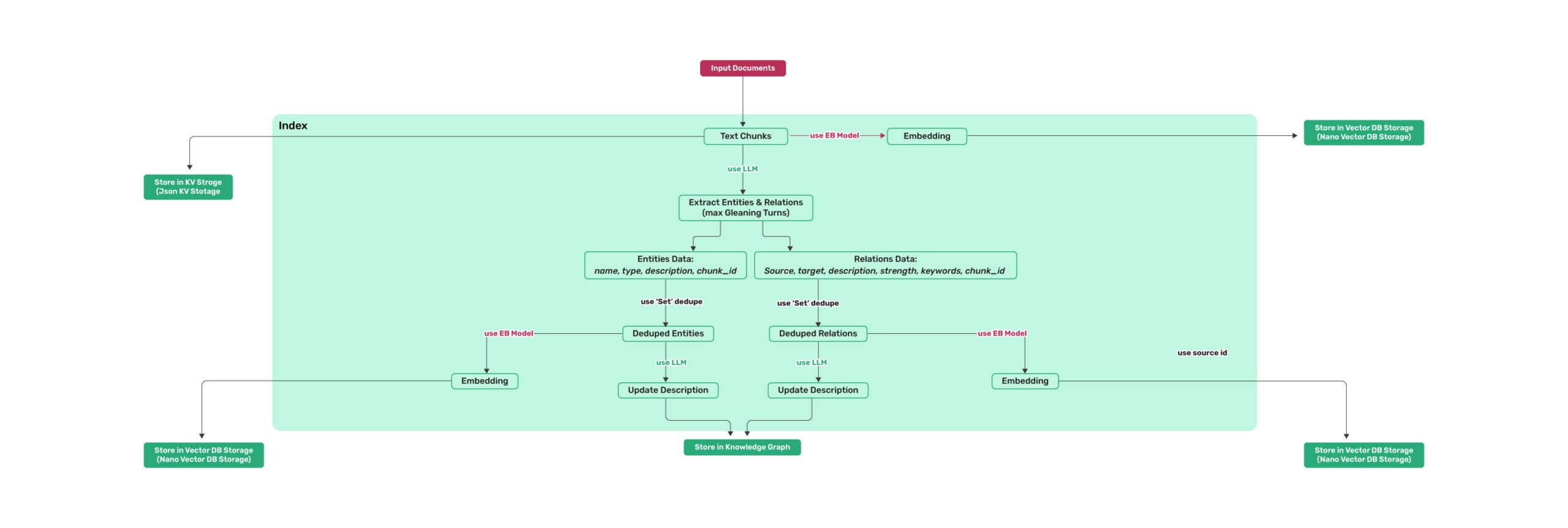 Figure 1: LightRAG Indexing Flowchart - Img Caption : Source
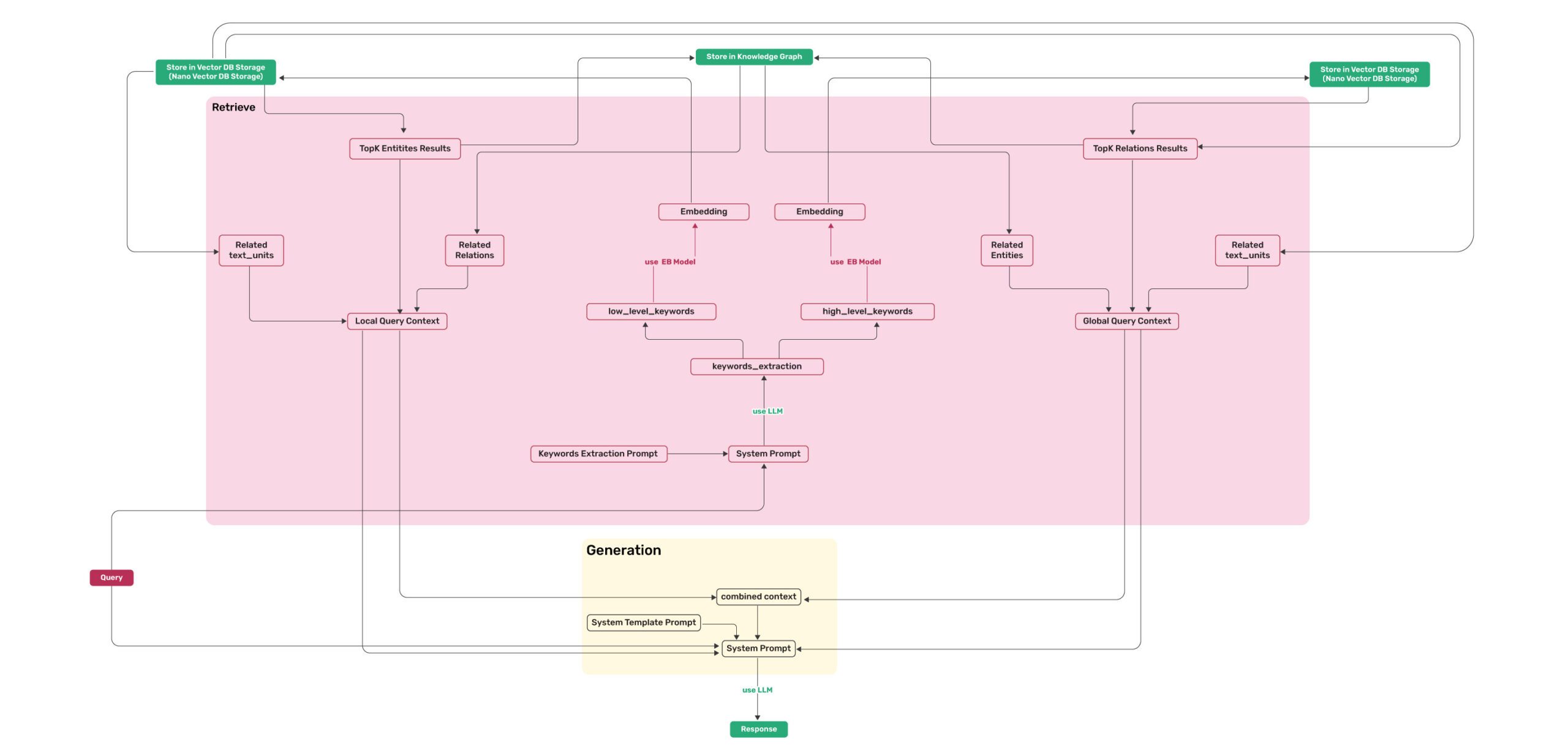 Figure 2: LightRAG Retrieval and Querying Flowchart - Img Caption : Source
Installation
💡 Using uv for Package Management: This project uses uv for fast and reliable Python package management. Install uv first: curl -LsSf https://astral.sh/uv/install.sh | sh (Unix/macOS) or powershell -c "irm https://astral.sh/uv/install.ps1 | iex" (Windows)
Note: You can also use pip if you prefer, but uv is recommended for better performance and more reliable dependency management.
📦 Offline Deployment: For offline or air-gapped environments, see the Offline Deployment Guide for instructions on pre-installing all dependencies and cache files.
Install LightRAG Server
- Install from PyPI
### Install LightRAG Server as tool using uv (recommended)
uv tool install "lightrag-hku[api]"

### Or using pip
# python -m venv .venv
# source .venv/bin/activate  # Windows: .venv\Scripts\activate
# pip install "lightrag-hku[api]"

# Setup env file
# Obtain the env.example file by downloading it from the GitHub repository root
# or by copying it from a local source checkout.
cp env.example .env  # Update the .env with your LLM and embedding configurations
# Launch the server. It binds to all interfaces (0.0.0.0) by default.
# SECURITY: before exposing it on a network, configure authentication in .env
# (LIGHTRAG_API_KEY, or AUTH_ACCOUNTS together with TOKEN_SECRET), or bind to
# 127.0.0.1 for local-only access; without auth every endpoint is public.
# Note: the Ollama-compatible /api/* routes stay open by default for client
# compatibility; set WHITELIST_PATHS=/health to require auth on them too.
lightrag-server- Installation from Source
git clone https://github.com/HKUDS/LightRAG.git
cd LightRAG

# Bootstrap the development environment (recommended)
make dev
source .venv/bin/activate  # Activate the virtual environment (Linux/macOS)
# Or on Windows: .venv\Scripts\activate

# make dev installs the test toolchain plus the full offline stack
# (API, storage backends, and provider integrations), then builds the frontend.
# Run make env-base or copy env.example to .env before starting the server.

# Equivalent manual steps with uv
# Note: uv sync automatically creates a virtual environment in .venv/
uv sync --extra test --extra offline
source .venv/bin/activate  # Activate the virtual environment (Linux/macOS)
# Or on Windows: .venv\Scripts\activate

### Or using pip with virtual environment
# python -m venv .venv
# source .venv/bin/activate  # Windows: .venv\Scripts\activate
# pip install -e ".[test,offline]"

# Build front-end artifacts
cd lightrag_webui
bun install --frozen-lockfile
bun run build
cd ..

# setup env file
make env-base  # Or: cp env.example .env and update it manually
# Launch API-WebUI server
lightrag-server- Launching the LightRAG Server with Docker Compose
git clone https://github.com/HKUDS/LightRAG.git
cd LightRAG
cp env.example .env  # Update the .env with your LLM and embedding configurations
# modify LLM and Embedding settings in .env
docker compose up
Historical versions of LightRAG docker images can be found here: LightRAG Docker Images
Official GHCR images published by GitHub Actions are signed with Sigstore Cosign using GitHub OIDC. See docs/DockerDeployment.md for verification commands.
On Apple Silicon (macOS 26) without Docker Desktop, you can run the same Postgres/Neo4j/Milvus storage stack on Apple’s native
containerruntime — see docs/AppleContainerSetup.md.
Create .env File With Setup Tool
Instead of editing env.example by hand, use the interactive setup wizard to generate a configured .env and, when needed, docker-compose.final.yml:
make env-base           # Required first step: LLM, embedding, reranker
make env-storage        # Optional: storage backends and database services
make env-server         # Optional: server port, auth, and SSL
make env-base-rewrite   # Optional: force-regenerate wizard-managed compose services
make env-storage-rewrite # Optional: force-regenerate wizard-managed compose services
make env-security-check # Optional: audit the current .env for security risks
For full description of every target see docs/InteractiveSetup.md.
Optional: spaCy Models for docx smart_heading
The native docx parser’s opt-in smart_heading engine parameter uses spaCy for sentence/NER heuristics. The spaCy runtime is already included in the api extra — only the two pinned language models (zh_core_web_sm / en_core_web_sm 3.8.0, GitHub release wheels not published on PyPI) need one extra step:
lightrag-download-cache --spacy-installEnable smart_heading per file/rule (e.g. LIGHTRAG_PARSER=docx:native(smart_heading=true)), or globally in .env:
# .docx files routed to the native engine get smart_heading by default;
# opt a file back out with an explicit native(smart_heading=false) rule/hint.
DOCX_SMART_HEADING=true
When the global switch is on (or a LIGHTRAG_PARSER rule carries native(smart_heading=true)), the server verifies the models at startup and fails fast with install guidance if they are missing. Deployments that never enable smart_heading need no models. The main Docker image ships the models pre-installed (the lite image does not); for air-gapped hosts see the Offline Deployment Guide.
Optional: libcairo for SVG Rasterization (native md/textpack)
The native markdown/textpack parser rasterizes embedded SVG images to PNG via cairosvg. cairosvg is a cffi binding: pip install cairosvg (pulled in by the api extra) always succeeds, but rendering only works if the native libcairo shared library is also present on the host — pip/uv cannot install system libraries. Without it, rasterization fails at runtime and the affected SVG is skipped (the rest of the document is unaffected); the server logs a warning at startup so the gap is visible before it shows up as a per-document warning later.
Install the system package for your platform:
# Debian / Ubuntu (the official Docker image already includes this)
sudo apt-get install -y libcairo2

# RHEL / Fedora
sudo dnf install -y cairo

# macOS (Homebrew)
brew install cairo

# Windows: install the GTK3 runtime, which bundles libcairo-2.dll
Deployments that never process markdown/textpack documents with embedded SVGs can ignore the startup warning.
About LightRAG
A Lightweight, Graph-Based RAG Framework
LightRAG is a lightweight knowledge-graph RAG framework and an efficient alternative to Microsoft GraphRAG. It adopts a dual-layer architecture to manage both knowledge graphs (KGs) and vector embeddings, effectively bridging the gap between traditional vector-based RAG and graph-based RAG approaches. Designed for high scalability, LightRAG addresses key challenges in large-scale graph indexing and retrieval, including heavy computational overhead, slow response times, and the high cost of incremental updates. While supporting large datasets, LightRAG can still deliver exceptionally high RAG quality, even when paired with a 30B open-source large language model (LLM).
Features & Advantages
- Deep Contextual Understanding: Through graph-structured indexing, LightRAG captures complex semantic dependencies between entities, overcoming the fragmented context limitations typical of traditional chunk-based retrieval methods. Its generation quality and context awareness are particularly outstanding in vertical domains (e.g., legal, financial) that require global comprehension or logical reasoning.
- Exceptional Comprehensiveness & Diversity: LightRAG’s dual-level retrieval mechanism allows it to integrate detailed facts and abstract concepts concurrently. This enables the system to achieve remarkable performance in query result comprehensiveness and diversity, making it highly effective at handling complex, cross-document queries.
- Extreme Retrieval Efficiency & Low Cost: LightRAG does not rely on inefficient community reports or multi-hop reasoning for complex queries. This drastically reduces the number of LLM calls required during both the indexing and querying phases, significantly lowering response latency and LLM computational costs.
- Incremental Updates & Selective Deletion: LightRAG addresses the challenges of incrementally updating and selectively deleting content from graph-based knowledge bases, keeping them current in dynamic data environments. When a document is deleted, the system can use the LLM cache created during indexing to quickly rebuild the affected entities and relationships, substantially improving update efficiency.
- Multiple Document Parsing Engines: LightRAG’s document processing pipeline supports MinerU, Docling, and Native and can be extended with third-party parsers. LightRAG’s Native engine efficiently parses images, tables, and formulas in Word and Markdown documents, making it especially suitable for documents rich in multimodal content. The Native engine also automatically detects and corrects section headings in Word documents, improving content extraction from documents with inconsistent outlines and laying the foundation for section-aware text chunking.
- Multiple Text Chunking Strategies: LightRAG supports four text chunking strategies:
Fixed-length (F),Recursive character (R),Vector semantic (V), andParagraph semantic (P). The LightRAG-nativeParagraph semantic (P)strategy aligns chunk boundaries with the document’s native semantic boundaries—headings, paragraphs, and tables—as closely as possible. This reduces problems such as mismatched headings and content or missing header rows when long tables are split. - Multiple Storage Backends: LightRAG’s default KV, vector, and graph stores use in-memory databases with local file persistence, making them well suited for quickly evaluating the project. LightRAG also supports a wide range of commonly used storage backends for production deployments with large datasets.
Multimodal Capability Upgrades
Traditional RAG systems lack an effective way to process multimodal content such as images, formulas, and tables in documents. Starting with v1.5, LightRAG seamlessly integrates multimodal processing into its document pipeline and query flow. Through the knowledge graph, LightRAG connects multimodal content with the body text and can use that information when answering queries to produce more accurate and reliable responses. This capability can substantially improve RAG quality for documents rich in multimodal content, such as operation manuals and academic papers.
LightRAG API Server
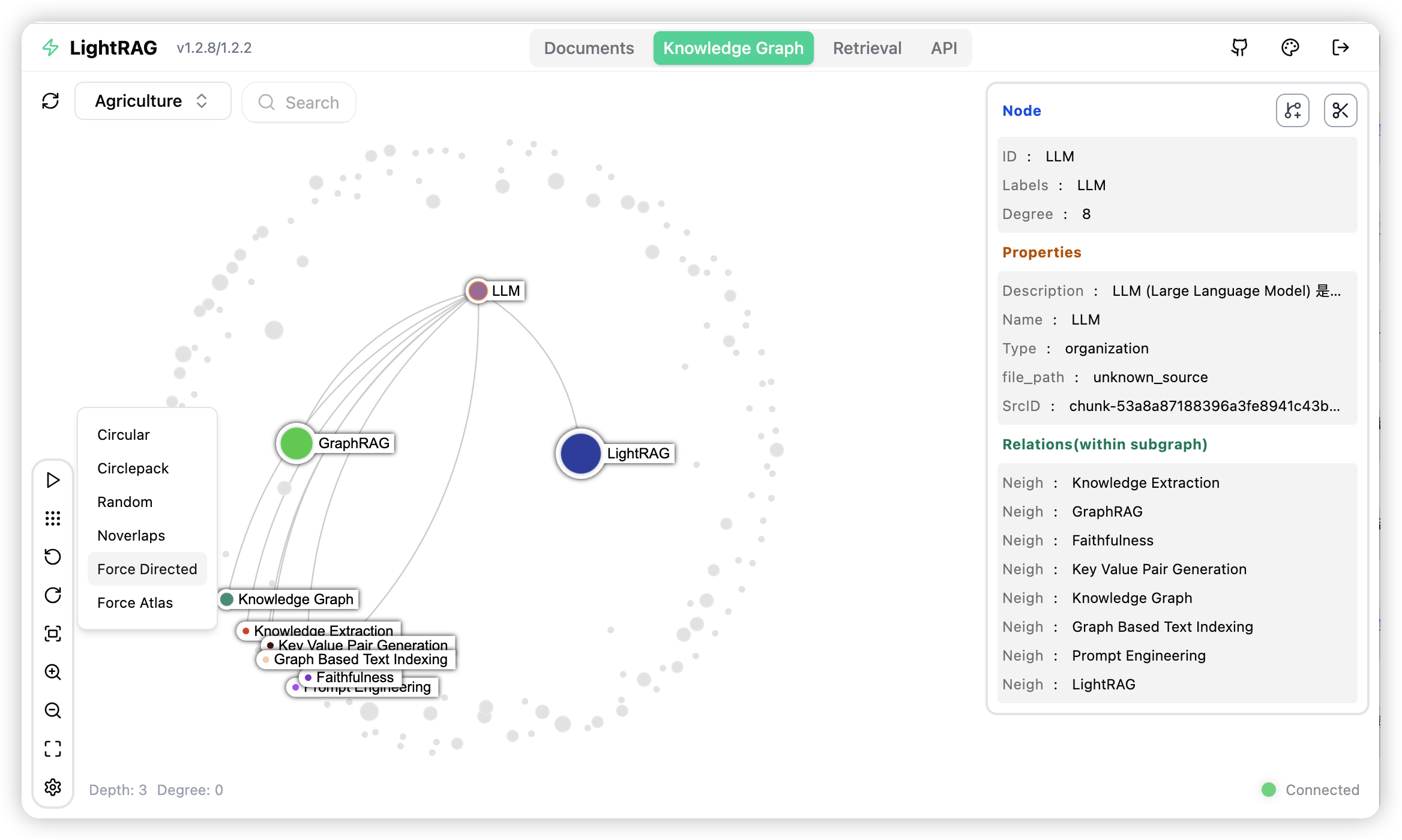
The LightRAG server offers not only a web-based UI for exploring LightRAG functionalities but also a comprehensive REST API. For more information about the LightRAG server, please refer to LightRAG Server.
Key Configuration Guide
Selecting LLM Models
LightRAG requires LLM/VLMs of four different roles during its workflow. You should configure models with different capabilities and speeds for different roles to strike a balance between performance and processing speed. LightRAG has higher capability requirements for Large Language Models (LLMs) than traditional RAG because it requires LLMs to perform complex entity-relation extraction tasks from documents. During the query phase, the LLM needs to process a large volume of retrieved information, including entities, relationships, and text chunks. This requires the model to have the capability of generating high-quality responses in long, noisy contexts.
Recommended models by role:
- Extraction LLM (
EXTRACT): Entity-relation extraction runs on every text chunk, so a fast, cost-effective mainstream model is enough — a non-thinking model (reasoning/thinking mode disabled) is strongly recommended to avoid slow, expensive extraction. Good hosted options include GPT-5.6-luna, Claude Haiku, or Gemini-mini internationally, and DeepSeek-V4-lite or Kimi in China. For local deployment, Qwen3-30B-A3B-Instruct is a reasonable minimum. - Query LLM (
QUERY): This model writes the final answer from long, noisy retrieved context, so it should be stronger than the extraction model in order to maximize answer quality. Choose a higher-tier model from the same families; a thinking-capable model is fine here. - Keyword LLM (
KEYWORD): A lightweight, latency-sensitive step that must use a non-thinking model to keep query latency low; a fast model comparable to the extraction one is sufficient. - VLM (
VLM): Any mainstream multimodal model with image-input support works. For local deployment, consider Qwen3.6-35B-A3B.
Within your acceptable latency and cost budget, prefer the highest-scoring model available (based on public benchmarks/leaderboards). For detailed model configurations, please refer to RoleSpecificLLMConfiguration.md
Selecting Query Modes
LightRAG supports five query modes:
- local: Focuses on precise matching of local contexts and specific entities. It retrieves candidate entities and their directly associated attributes from the knowledge graph. This mode is suitable for Q&A targeting specific objects, concrete concepts, or detailed facts, providing highly relevant and detailed local context support.
- global: Focuses on macro themes, cross-document reasoning, and deep relationships between entities. It retrieves relationship chains covering broad themes and concepts. This mode is suitable for queries that require summarization across multiple contexts, trend analysis, or understanding complex semantic dependencies.
- hybrid: Merges the retrieval results of both local and global modes. It performs comprehensive reasoning and generation by simultaneously recalling specific entities and global relationship contexts.
- naive: Traditional RAG retrieval based on text chunks. It does not use a knowledge graph and relies directly on vector similarity to retrieve from the original text chunks.
- mix: Fully-featured mode that merges retrieval results from local, global, and naive modes to provide the most comprehensive and rich retrieval results.
The default query mode for LightRAG is mix. Using mix mode generally yields the most ideal query results. The mix mode takes slightly longer than naive, while other query modes are roughly comparable in latency.
This README has been shortened. The full version is on GitHub. Read the original ↗
Other options in RAG & Retrieval
 ragflowRAG & Retrieval
RAGFlow is a server you run rather than a library you import: documents go into a dataset, it splits them into chunks, and you can read every chunk on screen and hand-correct the ones that came out wrong before any of it reaches a model, with chat answers citing the chunk they came from. Around that sit an agent canvas and an ingestion pipeline you can rebuild yourself, so retrieval, tools and MCP servers can be wired together without writing code. The optical character recognition, table-structure and layout models that make sense of scans run on PDFs and images only — Word, Excel and PowerPoint files are read structurally, and the docs tell you to convert a DOCX to PDF if you want the visual parser on it. The price of all this is weight: a Docker Compose stack with Elasticsearch, MySQL, MinIO and Redis behind it, 4 cores and 16 GB of RAM as the stated minimum, and parsing that the project's own FAQ concedes is slower than LangChain's. If your documents are already clean text and you want retrieval inside your own Python application, LlamaIndex or Haystack will fit better.
 DoclingData
The difference from a text extractor is that structure survives: page layout, reading order, table cells, code blocks and formulas come through as parts of a single document representation rather than as a flattened string, which is what decides whether a table in a report is still a table by the time an agent reads it. Everything can run locally, including in air-gapped environments. The cost of that fidelity is compute — machine-learning models run over each page, so this is a pipeline to budget for, not a fast converter to call inline.
 AnythingLLMRAG & Retrieval
AnythingLLM ships the whole retrieval stack as one installable application: a document collector, an embedding model, a vector database and the chat interface arrive together, so you drop files into a workspace and start asking questions without wiring services to each other. Documents attached to a chat go into the model's context in full by default, and only when they overflow the context window does the app offer to chunk and embed them, after which answers are assembled from a few retrieved snippets. New workspaces run in agent mode, so the same chat window can browse the web, query a SQL database, call MCP servers or run a flow you drew in the visual editor. The trade-off is that this is an application rather than a library — you extend it through its settings, its custom-skill plugin format and its REST API, never by importing it into a program of your own — and the three ways to run it are not the same product: the desktop build has no accounts, the Docker build has no bundled model, and the hosted tier has neither MCP nor custom skills.