
DeepEval
評価をユニットテストとして書く仕組み。悪化したプロンプトやモデル差し替えを、壊れたコードと同じようにCIで止める
DeepEvalとは
形は意図的にpytestそのものです。テスト関数の中に表明を書き、それを発見して実行するランナーがあり、引数を変えたケースも書けます。違うのは、表明の対象が「回答が文脈に忠実だったか」「エージェントがタスクを完了したか」である点です。この形にした狙いは明確で、品質の劣化を、構文エラーを捕まえるのと同じ関門の前に持ち込むことにあります。想定しておくべきなのは、これらの指標の多くがモデルによって採点されることです。通常のテストには無い費用とばらつきが伴います。
DeepEvalで何ができますか?
- テストと同じやり方で評価を回す — 表明は普通のテスト関数の中に置き、1つのコマンドがファイルを発見して実行します。引数を変えたケースもpytestと同様に書けます。別途覚えて保守する評価基盤が要りません。
- 評価基準を文章で書く — G-Evalは評価基準を自然な文章で受け取り、それに沿って採点します。既存の指標では表せない業務上のルールも、強制力のあるテストにできます。
- 最終回答だけでなく途中も採点する — 構成要素単位の評価では、検索、ツール呼び出し、推論の各ステップを個別に採点します。テストの失敗が、単に回答が悪化したことではなく、どの部分が劣化したかを示します。
- エージェントを完了できたかで評価する — タスク完了の指標は、目的が実際に達成されたかどうかを問います。応答単位の品質スコアでは構造的に答えられない問いです。
- 1往復ではなく会話を試験する — 会話用の指標は、やり取り全体を通した一貫性などを多ターンで評価します。数ターン進んで初めて現れる失敗を対象にできます。
DeepEvalを選ぶ前に
- 指標の多くはモデルが採点します。通常のユニットテストには無いAPI費用と実行ごとのばらつきが伴い、評価役のモデルを固定することが被験モデルの固定と同じくらい重要になります。
- Confident AIの公開部分にあたります。ローカル実行だけで完結しますが、共有レポート、劣化の履歴、本番監視は背後の商用プラットフォーム側にあります。
スター推移
8月21日〜8月28日 · +174
よくある質問
DeepEvalは商用利用できますか?
DeepEvalはApache-2.0ライセンスで公開されています。OSI承認のオープンソースライセンスで、商用利用が認められています。
DeepEvalはどの形で使えますか?
DeepEvalはローカル実行・セルフホストの形で利用できます。
ドキュメント
confident-ai/deepeval のREADMEより転載(Apache-2.0)。 原文を読む ↗
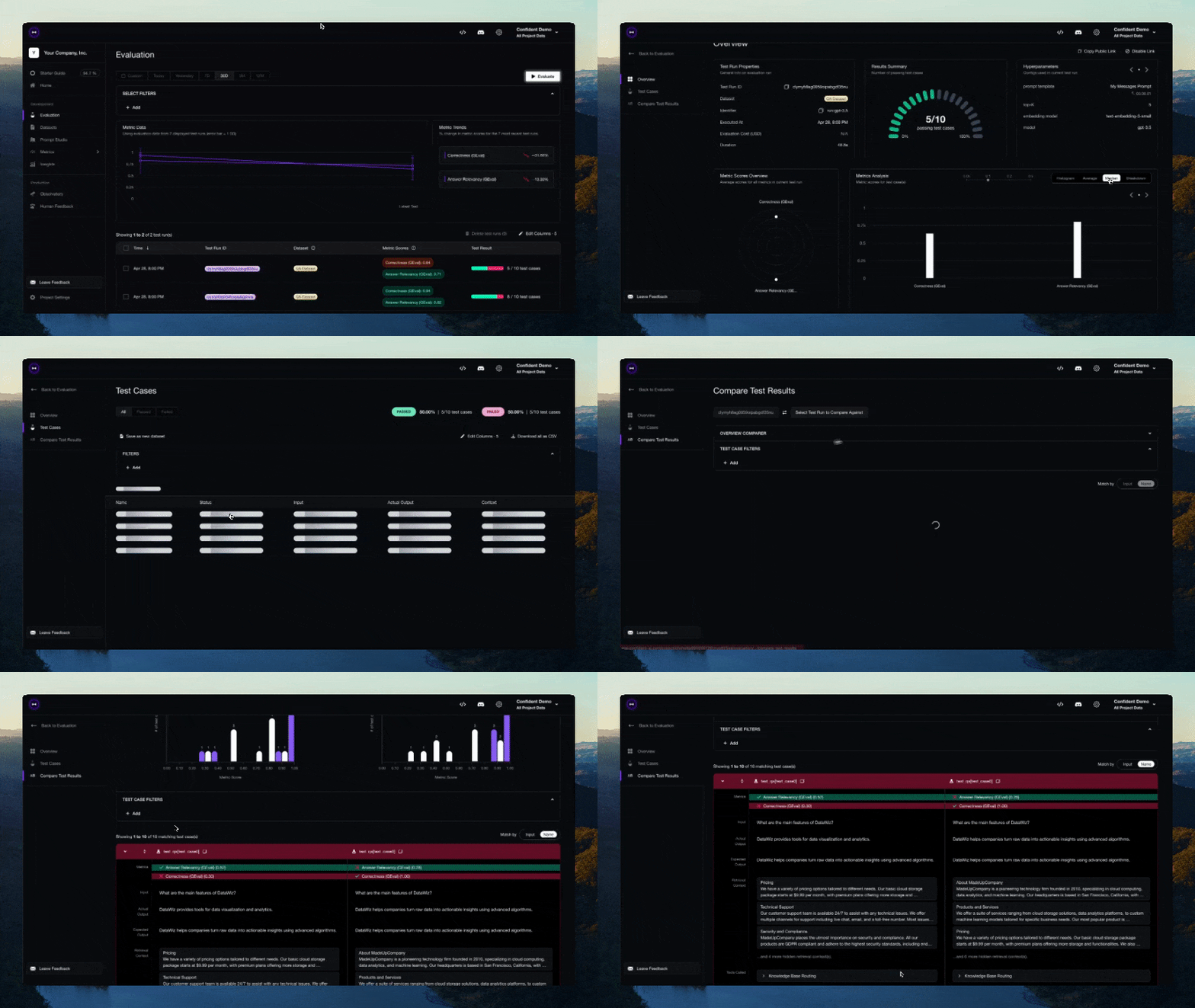
DeepEval is a simple-to-use, open-source LLM evaluation framework, for evaluating large-language model systems. It is similar to Pytest but specialized for unit testing LLM apps. DeepEval incorporates the latest research to run evals via metrics such as G-Eval, task completion, answer relevancy, hallucination, etc., which use LLM-as-a-judge and other NLP models that run locally on your machine.
Whether you’re building AI agents, RAG pipelines, or chatbots, implemented via LangChain or OpenAI, DeepEval has you covered. With it, you can easily evaluate:
- LLM apps end-to-end as black boxes
- Complete agent trajectories across every decision and action
- Individual agent steps such as LLM calls, tool use, retrieval, and sub-agent handoffs
Use these evaluations to determine the optimal models, prompts, and architecture to improve your AI quality, prevent prompt drifting, or even transition from OpenAI to Claude with confidence.
[!IMPORTANT] Want to compare iterations, share evaluation reports, and monitor your AI in production? Sign up for Confident AI, the enterprise AI evals and observability platform.
Want to talk LLM evaluation, need help picking metrics, or just to say hi? Come join our discord.
🔥 Metrics and Features
-
📐 Large variety of ready-to-use LLM eval metrics (all with explanations) powered by ANY LLM of your choice, statistical methods, or NLP models that run locally on your machine covering all use cases:
-
Custom, All-Purpose Metrics:
-
- Task Completion — evaluate whether an agent accomplished its goal
- Tool Correctness — check if the right tools were called with the right arguments
- Goal Accuracy — measure how accurately the agent achieved the intended goal
- Step Efficiency — evaluate whether the agent took unnecessary steps
- Plan Adherence — check if the agent followed the expected plan
- Plan Quality — evaluate the quality of the agent’s plan
- Tool Use — measure quality of tool usage
- Argument Correctness — validate tool call arguments
-
- Answer Relevancy — measure how relevant the RAG pipeline’s output is to the input
- Faithfulness — evaluate whether the RAG pipeline’s output factually aligns with the retrieval context
- Contextual Recall — measure how well the RAG pipeline’s retrieval context aligns with the expected output
- Contextual Precision — evaluate whether relevant nodes in the RAG pipeline’s retrieval context are ranked higher
- Contextual Relevancy — measure the overall relevance of the RAG pipeline’s retrieval context to the input
- RAGAS — average of answer relevancy, faithfulness, contextual precision, and contextual recall
-
- Knowledge Retention — evaluate whether the chatbot retains factual information throughout a conversation
- Conversation Completeness — measure whether the chatbot satisfies user needs throughout a conversation
- Turn Relevancy — evaluate whether the chatbot generates consistently relevant responses throughout a conversation
- Turn Faithfulness — check if the chatbot’s responses are factually grounded in retrieval context across turns
- Role Adherence — evaluate whether the chatbot adheres to its assigned role throughout a conversation
-
- MCP Task Completion — evaluate how effectively an MCP-based agent accomplishes a task
- MCP Use — measure how effectively an agent uses its available MCP servers
- Multi-Turn MCP Use — evaluate MCP server usage across conversation turns
-
- Text to Image — evaluate image generation quality based on semantic consistency and perceptual quality
- Image Editing — evaluate image editing quality based on semantic consistency and perceptual quality
- Image Coherence — measure how well images align with their accompanying text
- Image Helpfulness — evaluate how effectively images contribute to user comprehension of the text
- Image Reference — evaluate how accurately images are referred to or explained by accompanying text
-
- Hallucination — check whether the LLM generates factually correct information against provided context
- Summarization — evaluate whether summaries are factually correct and include necessary details
- Bias — detect gender, racial, or political bias in LLM outputs
- Toxicity — evaluate toxicity in LLM outputs
- JSON Correctness — check whether the output matches an expected JSON schema
- Prompt Alignment — measure whether the output aligns with instructions in the prompt template
-
-
🎯 Supports both end-to-end and component-level LLM evaluation.
-
🧩 Build your own custom metrics that are automatically integrated with DeepEval’s ecosystem.
-
🔮 Generate both single and multi-turn synthetic datasets for evaluation.
-
🔗 Integrates seamlessly with ANY CI/CD environment.
-
🧬 Optimize prompts automatically based on evaluation results.
-
🏆 Easily benchmark ANY LLM on popular LLM benchmarks in under 10 lines of code., including MMLU, HellaSwag, DROP, BIG-Bench Hard, TruthfulQA, HumanEval, GSM8K.
🔌 Integrations
DeepEval plugs into any LLM framework — OpenAI Agents, LangChain, CrewAI, and more. For enterprise teams standardizing evals and observability across the organization, Confident AI provides a native DeepEval integration.
Frameworks
- LangChain — evaluate LangChain applications with a callback handler
- LangGraph — evaluate LangGraph agents with a callback handler
- Pydantic AI — evaluate Pydantic AI agents with type-safe validation
- CrewAI — evaluate CrewAI multi-agent systems
- Anthropic — evaluate and trace Claude applications via a client wrapper
- AWS AgentCore — evaluate agents deployed on Amazon AgentCore
- Google ADK — evaluate Google ADK agents and multi-agent workflows
- AI SDK — evaluate AI SDK generations and tool-loop trajectories
- Mastra — evaluate Mastra agents and workflows with native tracing
- OpenAI — evaluate and trace OpenAI applications via a client wrapper
- OpenAI Agents — evaluate OpenAI Agents end-to-end in under a minute
- LlamaIndex — evaluate RAG applications built with LlamaIndex
☁️ Platform + Ecosystem
Confident AI is the enterprise AI evals and observability platform. It gives organizations one consistent standard across product teams, integrates natively with DeepEval, and remains model- and framework-agnostic.
- Product teams manage datasets, evaluate AI applications before launch, and monitor live traces with online evals and signals in production.
- Platform teams define one organization-wide quality standard and enforce it through governance and native red teaming.
- Don’t need a UI? Use Confident AI as your persistence layer to run evals, pull datasets, and inspect traces from Claude Code or Cursor through Confident AI’s MCP server.
🤖 Vibe-Coder QuickStart
Want your coding agent to add evals and fix failures for you? Install the DeepEval skill, point it at your agent, RAG pipeline, or chatbot, and ask it to generate a dataset, write the eval suite, run deepeval test run, and iterate on the failing metrics.
Start with the 5-minute vibe-coder guide.
🚀 Human QuickStart
Let’s pretend your LLM application is a RAG based customer support chatbot; here’s how DeepEval can help test what you’ve built.
Installation
Deepeval works with Python>=3.9+.
pip install -U deepevalCreate an account (highly recommended)
Using the deepeval platform will allow you to generate sharable testing reports on the cloud. It is free, takes no additional code to setup, and we highly recommend giving it a try.
To login, run:
deepeval loginFollow the instructions in the CLI to create an account, copy your API key, and paste it into the CLI. All test cases will automatically be logged (find more information on data privacy here).
Write your first test case
Create a test file:
touch test_chatbot.pyOpen test_chatbot.py and write your first test case to run an end-to-end evaluation using DeepEval, which treats your LLM app as a black-box:
import pytest
from deepeval import assert_test
from deepeval.metrics import GEval
from deepeval.test_case import LLMTestCase, SingleTurnParams

def test_case():
    correctness_metric = GEval(
        name="Correctness",
        criteria="Determine if the 'actual output' is correct based on the 'expected output'.",
        evaluation_params=[SingleTurnParams.ACTUAL_OUTPUT, SingleTurnParams.EXPECTED_OUTPUT],
        threshold=0.5
    )
    test_case = LLMTestCase(
        input="What if these shoes don't fit?",
        # Replace this with the actual output from your LLM application
        actual_output="You have 30 days to get a full refund at no extra cost.",
        expected_output="We offer a 30-day full refund at no extra costs.",
        retrieval_context=["All customers are eligible for a 30 day full refund at no extra costs."]
    )
    assert_test(test_case, [correctness_metric])
Set your OPENAI_API_KEY as an environment variable (you can also evaluate using your own custom model, for more details visit this part of our docs):
export OPENAI_API_KEY="..."And finally, run test_chatbot.py in the CLI:
deepeval test run test_chatbot.pyCongratulations! Your test case should have passed ✅ Let’s break down what happened.
- The variable
inputmimics a user input, andactual_outputis a placeholder for what your application’s supposed to output based on this input. - The variable
expected_outputrepresents the ideal answer for a giveninput, andGEvalis a research-backed metric provided bydeepevalfor you to evaluate your LLM outputs on any custom criteria with human-like accuracy. - In this example, the metric
criteriais correctness of theactual_outputbased on the providedexpected_output. - All metric scores range from 0 - 1, which the
threshold=0.5ultimately determines if your test has passed or not.
Read our documentation for more information!
Evals With Full Traceability
Use evals_iterator() to run the same dataset through your app, whether you instrument it manually or through one of DeepEval’s framework integrations. Because tracing captures the ordered sequence of model decisions, tool calls, and intermediate steps, you can run trajectory-based evaluations over the complete path your agent takes.
Here’s an example of manual instrumentation:
from deepeval.tracing import observe, update_current_span
from deepeval.test_case import LLMTestCase
from deepeval.metrics import TaskCompletionMetric

@observe()
def inner_component(input: str):
    output = "result"
    update_current_span(test_case=LLMTestCase(input=input, actual_output=output))
    return output

@observe()
def app(input: str):
    return inner_component(input)

# This metric evaluates the complete trajectory captured for this run.
for golden in dataset.evals_iterator(metrics=[TaskCompletionMetric()]):
    app(golden.input)
from deepeval.openai import OpenAI
from deepeval.tracing import trace
from deepeval.metrics import TaskCompletionMetric
client = OpenAI()
# This metric evaluates the complete trajectory captured for this run.
for golden in dataset.evals_iterator():
with trace(metrics=[TaskCompletionMetric()]):
client.chat.completions.create(
model="gpt-4o",
messages=[{"role": "user", "content": golden.input}],
)from agents import Runner
from deepeval.metrics import TaskCompletionMetric
# This metric evaluates the complete trajectory captured for this run.
for golden in dataset.evals_iterator(metrics=[TaskCompletionMetric()]):
Runner.run_sync(agent, golden.input)import { generateText } from "ai";
import { configureAiSdkTracing } from "deepeval/integrations/ai-sdk";
import { TaskCompletionMetric } from "deepeval/metrics";
const tracer = configureAiSdkTracing({ name: "my-agent" });
const ask = (input: string) =>
generateText({
model,
prompt: input,
experimental_telemetry: { isEnabled: true, tracer },
});
// This metric evaluates the complete trajectory captured for this run.
for await (const golden of dataset.evalsIterator({
metrics: [new TaskCompletionMetric()],
})) {
await ask(golden.input);
}import { Mastra } from "@mastra/core/mastra";
import { Observability } from "@mastra/observability";
import { DeepEvalExporter } from "deepeval/integrations/mastra";
import { TaskCompletionMetric } from "deepeval/metrics";
const mastra = new Mastra({
agents: { agent },
observability: new Observability({
configs: {
deepeval: { exporters: [new DeepEvalExporter()] },
},
}),
});
// This metric evaluates the complete trajectory captured for this run.
for await (const golden of dataset.evalsIterator({
metrics: [new TaskCompletionMetric()],
})) {
await mastra.getAgent("agent").generate(golden.input);
}from deepeval.anthropic import Anthropic
from deepeval.tracing import trace
from deepeval.metrics import TaskCompletionMetric
client = Anthropic()
# This metric evaluates the complete trajectory captured for this run.
for golden in dataset.evals_iterator():
with trace(metrics=[TaskCompletionMetric()]):
client.messages.create(
model="claude-sonnet-4-5",
max_tokens=1024,
messages=[{"role": "user", "content": golden.input}],
)from deepeval.integrations.langchain import CallbackHandler
from deepeval.metrics import TaskCompletionMetric
# This metric evaluates the complete trajectory captured for this run.
for golden in dataset.evals_iterator():
llm.invoke(
golden.input,
config={"callbacks": [CallbackHandler(metrics=[TaskCompletionMetric()])]},
)from deepeval.integrations.langchain import CallbackHandler
from deepeval.metrics import TaskCompletionMetric
# This metric evaluates the complete trajectory captured for this run.
for golden in dataset.evals_iterator():
agent.invoke(
{"messages": [{"role": "user", "content": golden.input}]},
config={"callbacks": [CallbackHandler(metrics=[TaskCompletionMetric()])]},
)from deepeval.metrics import TaskCompletionMetric
# This metric evaluates the complete trajectory captured for this run.
for golden in dataset.evals_iterator(metrics=[TaskCompletionMetric()]):
agent.run_sync(golden.input)from deepeval.integrations.crewai import instrument_crewai
from deepeval.metrics import TaskCompletionMetric
instrument_crewai()
# This metric evaluates the complete trajectory captured for this run.
for golden in dataset.evals_iterator(metrics=[TaskCompletionMetric()]):
crew.kickoff({"input": golden.input})from deepeval.integrations.agentcore import instrument_agentcore
from deepeval.metrics import TaskCompletionMetric
instrument_agentcore()
# This metric evaluates the complete trajectory captured for this run.
for golden in dataset.evals_iterator(metrics=[TaskCompletionMetric()]):
invoke({"prompt": golden.input})import asyncio
from deepeval.evaluate.configs import AsyncConfig
from deepeval.metrics import TaskCompletionMetricこのREADMEは一部を省略しています。全文はGitHubにあります。 原文を読む ↗
可観測性 / 評価の他の選択肢
 LiteLLMモデルサービング
ライブラリとしては、1つの関数呼び出しで対応プロバイダのどれにでも、OpenAI形式のリクエストとレスポンスのまま到達できます。多くのチームが導入する理由は後者のゲートウェイのほうです。自己ホストのサーバーが、個別の予算と流量制限を持つ仮想キーを発行し、プロバイダの障害時には代替へ切り替え、複数の配備先へ負荷を分散し、キーごとの費用を記録します。代償として、リクエスト経路に自分で運用する構成要素が1つ増えます。またenterpriseディレクトリ配下のコードはMITの対象外です。
 ClickHouse可観測性
追記が中心で値の種類が多いデータ——モデル呼び出しごとに1行を記録し、後からモデル名やコスト、エラーで絞り込む——に向いた列指向エンジンです。Langfuseは2024年12月にトレースの保存先をPostgreSQLからClickHouseへ移し、2026年1月にはClickHouseがLangfuseを買収したため、セルフホストの可観測性基盤を組むと下層にこれが入る構成が増えています。一方でトランザクション処理には向かず、更新や削除は行の書き換えではなく列パート単位の再作成になるため、アプリケーションの状態を書き込む先ではなく、エージェントの実行記録が着地する場所として扱ってください。
 Langfuse可観測性
エージェントが実際に何をしたか——各呼び出し、ツール実行、コスト——を記録し、そのトレースを評価用データセットへ変換できます。マネージド版とDocker Composeでセルフホストする版が同一コードベースのため、どちらの方向にも移行コストが低いのが利点です。一部のエンタープライズ機能はMITのコア部分に含まれないため、必要な機能の提供範囲を事前に確認してください。