
Diagram Design
39種類の図をHTMLとSVGだけで完結した形で描かせるスキル。Mermaidの既定の見た目にはならない
Diagram Designとは
エージェントに図を頼むと、角の丸い箱と矢印が返ってきて、載せたい文書の見た目とまるで合わず、結局使われないことがよくあります。このスキルはエージェントに語彙を与えます。アーキテクチャ、シーケンス、スイムレーン、四象限、サンキー、特性要因図、Wardleyマップ、ストーリーマップなど39種類の名前付きレイアウトがあり、それぞれ明色・暗色・編集向けの3種類で、SVGを埋め込んだHTMLファイル1枚として出力されます。ビルド工程もJavaScriptも外部画像も不要で、ブラウザで開くかページに貼るだけです。自分のサイトを読ませて配色を合わせることもでき、既存のdraw.ioやMermaidの図を、指定した大きさと詳しさで描き直させることもできます。
Diagram Designで何ができますか?
- 欲しい図の形を名前で指定する — 39種類のレイアウトにはそれぞれ名前と用途があります。「Wardleyマップで描いて」と言えばそれが出てきます。また箱と矢印、にはなりません。
- 導入不要のファイル1枚を受け取る — 出力はSVGを埋め込んだ自己完結のHTMLです。ビルド工程もJavaScriptも、行方不明になる外部画像もありません。
- 載せる文書に合わせる — サイトを読ませて配色や書体を取り込めるため、図が別の場所から貼られたようには見えず、ページに馴染みます。
- 既存の図を描き直す — 手元のdraw.ioやMermaidの記述を渡せば、指定した形式・大きさ・詳しさで作り直せます。
- 情報量を意図的に抑える — 強調色は本当に見てほしい1〜2箇所のために取っておき、要素を削る方向へ寄せます。図が構成のスクリーンショットと違うのはこの点です。
Diagram Designを選ぶ前に
- 出力はHTMLであり編集可能な図のファイルではありません。修正はエージェント経由になるため、同僚が開いて少し動かす用途より、作り直す前提の図に向きます。
- 39種類は覚えきれる数ではなく、選び間違いが典型的な失敗です。最初に頼む前に、どの型があるかを一度読んでおく価値があります。
よくある質問
Diagram Designは商用利用できますか?
Diagram DesignはMITライセンスで公開されています。OSI承認のオープンソースライセンスで、商用利用が認められています。
Diagram Designはどの形で使えますか?
Diagram Designはローカル実行の形で利用できます。
ドキュメント
cathrynlavery/diagram-design のREADMEより転載(MIT)。 原文を読む ↗
Diagram Design
Editorial diagrams your designer won’t hate.
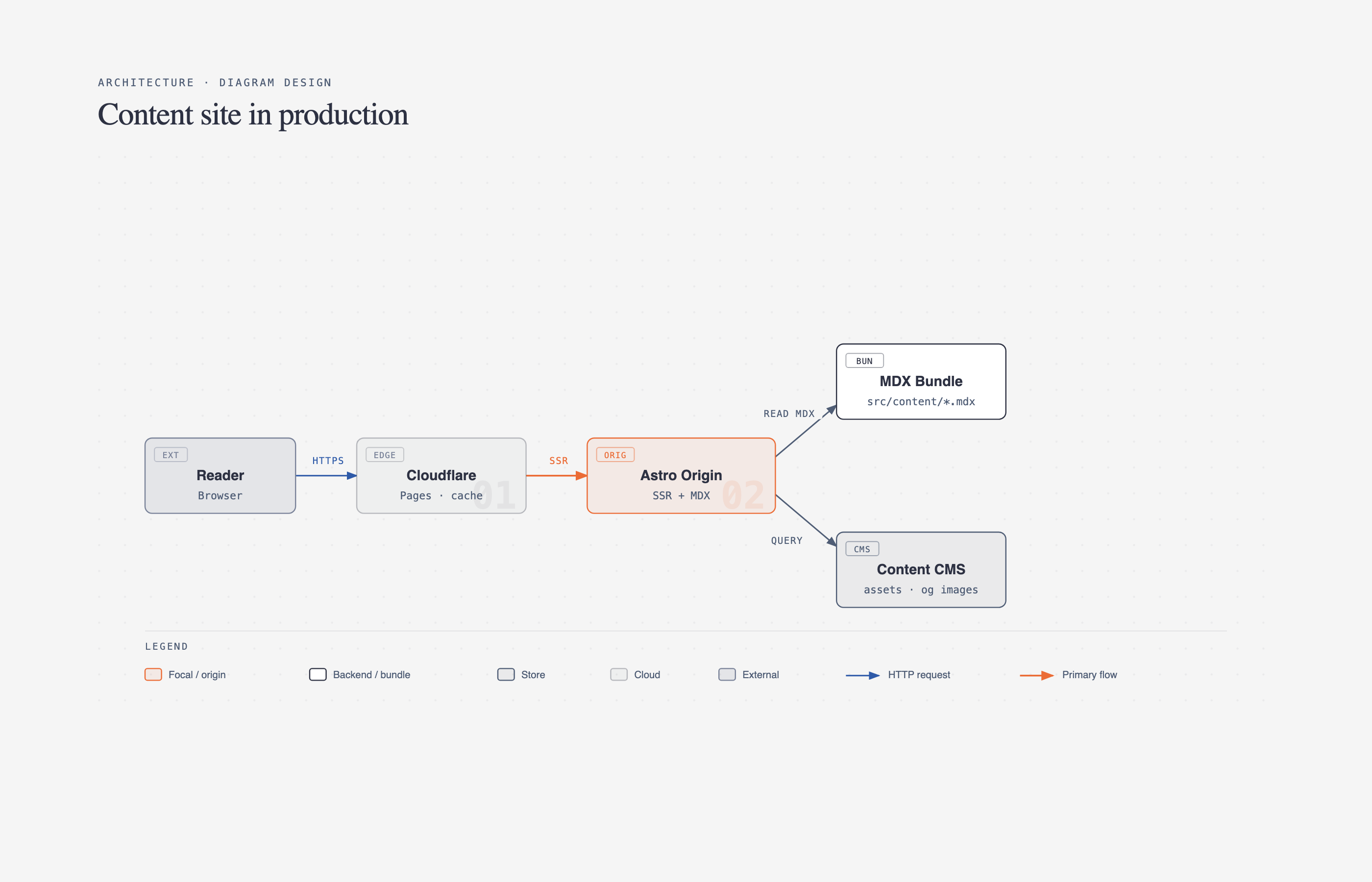
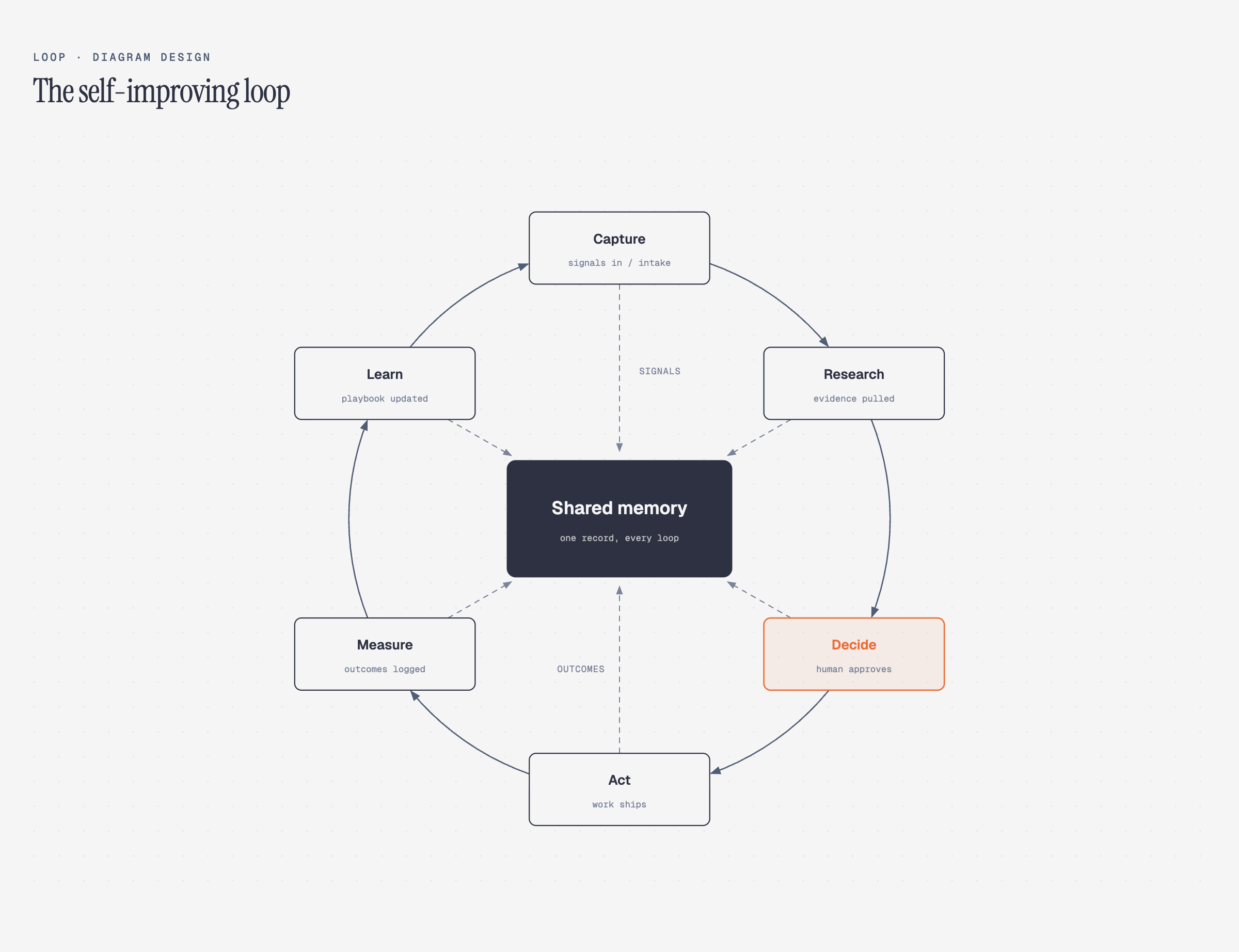
New in 2.0 — the Loop: flywheels with a shared-memory hub. The dashed lines are the write-backs.
New in 2.3: semantic system patterns and optional accessible motion, while static output stays the default.
New in 2.5.10: ten more layout grammars — Sankey, fishbone, Wardley map, kanban, user journey, deployment, dependency graph, UML class, story map, and database schema.
39 editorial diagram types for Claude Code, Codex, Factory Droid, and Pi. Self-contained HTML + SVG. No shadows. No Mermaid slop. Semantic patterns describe behavior separately from layout, so a queue, policy trace, or trust boundary can use the nearest existing type without expanding the type count. Static HTML remains the default; optional motion is available for ordered explanations. The skill also redraws draw.io or Mermaid sources at a chosen format, size, and detail level.
No Figma. No generic rounded boxes. No 30-minute color-picking sessions.
Why I built it
I write at littlemight.com (and run BestSelf.co on the side). Every time I needed a diagram — an architecture sketch, a flowchart, a pyramid of what matters most — I’d ask Claude and get back a generic rounded-box thing that looked nothing like the rest of the site. I’d either fight with Figma for 30 minutes or just skip the diagram.
So I built a Claude Code skill for it. Thirty-nine visual types, editorial quality, matches your brand in 60 seconds by reading your website.
The highest-quality move is usually deletion. Every node earns its place. The accent color is reserved for the 1–2 things the reader should look at first. Target density: 4/10.
What it makes
All 39 visual types ship in three static variants: minimal light, minimal dark, and full-editorial. Open any of them directly in a browser. There is no build step, JavaScript, or external image dependency.
The v2.5.10 release added the final ten types above. Compare their light, dark, and full-editorial variants in the 30-variant contact sheet.
Browse the live gallery: cathrynlavery.github.io/diagram-design — or open skills/diagram-design/assets/index.html locally to flip through all 39 diagrams with light / dark / full-editorial tabs.
Install
Claude Code:
/plugin marketplace add cathrynlavery/diagram-design
/plugin install diagram-design@diagram-design
Then enable updates once: run /plugin, open Marketplaces, select diagram-design, and choose Enable auto-update. Claude Code disables auto-update by default for third-party marketplaces; after this toggle, it refreshes the marketplace and installed plugin in the background after startup. Run /reload-plugins when prompted, or let the next session load the update.
Codex:
codex plugin marketplace add cathrynlavery/diagram-design
codex plugin add diagram-design@diagram-design
Codex refreshes configured Git marketplaces at startup. To fetch immediately, run codex plugin marketplace upgrade diagram-design and start a new session.
Factory Droid:
droid plugin marketplace add https://github.com/cathrynlavery/diagram-design
droid plugin install diagram-design@diagram-design --scope user
Droid tracks Git plugins by commit rather than the manifest’s display version. To fetch a merged update, run droid plugin marketplace update diagram-design, then droid plugin update diagram-design@diagram-design --scope user, and start a new session.
Claude Cowork (organization marketplace): Organization GitHub marketplaces currently require a private or internal repository, so first mirror this public repository into one owned by your organization. In Organization settings → Plugins, choose Add plugin → GitHub, connect that mirror, and enable Sync automatically from the marketplace menu. Automatic sync runs when a pull request containing a plugin version bump is merged to the mirror’s default branch; direct pushes do not trigger the webhook. Install Diagram Design from the resulting organization marketplace.
Pi:
pi install https://github.com/cathrynlavery/diagram-designRun /reload in an open Pi session. Pi makes the skill available for matching diagram requests; use /skill:diagram-design to invoke it explicitly. Pi also loads the /export-diagram, /import-mermaid, /profile, and /doctor prompt templates. The unpinned Git install is intentional: Pi has no automatic package refresh, so run pi update --extensions to pull merged updates.
One-time migration: an existing standalone
npx skills addcopy will not start following the Codex marketplace automatically. Remove that standalone copy, then use the Codex marketplace commands above. Likewise, uninstall a personal Cowork copy and reinstall Diagram Design from your organization’s marketplace. Future marketplace version bumps then flow through each client’s native update path.
Editable install
Managed installs are convenient, but changes to references/style-guide.md may be replaced by package updates. Saved profiles in ~/.diagram-design/profiles/ survive updates, and projects with a .diagram-design marker are unaffected. Clone the repo and install the local path if you plan to customize the working style guide directly:
git clone git@github.com:cathrynlavery/diagram-design.git ~/code/diagram-design

# Pi: register the checkout as a local package
pi install ~/code/diagram-design

# Claude Code: symlink the inner skill
ln -s ~/code/diagram-design/skills/diagram-design ~/.claude/skills/diagram-design
The shared skill lives at skills/diagram-design/. Pi discovers it through the repo’s standard skills/ package directory; Claude Code, Codex, Factory Droid, and other Agent Skills-compatible tools use the same files.
Onboarding — make it look like your brand
The whole point: ship editorial-quality diagrams in your colors and typography, not a generic template.
Out of the box, diagrams render in a clean jet-black + atomic-tangerine palette (white-smoke paper, jet-black ink, atomic-tangerine accent, blue-slate muted, silver hairlines). Good enough to screenshot straight away. But 60 seconds of onboarding is better — the skill will pull your brand from your website and apply it across every diagram.
The flow
You:     "onboard diagram-design to https://yoursite.com"
Agent:   → fetches the homepage
         → extracts the dominant palette + font stack
         → maps detected values to semantic roles:
             paper, ink, muted, accent, link
         → shows a proposed diff
         → writes your tokens to references/style-guide.md
You:     "yes, apply it"
Every new diagram now uses your colors. Your website’s paper color becomes the diagram background. Your CTA color becomes the focal accent. Your body font stack becomes the node label family.
Brand matching also emits a fidelity receipt: sampled URLs, exact color roles, font families and weights, font source URLs, and any fallback. Public site fonts are used directly and verified after rendering rather than silently replaced with generic system fonts.
What gets extracted
| Detected from your site | Becomes |
|---|---|
<body> background | paper token |
| Primary text color | ink token |
| Secondary / caption text | muted token |
| Cards or containers | paper-2 token |
| Most-used brand color (CTA, link, heading) | accent token |
<h1> font family | title font |
<body> font family | node-name font |
<code> / <pre> font | sublabel font |
Contrast checks happen automatically
Before writing tokens, the skill verifies WCAG AA contrast on ink over paper. If your site has a color that fails contrast at diagram sizes (9–12px), it proposes an adjusted value and explains why.
Accessible by default
Every diagram template gives the inline SVG an accessible name and description: role="img", a resolving aria-labelledby, and first-child <title> / <desc> slots. IDs are prefixed per diagram and variant, so multiple SVG exports can be safely inlined on one page without duplicate accessible-name IDs. Decorative specimen icons are hidden from assistive technology instead.
Manual override
Prefer to set tokens by hand? Open skills/diagram-design/references/style-guide.md and edit the table. Everything downstream reads from there — all 39 diagrams, the annotation primitive, and the gallery all inherit semantic role names (accent, not #eb6c36).
First-run gate
The skill won’t silently ship default-skinned diagrams into a branded project. On first use in a new project, it checks if style-guide.md has been customized. If not, it pauses and asks:
“This is your first diagram in this project. The style guide is still at the default. Want to run onboarding, paste tokens manually, or proceed with default?”
See skills/diagram-design/references/onboarding.md for the full spec.
Working with multiple clients
Onboard a brand once, save the result as a named profile, then add a .diagram-design marker containing profile: <slug> to each client project. Marker projects read ~/.diagram-design/profiles/<slug>.md directly, so parallel workspaces can use different brands without overwriting a shared installed style-guide.md.
The profile library is shared across Claude Code, Codex, Factory Droid, and Pi. Use /diagram-design:profile in Claude Code, /profile in Factory Droid or Pi, or ask in natural language in any host. See profiles.md for the storage, marker, and recovery contract.
Quickstart
# From a cloned checkout, open the gallery to see all 39 diagrams
open skills/diagram-design/assets/index.html       # macOS
xdg-open skills/diagram-design/assets/index.html  # Linux

# In Claude Code, Codex, Factory Droid, or Pi, ask:
# "Make me an architecture diagram of my app: frontend, backend, database, Redis cache."
# "I need a quadrant showing Q2 projects by impact vs effort."
# "Give me a sequence of a bearer call with token refresh on 401."
# (branching refresh uses the ALT combined-fragment grammar in type-sequence.md;
#  see skills/diagram-design/assets/example-sequence-oauth.html — not a full authorize-code handshake)
Your agent will pick the right type, build the HTML, and save it. You can also start from a template directly:
cp skills/diagram-design/assets/template.html my-diagram.html        # minimal light
cp skills/diagram-design/assets/template-full.html my-diagram.html   # editorial with summary cards
cp skills/diagram-design/assets/template-motion.html my-diagram.html # optional accessible motion
Semantic patterns and optional motion
When behavior matters, the skill chooses a semantic pattern first and a visual type second. The seven routed patterns cover fan-in queues and bottlenecks, repeated stage slots, unstructured-input transformation, paired policy traces, secure paved roads, governance catalogs, and compensating security layers. Each pattern defines its triggers, primitives, budget, anti-patterns, static fallback, and nearest visual type in semantic-patterns.md.
Motion is optional and does not create another visual type. animation.md defines none, reveal, step, and loop modes with a complete static first frame, deterministic timing, and controls when interaction is available. Reduced-motion output shows the complete static frame and hides/disables playback controls. Motion HTML uses the exact reviewed controller from template-motion.html; arbitrary or modified inline scripts, remote assets, CSS imports, and executable HTML attributes are rejected. The default is none: ordinary output remains static and script-free. example-policy-trace-animated.html is the self-contained interactive example.
Import from draw.io or Mermaid
Already have diagrams in draw.io / diagrams.net or Mermaid? Point the skill at the source and it redraws them — same content, this design system, at whatever the destination needs.
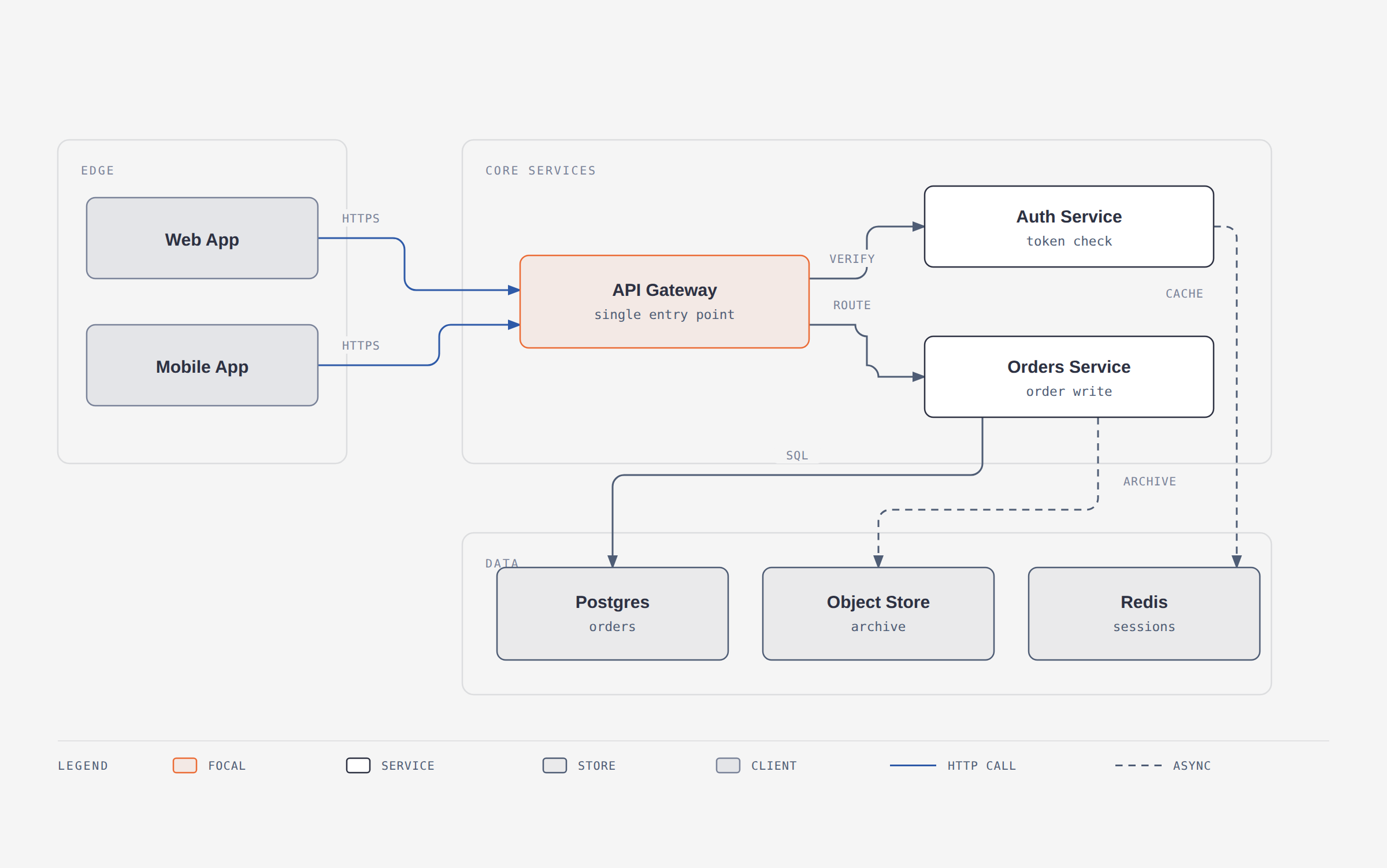
A 12-node draw.io file redrawn at balanced detail for a blog post. The source’s six pastel fills became one accent; its hand-dragged coordinates became a 4px grid.
/diagram-design:import-drawio platform.drawio
/diagram-design:import-drawio platform.drawio --size=slide-16x9 --detail=simplified --audience=executive
/diagram-design:import-drawio platform.drawio --detail=faithful --format=png --page=all
/diagram-design:import-mermaid README.md --diagram=all
/diagram-design:import-mermaid architecture.mmd --size=slide-16x9 --detail=simplified
Or just ask: “redraw this drawio file for my deck”, “make this Mermaid block editorial”, or “この Mermaid をスライド用にきれいにして”.
Reads the common containers draw.io writes — .drawio, .drawio.xml, .drawio.png (embedded diagram), and .drawio.svg — including compressed payloads that look like base64 garbage in an editor.
For Mermaid, it accepts .mmd, .mermaid, and one or more fenced mermaid blocks in Markdown. It parses text only: no rendering, JavaScript, browser, network, or followed click targets.
このREADMEは一部を省略しています。全文はGitHubにあります。 原文を読む ↗
ツール連携の他の選択肢
 openclawツール連携
`openclaw onboard --install-daemon`で手元のマシンにGatewayを常駐させると、セッション、ツール、イベント、チャネル接続がそこへ集約され、Control UI、CLI、TUI、接続済みのメッセージングチャネルが同じアシスタントを共有します。モデルはホスト型でもローカルでも構成でき、機能追加は本体の改造ではなくplugin SDKで作るプラグインを前提としています。一方で想定利用者は単独のオペレーターで、メインセッションのツールはサンドボックスを明示的に設定しない限りホスト上でそのまま実行され、DM可能なチャネルでは受信メッセージを未信頼の入力として扱う前提になっています。他のユーザーを参加させたりGatewayを外部へ公開したりする構成は、README自体がsecurityとsandboxingのガイドを先に読むよう促している領域であり、チームでの共有運用を第一に考えるなら選択肢から外れます。
 hermes-agentツール連携
Nous Research自身が開発するエージェント本体で、TUIと単一のgatewayプロセスがTelegram、Discord、Slack、WhatsApp、Signal、Emailの会話を束ね、cronスケジューラ、隔離されたサブエージェント、local/Docker/SSH/Singularity/Modal/Daytona/Vercel Sandboxという7種類のターミナルバックエンドを備えます。核になるのは閉じた学習ループで、定期的な促しに応じて記憶を整理し、複雑なタスクの後に自らスキルを作り、FTS5とLLM要約で過去セッションを検索します。裏を返せば、有用さの源である状態が`~/.hermes`配下に溜まり続け、バージョン管理の外で育つため、定期的な棚卸しが前提になります。組み込み用のライブラリではなく運用するアシスタントであり、READMEが記載するのはhermesのサブコマンドとスラッシュコマンドで、埋め込み用のAPIではありません。自作コードから呼ぶエージェントループが欲しい用途には向きません。シェルを扱えるエージェントをチャット経由で露出させる以上、コマンド承認とDMペアリングの設定は任意の飾りではなくなります。
 n8nワークフロー
数百のサービスをつなぐ処理をワークフローとして画面上で組み立てる自動化ツールです。流れの中の1つ1つの処理はノードと呼ばれ、近年はAIエージェントをノードとしてワークフローに組み込む使い方が増えています。最初に確認すべきはライセンスです。OSI承認のオープンソースではなく、Sustainable Use Licenseによるソース公開型にあたります。社内利用やセルフホストは可能ですが、ホスティングサービスとして再販することは認められていません。