
Diagram Design
Thirty-nine diagram types an agent can draw as self-contained HTML and SVG, without Mermaid's default look
What is Diagram Design?
Asking an agent for a diagram usually returns rounded boxes and arrows that look nothing like the document they are going into, so the diagram gets dropped. This skill gives the agent a vocabulary instead: thirty-nine named layouts — architecture, sequence, swimlane, quadrant, Sankey, fishbone, Wardley map, story map and more — each shipped in light, dark and full-editorial variants as one HTML file with inline SVG. No build step, no JavaScript, no external images: open the file in a browser or drop it into a page. It can also read your site to pick up the brand, and redraw an existing draw.io or Mermaid source at a chosen size and level of detail.
What can you do with Diagram Design?
- Name the shape you want — Thirty-nine layouts each have a name and a purpose, so "draw this as a Wardley map" produces that, rather than boxes with arrows again.
- Get one file with nothing to install — Output is a self-contained HTML file with inline SVG — no build step, no JavaScript and no external images to lose track of.
- Match the document it goes into — It can read a site to pick up colours and type, so a diagram sits in a page rather than looking pasted in from elsewhere.
- Redraw what you already have — An existing draw.io or Mermaid source can be handed over and reproduced at a chosen format, size and level of detail.
- Keep the density down on purpose — The skill reserves the accent colour for the one or two things that matter and pushes towards deletion, which is what separates a diagram from a picture of a system.
Before you choose Diagram Design
- The output is HTML, not an editable diagram file — changes go back through the agent, so this suits a diagram you regenerate rather than one a colleague opens and nudges.
- Thirty-nine named types is a lot to hold in your head, and picking the wrong one is the usual failure — the type list is worth reading before the first request rather than after.
Frequently asked questions
Is Diagram Design free for commercial use?
Diagram Design is released under the MIT licence — OSI-approved open source, which permits commercial use.
How can Diagram Design be deployed?
Diagram Design is available as Runs locally.
Documentation
Reproduced from the cathrynlavery/diagram-design README, published under MIT. Read the original ↗
Diagram Design
Editorial diagrams your designer won’t hate.
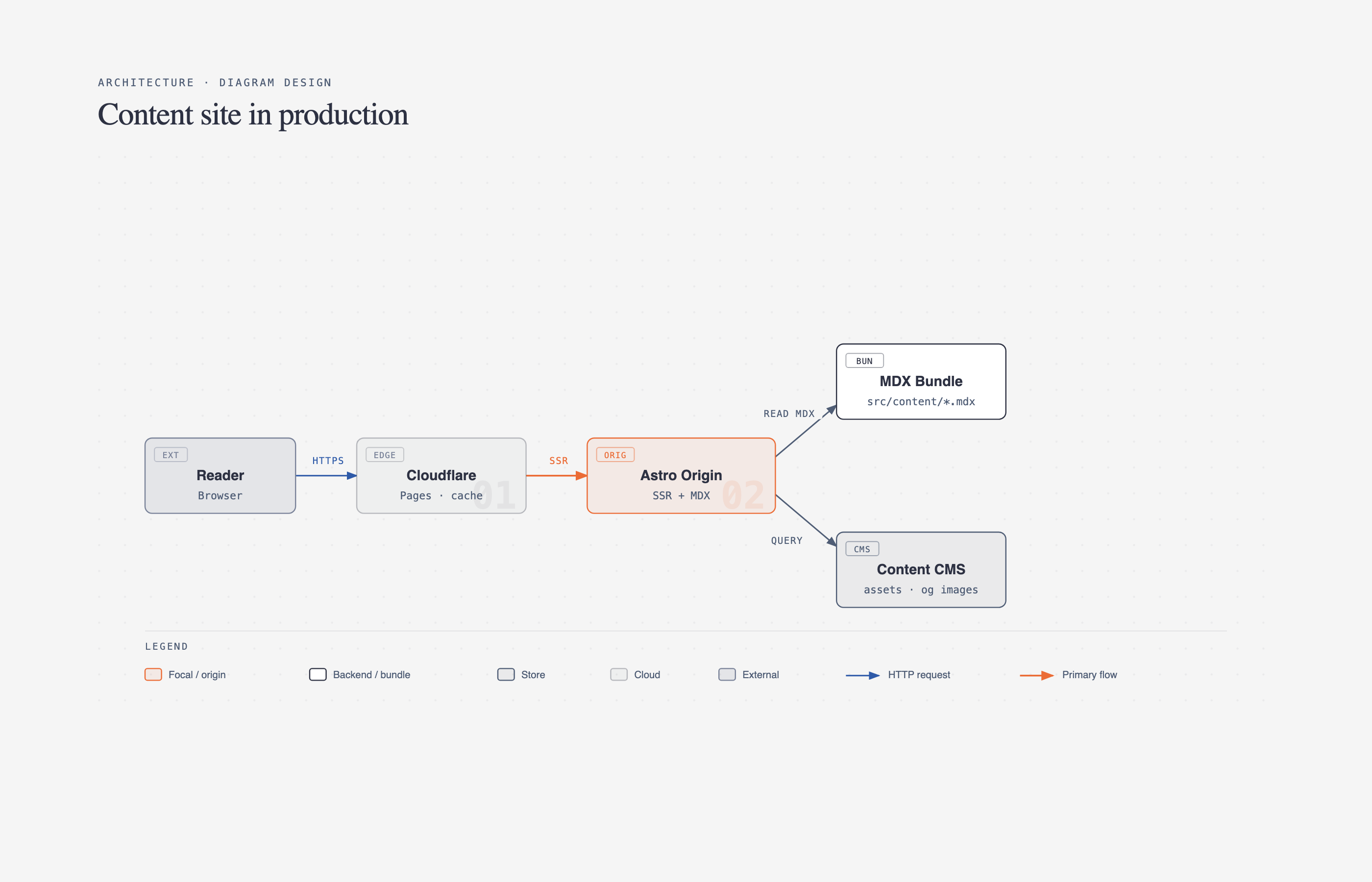
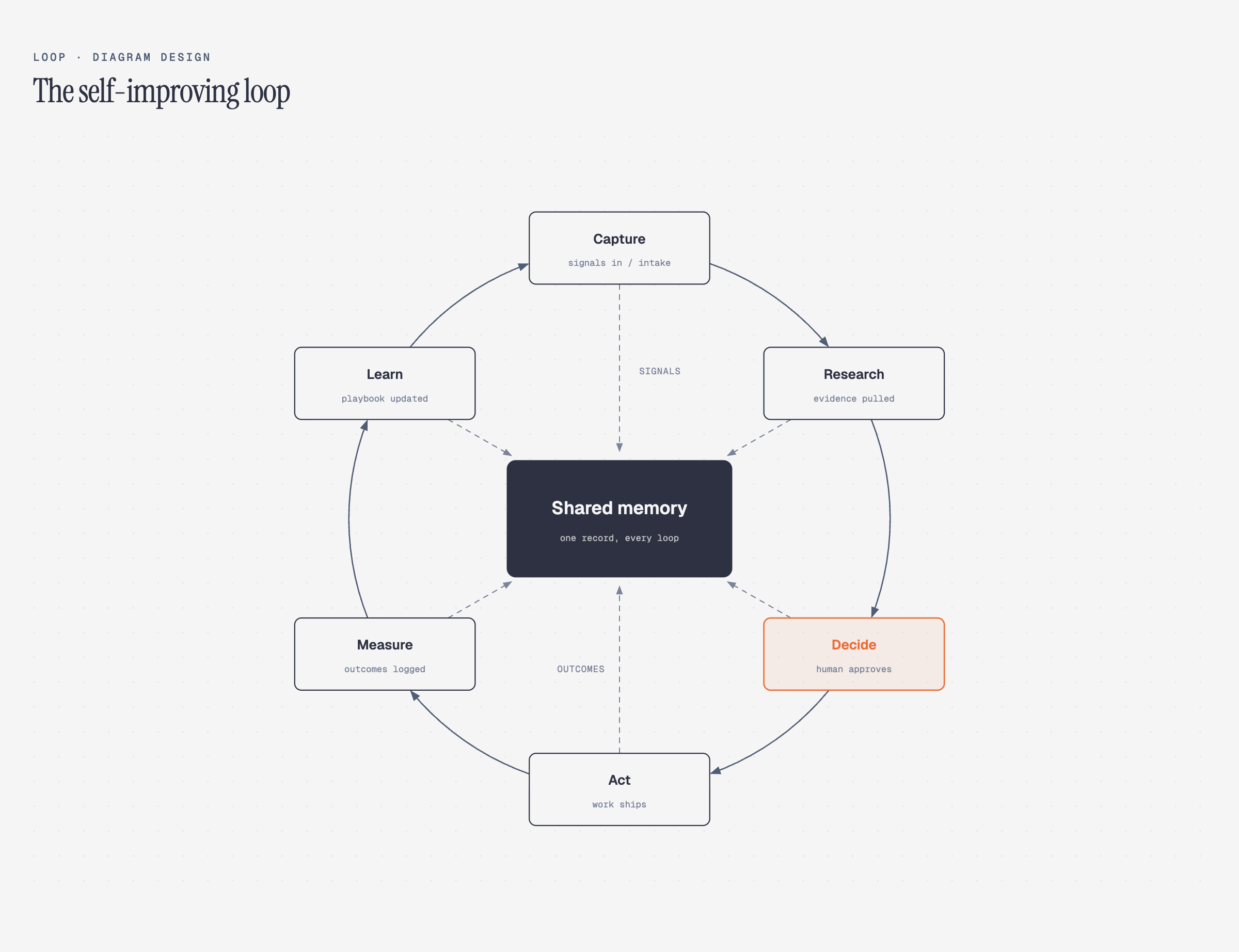
New in 2.0 — the Loop: flywheels with a shared-memory hub. The dashed lines are the write-backs.
New in 2.3: semantic system patterns and optional accessible motion, while static output stays the default.
New in 2.5.10: ten more layout grammars — Sankey, fishbone, Wardley map, kanban, user journey, deployment, dependency graph, UML class, story map, and database schema.
39 editorial diagram types for Claude Code, Codex, Factory Droid, and Pi. Self-contained HTML + SVG. No shadows. No Mermaid slop. Semantic patterns describe behavior separately from layout, so a queue, policy trace, or trust boundary can use the nearest existing type without expanding the type count. Static HTML remains the default; optional motion is available for ordered explanations. The skill also redraws draw.io or Mermaid sources at a chosen format, size, and detail level.
No Figma. No generic rounded boxes. No 30-minute color-picking sessions.
Why I built it
I write at littlemight.com (and run BestSelf.co on the side). Every time I needed a diagram — an architecture sketch, a flowchart, a pyramid of what matters most — I’d ask Claude and get back a generic rounded-box thing that looked nothing like the rest of the site. I’d either fight with Figma for 30 minutes or just skip the diagram.
So I built a Claude Code skill for it. Thirty-nine visual types, editorial quality, matches your brand in 60 seconds by reading your website.
The highest-quality move is usually deletion. Every node earns its place. The accent color is reserved for the 1–2 things the reader should look at first. Target density: 4/10.
What it makes
All 39 visual types ship in three static variants: minimal light, minimal dark, and full-editorial. Open any of them directly in a browser. There is no build step, JavaScript, or external image dependency.
The v2.5.10 release added the final ten types above. Compare their light, dark, and full-editorial variants in the 30-variant contact sheet.
Browse the live gallery: cathrynlavery.github.io/diagram-design — or open skills/diagram-design/assets/index.html locally to flip through all 39 diagrams with light / dark / full-editorial tabs.
Install
Claude Code:
/plugin marketplace add cathrynlavery/diagram-design
/plugin install diagram-design@diagram-design
Then enable updates once: run /plugin, open Marketplaces, select diagram-design, and choose Enable auto-update. Claude Code disables auto-update by default for third-party marketplaces; after this toggle, it refreshes the marketplace and installed plugin in the background after startup. Run /reload-plugins when prompted, or let the next session load the update.
Codex:
codex plugin marketplace add cathrynlavery/diagram-design
codex plugin add diagram-design@diagram-design
Codex refreshes configured Git marketplaces at startup. To fetch immediately, run codex plugin marketplace upgrade diagram-design and start a new session.
Factory Droid:
droid plugin marketplace add https://github.com/cathrynlavery/diagram-design
droid plugin install diagram-design@diagram-design --scope user
Droid tracks Git plugins by commit rather than the manifest’s display version. To fetch a merged update, run droid plugin marketplace update diagram-design, then droid plugin update diagram-design@diagram-design --scope user, and start a new session.
Claude Cowork (organization marketplace): Organization GitHub marketplaces currently require a private or internal repository, so first mirror this public repository into one owned by your organization. In Organization settings → Plugins, choose Add plugin → GitHub, connect that mirror, and enable Sync automatically from the marketplace menu. Automatic sync runs when a pull request containing a plugin version bump is merged to the mirror’s default branch; direct pushes do not trigger the webhook. Install Diagram Design from the resulting organization marketplace.
Pi:
pi install https://github.com/cathrynlavery/diagram-designRun /reload in an open Pi session. Pi makes the skill available for matching diagram requests; use /skill:diagram-design to invoke it explicitly. Pi also loads the /export-diagram, /import-mermaid, /profile, and /doctor prompt templates. The unpinned Git install is intentional: Pi has no automatic package refresh, so run pi update --extensions to pull merged updates.
One-time migration: an existing standalone
npx skills addcopy will not start following the Codex marketplace automatically. Remove that standalone copy, then use the Codex marketplace commands above. Likewise, uninstall a personal Cowork copy and reinstall Diagram Design from your organization’s marketplace. Future marketplace version bumps then flow through each client’s native update path.
Editable install
Managed installs are convenient, but changes to references/style-guide.md may be replaced by package updates. Saved profiles in ~/.diagram-design/profiles/ survive updates, and projects with a .diagram-design marker are unaffected. Clone the repo and install the local path if you plan to customize the working style guide directly:
git clone git@github.com:cathrynlavery/diagram-design.git ~/code/diagram-design

# Pi: register the checkout as a local package
pi install ~/code/diagram-design

# Claude Code: symlink the inner skill
ln -s ~/code/diagram-design/skills/diagram-design ~/.claude/skills/diagram-design
The shared skill lives at skills/diagram-design/. Pi discovers it through the repo’s standard skills/ package directory; Claude Code, Codex, Factory Droid, and other Agent Skills-compatible tools use the same files.
Onboarding — make it look like your brand
The whole point: ship editorial-quality diagrams in your colors and typography, not a generic template.
Out of the box, diagrams render in a clean jet-black + atomic-tangerine palette (white-smoke paper, jet-black ink, atomic-tangerine accent, blue-slate muted, silver hairlines). Good enough to screenshot straight away. But 60 seconds of onboarding is better — the skill will pull your brand from your website and apply it across every diagram.
The flow
You:     "onboard diagram-design to https://yoursite.com"
Agent:   → fetches the homepage
         → extracts the dominant palette + font stack
         → maps detected values to semantic roles:
             paper, ink, muted, accent, link
         → shows a proposed diff
         → writes your tokens to references/style-guide.md
You:     "yes, apply it"
Every new diagram now uses your colors. Your website’s paper color becomes the diagram background. Your CTA color becomes the focal accent. Your body font stack becomes the node label family.
Brand matching also emits a fidelity receipt: sampled URLs, exact color roles, font families and weights, font source URLs, and any fallback. Public site fonts are used directly and verified after rendering rather than silently replaced with generic system fonts.
What gets extracted
| Detected from your site | Becomes |
|---|---|
<body> background | paper token |
| Primary text color | ink token |
| Secondary / caption text | muted token |
| Cards or containers | paper-2 token |
| Most-used brand color (CTA, link, heading) | accent token |
<h1> font family | title font |
<body> font family | node-name font |
<code> / <pre> font | sublabel font |
Contrast checks happen automatically
Before writing tokens, the skill verifies WCAG AA contrast on ink over paper. If your site has a color that fails contrast at diagram sizes (9–12px), it proposes an adjusted value and explains why.
Accessible by default
Every diagram template gives the inline SVG an accessible name and description: role="img", a resolving aria-labelledby, and first-child <title> / <desc> slots. IDs are prefixed per diagram and variant, so multiple SVG exports can be safely inlined on one page without duplicate accessible-name IDs. Decorative specimen icons are hidden from assistive technology instead.
Manual override
Prefer to set tokens by hand? Open skills/diagram-design/references/style-guide.md and edit the table. Everything downstream reads from there — all 39 diagrams, the annotation primitive, and the gallery all inherit semantic role names (accent, not #eb6c36).
First-run gate
The skill won’t silently ship default-skinned diagrams into a branded project. On first use in a new project, it checks if style-guide.md has been customized. If not, it pauses and asks:
“This is your first diagram in this project. The style guide is still at the default. Want to run onboarding, paste tokens manually, or proceed with default?”
See skills/diagram-design/references/onboarding.md for the full spec.
Working with multiple clients
Onboard a brand once, save the result as a named profile, then add a .diagram-design marker containing profile: <slug> to each client project. Marker projects read ~/.diagram-design/profiles/<slug>.md directly, so parallel workspaces can use different brands without overwriting a shared installed style-guide.md.
The profile library is shared across Claude Code, Codex, Factory Droid, and Pi. Use /diagram-design:profile in Claude Code, /profile in Factory Droid or Pi, or ask in natural language in any host. See profiles.md for the storage, marker, and recovery contract.
Quickstart
# From a cloned checkout, open the gallery to see all 39 diagrams
open skills/diagram-design/assets/index.html       # macOS
xdg-open skills/diagram-design/assets/index.html  # Linux

# In Claude Code, Codex, Factory Droid, or Pi, ask:
# "Make me an architecture diagram of my app: frontend, backend, database, Redis cache."
# "I need a quadrant showing Q2 projects by impact vs effort."
# "Give me a sequence of a bearer call with token refresh on 401."
# (branching refresh uses the ALT combined-fragment grammar in type-sequence.md;
#  see skills/diagram-design/assets/example-sequence-oauth.html — not a full authorize-code handshake)
Your agent will pick the right type, build the HTML, and save it. You can also start from a template directly:
cp skills/diagram-design/assets/template.html my-diagram.html        # minimal light
cp skills/diagram-design/assets/template-full.html my-diagram.html   # editorial with summary cards
cp skills/diagram-design/assets/template-motion.html my-diagram.html # optional accessible motion
Semantic patterns and optional motion
When behavior matters, the skill chooses a semantic pattern first and a visual type second. The seven routed patterns cover fan-in queues and bottlenecks, repeated stage slots, unstructured-input transformation, paired policy traces, secure paved roads, governance catalogs, and compensating security layers. Each pattern defines its triggers, primitives, budget, anti-patterns, static fallback, and nearest visual type in semantic-patterns.md.
Motion is optional and does not create another visual type. animation.md defines none, reveal, step, and loop modes with a complete static first frame, deterministic timing, and controls when interaction is available. Reduced-motion output shows the complete static frame and hides/disables playback controls. Motion HTML uses the exact reviewed controller from template-motion.html; arbitrary or modified inline scripts, remote assets, CSS imports, and executable HTML attributes are rejected. The default is none: ordinary output remains static and script-free. example-policy-trace-animated.html is the self-contained interactive example.
Import from draw.io or Mermaid
Already have diagrams in draw.io / diagrams.net or Mermaid? Point the skill at the source and it redraws them — same content, this design system, at whatever the destination needs.
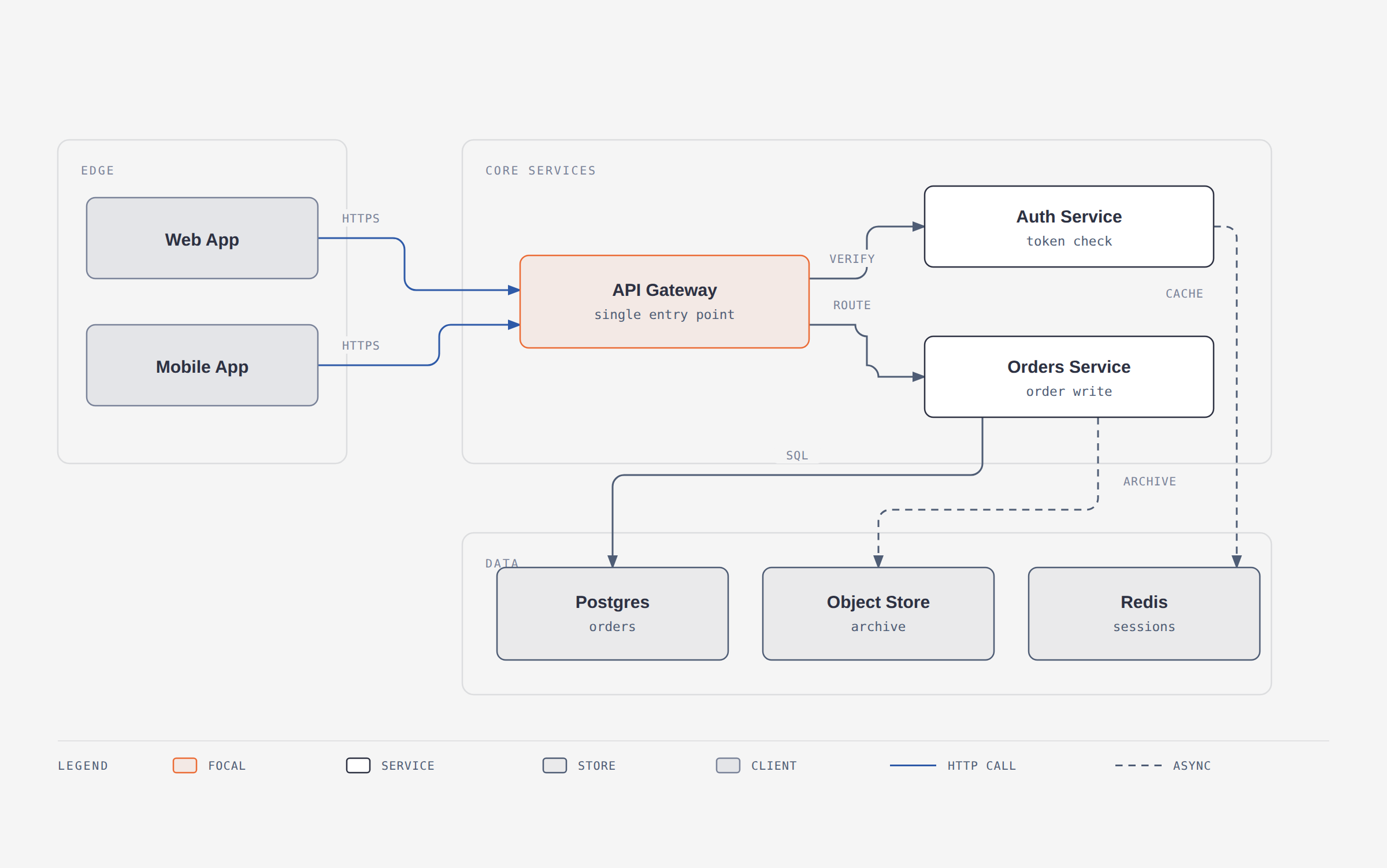
A 12-node draw.io file redrawn at balanced detail for a blog post. The source’s six pastel fills became one accent; its hand-dragged coordinates became a 4px grid.
/diagram-design:import-drawio platform.drawio
/diagram-design:import-drawio platform.drawio --size=slide-16x9 --detail=simplified --audience=executive
/diagram-design:import-drawio platform.drawio --detail=faithful --format=png --page=all
/diagram-design:import-mermaid README.md --diagram=all
/diagram-design:import-mermaid architecture.mmd --size=slide-16x9 --detail=simplified
Or just ask: “redraw this drawio file for my deck”, “make this Mermaid block editorial”, or “この Mermaid をスライド用にきれいにして”.
Reads the common containers draw.io writes — .drawio, .drawio.xml, .drawio.png (embedded diagram), and .drawio.svg — including compressed payloads that look like base64 garbage in an editor.
For Mermaid, it accepts .mmd, .mermaid, and one or more fenced mermaid blocks in Markdown. It parses text only: no rendering, JavaScript, browser, network, or followed click targets.
This README has been shortened. The full version is on GitHub. Read the original ↗
Other options in Tools & Integrations
 openclawTools & Integrations
OpenClaw installs a Gateway on your own machine and makes it the local control plane for sessions, tools, events and channel connections, so the Control UI, CLI, TUI and every connected messaging channel drive the same assistant. Models can be hosted or local, and the project expects new capabilities to arrive as plugins built on the plugin SDK rather than as changes to the core. The constraints are stated plainly in the README: it is designed for a single operator, tools run on the host for the main session unless you configure sandboxing, and DM-capable channels leave the assistant reachable by unknown senders until you approve a pairing with `openclaw pairing approve <channel> <code>`. The README tells you to read the security, exposure and sandboxing guides before connecting other users or exposing the Gateway remotely, which is a fair signal that shared or multi-user deployment is not the case it was built for.
 hermes-agentTools & Integrations
Hermes Agent is Nous Research's own agent: a terminal UI plus a single gateway process that carries the same conversation into Telegram, Discord, Slack, WhatsApp, Signal and Email, with a cron scheduler, isolated subagents, and seven terminal backends from local and Docker to Modal and Vercel Sandbox. Its distinguishing piece is a closed learning loop — the agent curates its own memory on periodic nudges, creates skills after complex tasks, and searches past sessions through FTS5 with LLM summarization — which means the state that makes it useful accumulates under `~/.hermes`, outside your version control, and needs occasional pruning. It is an assistant you run and configure rather than a library you build on: the README documents `hermes` subcommands and slash commands, not an embedding API, so it is a poor fit if you wanted an agent loop to call from your own code. Putting a shell-capable agent behind chat platforms also makes the command-approval and DM-pairing settings load-bearing rather than optional.
 n8nWorkflow
Connects hundreds of services as workflows you draw on screen — each step in the flow is a node — and increasingly puts an AI agent node inside those workflows. The licence is the thing to check first: it is source-available under the Sustainable Use License, not OSI-approved open source. Internal use and self-hosting are fine; reselling it as a hosted service is not.