
MCP Inspector
MCPサーバーに接続し、ツールやリソースの応答をエージェントより先に自分で確かめるデバッグツール
MCP Inspectorとは
開発中のMCPサーバーにInspectorを接続し、ツールの呼び出し・リソースの読み出し・プロンプトの展開を1つずつ試して、返ってくる応答を確かめるデバッグツールです。インストール不要でnpxから起動でき、画面で操作するWeb UIのほか、CIに組み込めるCLI、ターミナルで完結するTUIを同じコマンドで切り替えられます。あくまで開発時の確認ツールであり、本番運用での監視や評価はこのツールの範囲外です。
MCP Inspectorで何ができますか?
- npxから起動してサーバーにつなぐ —
npx @modelcontextprotocol/inspectorでインストールなしに起動し、stdioで立ち上げたローカルのサーバーにも、URLを指定したリモートのサーバーにも接続できます。 - ツール・リソース・プロンプトを1つずつ試す — サーバーが公開するツールを一覧し、引数をフォームに入れて呼び出し、返ってきた結果やエラーをそのまま確認できます。リソースとプロンプトも同じ要領です。
- Web UI・CLI・TUIを同じコマンドで使い分ける — 既定は画面で操作するWeb UIで、
--cliはスクリプトやCIでの自動確認に、--tuiはターミナルだけで完結させたい場面に向きます。 - OAuth保護されたサーバーにも接続する — リモートサーバーのOAuth認証フローがInspectorの中で完結するため、認証付きのサーバーも開発中にそのまま試せます。
- 接続設定をファイルで持ち回る — 接続先は
--configや--catalogのファイルでも指定でき、複数サーバーの定義を毎回入力し直さずに切り替えられます。
MCP Inspectorを選ぶ前に
- v2.2.0時点でリポジトリにライセンス全文が無く、package.jsonのMIT表記だけが根拠です。Linux Foundation移管時に複合ライセンスへ変更された経緯があり、現状は確認できる条項そのものがありません。
- v2はNode 22.19以上が必須で、v1とはコマンドの指定方法や同梱パッケージが変わっています。v1系はセキュリティ修正のみの提供です。
スター推移
8月17日〜8月28日 · +99
よくある質問
MCP Inspectorは商用利用できますか?
MCP InspectorはMITライセンスで公開されています。OSI承認のオープンソースライセンスで、商用利用が認められています。
MCP Inspectorはどの形で使えますか?
MCP Inspectorはローカル実行の形で利用できます。
ドキュメント
modelcontextprotocol/inspector のREADMEより転載(UNKNOWN — read the LICENSE file)。 原文を読む ↗
MCP Inspector
A developer tool for inspecting Model Context Protocol (MCP) servers. It ships as a single package, @modelcontextprotocol/inspector, that provides three ways to inspect a server:
- Web — a Vite + React + Mantine single-page app with a Node backend.
- CLI — a scriptable command-line client for automation, CI, and fast agent feedback loops.
- TUI — an interactive terminal UI built with Ink.
All three run through one global mcp-inspector binary:
npx @modelcontextprotocol/inspector          # web UI (default)
npx @modelcontextprotocol/inspector --cli    # CLI
npx @modelcontextprotocol/inspector --tui    # TUI
Upgrading from v1? Read the v1 → v2 migration guide — CLI flags, the new
--configvs.--catalogsplit, the Node engine bump, and what no longer ships.
Repo status. This is the v2 line of the Inspector. Active development happens on
v2/main(the develop branch — all v2 PRs target it), which is merged intomainat milestone releases;mainis the default branch and holds the latest released v2, published to the npmlatesttag. The legacy v1 line lives onv1/main— security fixes only, published straight from that branch to the npmv1-latesttag (npx @modelcontextprotocol/inspector@v1-latest). SeeAGENTS.mdfor branch/board conventions.
Project layout
v2 is not an npm workspace. Each client under clients/* keeps its own package.json and node_modules; shared code lives in core/ and is consumed via a @inspector/core build-time alias (no package.json of its own). A single npm install at the root cascades installs into every client (see Setup).
inspector/
├── clients/
│   ├── web/          # Web client (Vite + React + Mantine). src/ = browser app; server/ = Node dev/prod backend
│   ├── cli/          # CLI client (tsup bundle, @inspector/core alias)
│   ├── tui/          # TUI client (Ink + React, tsup bundle)
│   └── launcher/     # Shared launcher — provides the `mcp-inspector` bin, dispatches to web/cli/tui
├── core/             # Shared code consumed via the `@inspector/core` alias (no package.json)
│   ├── auth/         # OAuth: providers, discovery, storage, mid-session recovery (browser/node/remote backends)
│   ├── client/       # Install-level client config (`client.json`): browser-safe parse/validate + Node load/save, remote backend, secrets
│   ├── json/         # JSON + parameter/argument conversion utilities
│   ├── logging/      # Silent pino logger singleton
│   ├── mcp/          # InspectorClient runtime, state stores, transports, config import
│   ├── node/         # Node-only shared helpers: version reader, hostUrl (host normalize/canonicalize + all-interfaces/loopback detection)
│   ├── react/        # React hooks over the state stores
│   └── storage/      # File I/O helpers for the OAuth persist backends
├── test-servers/     # Composable MCP test servers + fixtures used by integration tests
├── scripts/          # Root build/verify tooling (install cascade, smokes, verify-build-gate, verify-format-coverage, verify-dep-lockstep, pack:verify)
├── docs/             # Task-oriented guides (v1→v2 migration, server configuration, MCP App review, launcher/config plan)
├── specification/    # Design/build specifications
├── AGENTS.md         # Contribution rules for agents AND humans (see below)
└── README.md         # You are here
Each client has its own README with client-specific detail: web · cli · tui · launcher.
Task-oriented guides live under docs/:
- Migrating from v1 to v2 — the v1 → v2 map: CLI flag mapping,
--configvs.--catalogsemantics with before/after examples, the Node engine bump (>=22.7.5→>=22.19.0), env-var renames, and the sub-packages that no longer ship. - MCP server configuration — which server(s) the Inspector connects to:
--catalogvs.--config, ad-hoc targets, the--separator, the file format and its Inspector-specific per-server fields. Shared by all three clients; the cli and tui READMEs delegate their server-options sections to it. - Reviewing an MCP App — the CLI-first → one-shot-web recipe for automated App-tool review:
--app-infoprobe → deep-link navigate → rendered widget, plus OAuth handoff and proxy support. - Launcher and config consolidation — why the launcher runs a client in-process rather than spawning it, and how the shared config processor fits in.
Setup
Requires Node >=22.19.0.
npm install # root install; postinstall cascades into every client- Fresh clone: run
npm installat the repo root. - After a pull that changes a client’s dependencies: re-run
npm installat the root to re-sync every client.
The cascade (scripts/install-clients.mjs) is dev-only — it exits early when the package is installed as a dependency, and the published tarball ships only each client’s build/, so end users are unaffected. Set INSPECTOR_SKIP_CLIENT_INSTALL=1 to skip it.
Where a dependency is declared. The MCP SDK packages (@modelcontextprotocol/client, core, server, server-legacy, ext-apps) live in the root package.json only — never in a client’s. Node resolution walks up, so the root install is on every client’s chain, and the root manifest is already what the published tarball resolves against. Declaring them per client installs a second copy that can drift from the root’s, which is how two versions of ext-apps (and of the transitive v1 @modelcontextprotocol/sdk) ended up in the tree before #1970 — and a second copy of client/core is the failure vitest.shared.mts carries a dedupe workaround for. The same root-only placement holds for anything reached solely through root-owned code with no manifest of its own (test-servers/src, core/), and vitest.shared.mts aliases those to the repo root — express and yaml, both reached through test-servers/src, are the two today. Whether such a package is a dependency or a devDependency follows from who consumes it at runtime, not from where it is declared: anything core/ imports at runtime must be a root dependency, because the client builds externalize npm packages and a published install resolves them from the root manifest, where devDependencies are absent. express is test-only and is a devDependency; yaml currently sits in dependencies.
Running during development
For day-to-day web iteration, run Vite directly from the web client (fast HMR, no launcher build needed):
cd clients/web && npm run devThe launcher-driven scripts below run the built launcher, so build first (npm run build):
npm run web        # prod web launcher against clients/web/dist
npm run web:dev    # web launcher in --dev mode (Vite)
The @inspector/core shared package
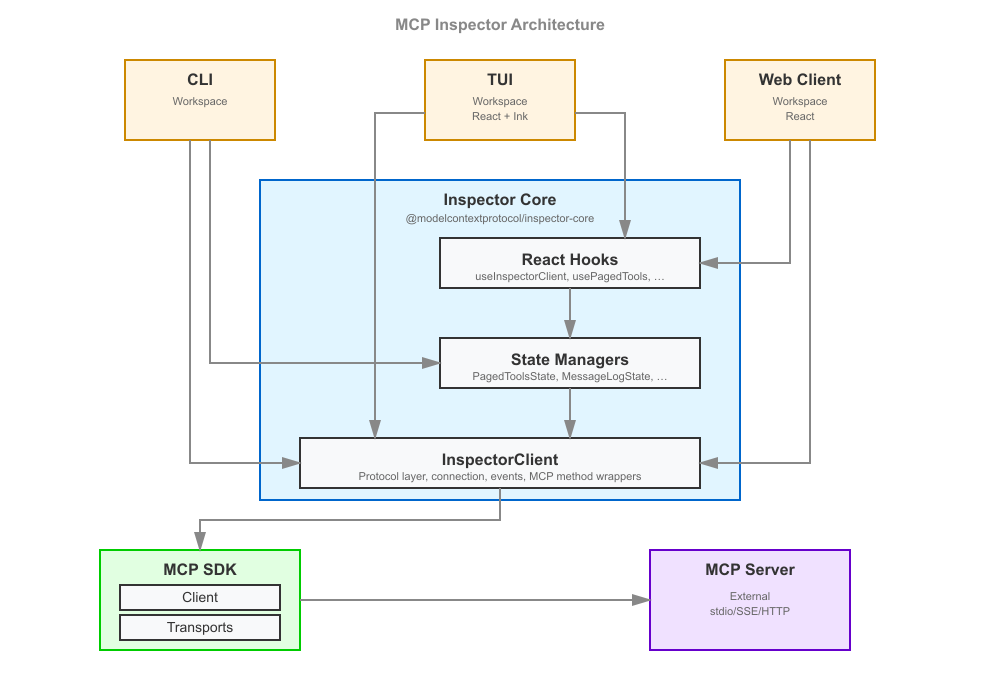
core/ holds the logic shared by all three clients so that web, CLI, and TUI behave identically. Its entry point is the InspectorClient class (core/mcp/), which owns the connection to an MCP server, the request/response lifecycle, and a set of state stores; core/react/ exposes React hooks over those stores that both the web and TUI (Ink) React trees consume. OAuth (core/auth/) is factored into isomorphic logic plus browser/node/remote backends so the same flows work in the browser, in Node, and against a remote backend.
core/ intentionally has no package.json — it is not published on its own. Each client bundles it in via a @inspector/core alias:
- CLI / TUI:
esbuildOptions.aliasin theirtsup.config.tsmaps@inspector/core→ the repocore/directory, andnoExternal: [/^@inspector\/core/]inlines it into the bundle. - Web: the same alias in
clients/web/vite.config.tsfor the browser app and the Node backend runner.
Publishing core/ as its own package (e.g. for third parties to build on) is deliberately deferred — see issue #1636.
Web client: “dumb components” + Storybook
The v2 web client is built from presentational (“dumb”) components — they accept data and callbacks as props and contain only display logic, with no direct data fetching or client state. State comes from the @inspector/core hooks, wired in near the top of the tree. This keeps components isolated, testable, and documentable.
That approach is what makes Storybook first-class here: every screen and element component has a *.stories.tsx file (96+ stories) that renders it against fixture props. Storybook play functions double as interaction tests, run headless in CI (npm run ci:storybook, Chromium via Playwright).
Styling follows a strict Mantine-first convention (theme variants and component props over CSS classes, --inspector-* CSS custom properties over raw color literals). The full rules live in AGENTS.md under React instructions — read them before touching web UI. Element components live in clients/web/src/components/elements/; theme variants in clients/web/src/theme/.
Test servers
test-servers/ provides composable MCP servers used by the integration and smoke suites, so tests exercise a real server over a real transport instead of mocks. A server is assembled from presets (fixture factories in test-servers/src/preset-registry.ts — tools, resources, prompts, tasks, elicitation, sampling, OAuth, …) and can be driven two ways:
- In-process — import the factories (
createTestServerHttp,createEchoTool, …) and run the server inside the test’s event loop (used by the HTTP integration paths). - As a subprocess —
test-servers/build/test-server-stdio.jsis spawned as a real stdio child (used by the CLI smoke and stdio integration tests).
Configure a server declaratively with a JSON config (see test-servers/configs/*.json) selecting presets, then load it via --config. Because the servers are spawned as real subprocesses, the build output must exist first:
npm run test-servers:build # (from clients/web) → tsc -p test-servers, emits test-servers/build/The Vite alias @modelcontextprotocol/inspector-test-server (in clients/web/vite.config.ts) points at test-servers/build/index.js so getTestMcpServerPath() resolves to a real .js path.
Serving the modern protocol era
A streamable-HTTP server can also serve the modern (2026-07-28) protocol era via the SDK’s createMcpHandler:
- Set
transport.modernin the JSON config —truefor dual-era stateless serving, or{ "legacy": "reject" }for modern-only strict. - Or pass
modernon theServerConfigfor an in-processcreateTestServerHttp.
This is what lets an Inspector connection negotiating protocolEra: "auto" | "modern" reach the modern leg (populated server/discover, sessionless). See test-servers/configs/modern-http.json.
Showcase configs
Each config below is a ready-made server for exercising one feature by hand. Load one with --config, and unless noted, connect with Protocol Era = Modern.
| Config | Demonstrates | Issue |
|---|---|---|
mcp-app-http.json (legacy era) | An MCP App (UI resource + app tool) in the Apps tab | #1859 |
modern-mrtr-http.json | A single MRTR round-trip | — |
mrtr-showcase-http.json | Every MRTR preset in one server | — |
modern-network-http.json | Network tab: Mcp-* headers + error taxonomy | #1628 |
xmcpheader-modern-http.json | Tools tab: x-mcp-header mirroring and exclusions | #1632 |
pagination-http.json | Page-by-page list fetching | #1721 |
structured-output-http.json | Tools tab: a result’s structuredContent section | #1908 |
duplicate-tool-names-http.json | A tools/list that repeats a tool name | #1957 |
advertised-extensions-http.json | Tool registration gated on advertised extensions | #1739 |
logging-{legacy,modern}-http.json | Logging, both eras | #1629 |
subscriptions-{legacy,modern}-http.json | Resource subscriptions, both eras | #1630 |
tasks-{legacy,modern}-http.json | Tasks, both eras | #1631 |
MCP Apps
mcp-app-http.json serves the mcp_app_demo tool (_meta.ui.resourceUri) alongside its mcp_app_demo_widget UI resource, so the Apps tab has a real App to render. It is a plain streamable-HTTP server — connect with the default (legacy) protocol era, not Modern.
Open the Apps tab, select mcp_app_demo, give it a title and click Open App: the widget renders inside the sandbox iframe and exercises the host-side UI protocol surface — host-context render, size-changed, ui/message, and a log line into the App logs panel. Because the widget is served through the sandbox proxy page, this config is also what reproduces #1859 (a missing clients/web/static/sandbox_proxy.html surfaces here as a “Sandbox not loaded” message in place of the widget) — a failure that only ever appeared in an installed package, never in the repo.
For the scripted version of the same flow (--app-info probe → deep link → rendered widget), see Reviewing an MCP App.
MRTR
modern-mrtr-http.json serves the mrtr_confirm tool (preset mrtr_confirm, createMrtrTool) over the modern leg. Its handler returns inputRequired(...) embedding a form elicitation, so invoking it produces a real round-trip: input_required → the client fulfils the embedded elicitation and retries with a new id → complete.
The Inspector drives MRTR manually (inputRequired: { autoFulfill: false }), so the embedded elicitation pauses at the pending-request modal (tagged “input_required”) for you to answer, then the retry completes. Useful for eyeballing both that pending-request UX and the Protocol view’s MRTR conversation grouping.
mrtr-showcase-http.json bundles every MRTR preset in one server:
| Preset | Behavior |
|---|---|
mrtr_confirm | Single round |
mrtr_two_step | Two elicitation rounds via requestState |
mrtr_sample | Embedded sampling → the Sampling panel |
mrtr_roots | Embedded roots/list, auto-answered silently from configured roots (no modal) |
mrtr_edge | An inputRequests-only round, then a requestState-only round |
mrtr_loop | Never completes → trips the MRTR_MAX_ROUNDS bound |
The legacy
collect_elicitationpreset callsserver.elicitInput, which errors on the 2026-07-28 leg — server→client requests aren’t allowed there. MRTR is the modern replacement.
Network tab — standardized headers and error taxonomy
modern-network-http.json covers SEP-2243 / SEP-2575. It serves a get_weather tool whose city argument carries an x-mcp-header: "City" annotation, so a modern client mirrors it to Mcp-Param-City.
It also serves four trigger_* tools that the modern leg’s spec-error injector (transport.modern.injectSpecErrors: true) answers with a real HTTP status plus JSON-RPC error body:
| Tool | Response |
|---|---|
trigger_header_mismatch | 400 / -32020 |
trigger_missing_capability | 400 / -32021 |
trigger_unsupported_version | 400 / -32022 (with data.supported) |
trigger_method_not_found | 404 / -32601 |
Open the Network tab to see the mirrored Mcp-* headers highlighted, sentinel values decoded, and each error rendered distinctly.
Mcp-Param-*mirroring is built by the Inspector, not the SDK. The SDK only mirrors insideclient.callTool(), and skips it in the browser (detectProbeEnvironment() !== "browser"). The Inspector routestools/callthroughclient.request()to drive MRTR manually, so it builds the mirrored headers itself (#1846) — on every client, web included, since the web client’s upstream request is issued by the Node backend rather than the browser. Soget_weatheris callable from web, CLI, and TUI alike, in both the plain and “Run as task” forms.
x-mcp-header in the Tools tab
xmcpheader-modern-http.json serves:
echo— plain tool.get_weather— a validx-mcp-header: "City"annotation on itscityargument.invalid_header_tool— an annotation using the header name"Bad Header". The space makes it an invalid RFC 9110 token, so the whole tool definition is invalid.trigger_invalid_params— answered with a real-32602 Invalid paramserror whose message is not about a missing tool.
Open the Tools tab: get_weather’s detail panel shows a “Mirrored request headers (SEP-2243)” section (city → Mcp-Param-City), and invalid_header_tool appears struck-through under an “Excluded (SEP-2243)” divider with the reason on hover. A conforming Streamable HTTP client MUST drop it from tools/list; the Inspector surfaces why.
Under SDK v2 a tools/call rejecting with -32602 renders as a distinct error panel rather than an isError result — headed “Unknown Tool” when the message names a missing tool, or “Invalid Parameters” otherwise (run trigger_invalid_params).
Page-by-page fetching
pagination-http.json serves 12 tools, 12 resources, and 12 prompts (presets numbered_tools / numbered_resources / numbered_prompts, count: 12) with a maxPageSize of 4 each, so every list paginates into three pages.
Turn on “Fetch Lists One Page at a Time” (Server Settings — the paginatedLists setting, or the Paginated switch in a list sidebar) and the lists load page 1 only (4 items) with a Load next page control and an N pages loaded status. Each click fetches the next 4 and appends them; Refresh resets to page 1. With the switch off (the default), the same lists auto-aggregate all three pages on connect.
Structured output
structured-output-http.json serves list_items (nested structuredContent — objects inside arrays inside an object, the shape from #1908), get_temp (a flat three-key payload), and echo (no outputSchema at all). It is a plain streamable-HTTP server — connect with the default (legacy) protocol era.
Run list_items from the Tools tab: the result panel shows the content[] text summary (“Found 2 items.”) and a collapsible Structured Output section rendering the schema-validated payload as pretty-printed, copyable JSON. That section is what v2 was dropping — a tool declaring an outputSchema returns its real data there, and the text block usually only summarizes it. Run echo to confirm the section is absent when a result carries no structuredContent.
Duplicate tool names
duplicate-tool-names-http.json serves get_weather, get_temp, echo, and add, then repeats get_weather and echo at the end of tools/list with the same name and a (duplicate) title (duplicateToolNames). No preset can produce this shape — the SDK’s registerTool rejects a repeated name — but a real server can and does, and the Inspector has to render it faithfully.
Connect (default legacy era), open the Tools tab, and type get into Search tools: the list must narrow to exactly the three get_* rows. On the broken build it kept a stale echo row, because the sidebar keyed rows by tool.name alone and the colliding keys orphaned a child during reconciliation (#1957).
The duplicated copies are appended rather than placed beside their twin on purpose. React matches a leading run of same-key children first, so a head-adjacent duplicate happens to line up and the defect hides; separating the pair is what makes it observable — and it is also the realistic shape, two tool sources concatenated.
このREADMEは一部を省略しています。全文はGitHubにあります。 原文を読む ↗
プロトコル / 相互運用の他の選択肢
 MCP Reference Serversプロトコル
Model Context Protocolを理解する最も確実な方法は、正しく実装されたサーバーを読むことであり、この集合がそれにあたります。実用的なコネクタとしても、自作する際に写経する雛形としても機能します。
 Context7プロトコル
ライブラリ名を挙げると /vercel/next.js のような識別子に解決し、続く質問には絶えず再索引されるドキュメントの断片で答えます。モデルは学習データにある古いAPIではなく、いま実在するAPIに沿ってコードを書くようになります。導入はコマンド1つかURLの貼り付けで済み、公開リポジトリなら誰でも索引への追加を申請できます。ただし把握しておくべき性格があり、OSSなのは薄いクライアント側だけで、クローラー・パーサー・索引はUpstashの非公開ホスト型サービスです。無料枠は月1,000呼び出しで、2026年8月に実際に起きたように、ホスト側が止まるとこのツールは何も答えられなくなります。
 chrome-devtools-mcpプロトコル
エージェントに実物のChromeとDevToolsの計測器を渡すMCPサーバーです。性能トレースを記録してCore Web Vitalsを要点付きで読み上げ、ネットワークリクエストとソースマップ適用済みのコンソールエラーを一覧し、Lighthouse監査も実行します。ページの操作も、他のブラウザ系MCPと同じくテキストのスナップショット経由で行えます。すでに開いている自分のChromeへプロファイルごと接続することもでき、そこが便利さと同時に注意所です。Playwright MCPとの分かれ目は対応範囲で、こちらはChrome専用。その代わりに、ブラウザ横断のサーバーには無い分析機能が手に入ります。