
MCP Inspector
Connect to an MCP server and try its tools, resources and prompts before an agent does
What is MCP Inspector?
Connects to an MCP server you are developing and lets you call its tools, read its resources and render its prompts one at a time, checking each response as it comes back. It starts from npx with nothing installed, as a web UI, a scriptable CLI for CI, or a terminal TUI — all from the same command. It is a development-time check, not production monitoring or evals.
What can you do with MCP Inspector?
- Start from npx and connect —
npx @modelcontextprotocol/inspectorstarts it with nothing installed; connect to a local server launched over stdio or to a remote one by URL. - Try tools, resources and prompts one by one — List the server's tools, fill in arguments in a form, call one, and see the exact result or error that comes back — the same for resources and prompts.
- One command, three clients — The default is the web UI;
--clisuits scripts and CI checks, and--tuistays entirely in the terminal. All three run from the samemcp-inspectorbinary. - Sign in to OAuth-protected servers — OAuth flows for remote servers run inside the Inspector, so a server behind authentication can still be exercised during development.
- Keep server definitions in a file — Connection targets can come from a
--configor--catalogfile, so a set of server definitions can be reused and switched between instead of retyped.
Before you choose MCP Inspector
- As of v2.2.0 the repository contains no licence text — only package.json's MIT field. The licence was deliberately changed to a hybrid during the Linux Foundation transition, so there are currently no terms to read.
- v2 requires Node 22.19 or newer and changes command flags and shipped packages from v1; the v1 line receives security fixes only.
Star history
17 Aug to 28 Aug · +99
Frequently asked questions
Is MCP Inspector free for commercial use?
MCP Inspector is released under the MIT licence — OSI-approved open source, which permits commercial use.
How can MCP Inspector be deployed?
MCP Inspector is available as Runs locally.
Documentation
Reproduced from the modelcontextprotocol/inspector README, published under UNKNOWN — read the LICENSE file. Read the original ↗
MCP Inspector
A developer tool for inspecting Model Context Protocol (MCP) servers. It ships as a single package, @modelcontextprotocol/inspector, that provides three ways to inspect a server:
- Web — a Vite + React + Mantine single-page app with a Node backend.
- CLI — a scriptable command-line client for automation, CI, and fast agent feedback loops.
- TUI — an interactive terminal UI built with Ink.
All three run through one global mcp-inspector binary:
npx @modelcontextprotocol/inspector          # web UI (default)
npx @modelcontextprotocol/inspector --cli    # CLI
npx @modelcontextprotocol/inspector --tui    # TUI
Upgrading from v1? Read the v1 → v2 migration guide — CLI flags, the new
--configvs.--catalogsplit, the Node engine bump, and what no longer ships.
Repo status. This is the v2 line of the Inspector. Active development happens on
v2/main(the develop branch — all v2 PRs target it), which is merged intomainat milestone releases;mainis the default branch and holds the latest released v2, published to the npmlatesttag. The legacy v1 line lives onv1/main— security fixes only, published straight from that branch to the npmv1-latesttag (npx @modelcontextprotocol/inspector@v1-latest). SeeAGENTS.mdfor branch/board conventions.
Project layout
v2 is not an npm workspace. Each client under clients/* keeps its own package.json and node_modules; shared code lives in core/ and is consumed via a @inspector/core build-time alias (no package.json of its own). A single npm install at the root cascades installs into every client (see Setup).
inspector/
├── clients/
│   ├── web/          # Web client (Vite + React + Mantine). src/ = browser app; server/ = Node dev/prod backend
│   ├── cli/          # CLI client (tsup bundle, @inspector/core alias)
│   ├── tui/          # TUI client (Ink + React, tsup bundle)
│   └── launcher/     # Shared launcher — provides the `mcp-inspector` bin, dispatches to web/cli/tui
├── core/             # Shared code consumed via the `@inspector/core` alias (no package.json)
│   ├── auth/         # OAuth: providers, discovery, storage, mid-session recovery (browser/node/remote backends)
│   ├── client/       # Install-level client config (`client.json`): browser-safe parse/validate + Node load/save, remote backend, secrets
│   ├── json/         # JSON + parameter/argument conversion utilities
│   ├── logging/      # Silent pino logger singleton
│   ├── mcp/          # InspectorClient runtime, state stores, transports, config import
│   ├── node/         # Node-only shared helpers: version reader, hostUrl (host normalize/canonicalize + all-interfaces/loopback detection)
│   ├── react/        # React hooks over the state stores
│   └── storage/      # File I/O helpers for the OAuth persist backends
├── test-servers/     # Composable MCP test servers + fixtures used by integration tests
├── scripts/          # Root build/verify tooling (install cascade, smokes, verify-build-gate, verify-format-coverage, verify-dep-lockstep, pack:verify)
├── docs/             # Task-oriented guides (v1→v2 migration, server configuration, MCP App review, launcher/config plan)
├── specification/    # Design/build specifications
├── AGENTS.md         # Contribution rules for agents AND humans (see below)
└── README.md         # You are here
Each client has its own README with client-specific detail: web · cli · tui · launcher.
Task-oriented guides live under docs/:
- Migrating from v1 to v2 — the v1 → v2 map: CLI flag mapping,
--configvs.--catalogsemantics with before/after examples, the Node engine bump (>=22.7.5→>=22.19.0), env-var renames, and the sub-packages that no longer ship. - MCP server configuration — which server(s) the Inspector connects to:
--catalogvs.--config, ad-hoc targets, the--separator, the file format and its Inspector-specific per-server fields. Shared by all three clients; the cli and tui READMEs delegate their server-options sections to it. - Reviewing an MCP App — the CLI-first → one-shot-web recipe for automated App-tool review:
--app-infoprobe → deep-link navigate → rendered widget, plus OAuth handoff and proxy support. - Launcher and config consolidation — why the launcher runs a client in-process rather than spawning it, and how the shared config processor fits in.
Setup
Requires Node >=22.19.0.
npm install # root install; postinstall cascades into every client- Fresh clone: run
npm installat the repo root. - After a pull that changes a client’s dependencies: re-run
npm installat the root to re-sync every client.
The cascade (scripts/install-clients.mjs) is dev-only — it exits early when the package is installed as a dependency, and the published tarball ships only each client’s build/, so end users are unaffected. Set INSPECTOR_SKIP_CLIENT_INSTALL=1 to skip it.
Where a dependency is declared. The MCP SDK packages (@modelcontextprotocol/client, core, server, server-legacy, ext-apps) live in the root package.json only — never in a client’s. Node resolution walks up, so the root install is on every client’s chain, and the root manifest is already what the published tarball resolves against. Declaring them per client installs a second copy that can drift from the root’s, which is how two versions of ext-apps (and of the transitive v1 @modelcontextprotocol/sdk) ended up in the tree before #1970 — and a second copy of client/core is the failure vitest.shared.mts carries a dedupe workaround for. The same root-only placement holds for anything reached solely through root-owned code with no manifest of its own (test-servers/src, core/), and vitest.shared.mts aliases those to the repo root — express and yaml, both reached through test-servers/src, are the two today. Whether such a package is a dependency or a devDependency follows from who consumes it at runtime, not from where it is declared: anything core/ imports at runtime must be a root dependency, because the client builds externalize npm packages and a published install resolves them from the root manifest, where devDependencies are absent. express is test-only and is a devDependency; yaml currently sits in dependencies.
Running during development
For day-to-day web iteration, run Vite directly from the web client (fast HMR, no launcher build needed):
cd clients/web && npm run devThe launcher-driven scripts below run the built launcher, so build first (npm run build):
npm run web        # prod web launcher against clients/web/dist
npm run web:dev    # web launcher in --dev mode (Vite)
The @inspector/core shared package
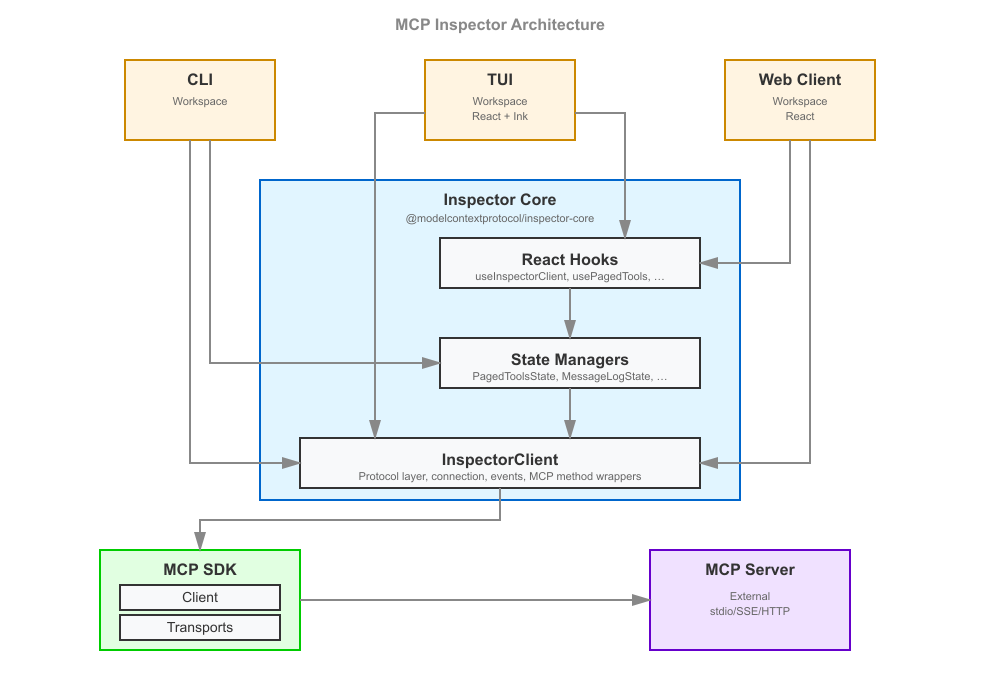
core/ holds the logic shared by all three clients so that web, CLI, and TUI behave identically. Its entry point is the InspectorClient class (core/mcp/), which owns the connection to an MCP server, the request/response lifecycle, and a set of state stores; core/react/ exposes React hooks over those stores that both the web and TUI (Ink) React trees consume. OAuth (core/auth/) is factored into isomorphic logic plus browser/node/remote backends so the same flows work in the browser, in Node, and against a remote backend.
core/ intentionally has no package.json — it is not published on its own. Each client bundles it in via a @inspector/core alias:
- CLI / TUI:
esbuildOptions.aliasin theirtsup.config.tsmaps@inspector/core→ the repocore/directory, andnoExternal: [/^@inspector\/core/]inlines it into the bundle. - Web: the same alias in
clients/web/vite.config.tsfor the browser app and the Node backend runner.
Publishing core/ as its own package (e.g. for third parties to build on) is deliberately deferred — see issue #1636.
Web client: “dumb components” + Storybook
The v2 web client is built from presentational (“dumb”) components — they accept data and callbacks as props and contain only display logic, with no direct data fetching or client state. State comes from the @inspector/core hooks, wired in near the top of the tree. This keeps components isolated, testable, and documentable.
That approach is what makes Storybook first-class here: every screen and element component has a *.stories.tsx file (96+ stories) that renders it against fixture props. Storybook play functions double as interaction tests, run headless in CI (npm run ci:storybook, Chromium via Playwright).
Styling follows a strict Mantine-first convention (theme variants and component props over CSS classes, --inspector-* CSS custom properties over raw color literals). The full rules live in AGENTS.md under React instructions — read them before touching web UI. Element components live in clients/web/src/components/elements/; theme variants in clients/web/src/theme/.
Test servers
test-servers/ provides composable MCP servers used by the integration and smoke suites, so tests exercise a real server over a real transport instead of mocks. A server is assembled from presets (fixture factories in test-servers/src/preset-registry.ts — tools, resources, prompts, tasks, elicitation, sampling, OAuth, …) and can be driven two ways:
- In-process — import the factories (
createTestServerHttp,createEchoTool, …) and run the server inside the test’s event loop (used by the HTTP integration paths). - As a subprocess —
test-servers/build/test-server-stdio.jsis spawned as a real stdio child (used by the CLI smoke and stdio integration tests).
Configure a server declaratively with a JSON config (see test-servers/configs/*.json) selecting presets, then load it via --config. Because the servers are spawned as real subprocesses, the build output must exist first:
npm run test-servers:build # (from clients/web) → tsc -p test-servers, emits test-servers/build/The Vite alias @modelcontextprotocol/inspector-test-server (in clients/web/vite.config.ts) points at test-servers/build/index.js so getTestMcpServerPath() resolves to a real .js path.
Serving the modern protocol era
A streamable-HTTP server can also serve the modern (2026-07-28) protocol era via the SDK’s createMcpHandler:
- Set
transport.modernin the JSON config —truefor dual-era stateless serving, or{ "legacy": "reject" }for modern-only strict. - Or pass
modernon theServerConfigfor an in-processcreateTestServerHttp.
This is what lets an Inspector connection negotiating protocolEra: "auto" | "modern" reach the modern leg (populated server/discover, sessionless). See test-servers/configs/modern-http.json.
Showcase configs
Each config below is a ready-made server for exercising one feature by hand. Load one with --config, and unless noted, connect with Protocol Era = Modern.
| Config | Demonstrates | Issue |
|---|---|---|
mcp-app-http.json (legacy era) | An MCP App (UI resource + app tool) in the Apps tab | #1859 |
modern-mrtr-http.json | A single MRTR round-trip | — |
mrtr-showcase-http.json | Every MRTR preset in one server | — |
modern-network-http.json | Network tab: Mcp-* headers + error taxonomy | #1628 |
xmcpheader-modern-http.json | Tools tab: x-mcp-header mirroring and exclusions | #1632 |
pagination-http.json | Page-by-page list fetching | #1721 |
structured-output-http.json | Tools tab: a result’s structuredContent section | #1908 |
duplicate-tool-names-http.json | A tools/list that repeats a tool name | #1957 |
advertised-extensions-http.json | Tool registration gated on advertised extensions | #1739 |
logging-{legacy,modern}-http.json | Logging, both eras | #1629 |
subscriptions-{legacy,modern}-http.json | Resource subscriptions, both eras | #1630 |
tasks-{legacy,modern}-http.json | Tasks, both eras | #1631 |
MCP Apps
mcp-app-http.json serves the mcp_app_demo tool (_meta.ui.resourceUri) alongside its mcp_app_demo_widget UI resource, so the Apps tab has a real App to render. It is a plain streamable-HTTP server — connect with the default (legacy) protocol era, not Modern.
Open the Apps tab, select mcp_app_demo, give it a title and click Open App: the widget renders inside the sandbox iframe and exercises the host-side UI protocol surface — host-context render, size-changed, ui/message, and a log line into the App logs panel. Because the widget is served through the sandbox proxy page, this config is also what reproduces #1859 (a missing clients/web/static/sandbox_proxy.html surfaces here as a “Sandbox not loaded” message in place of the widget) — a failure that only ever appeared in an installed package, never in the repo.
For the scripted version of the same flow (--app-info probe → deep link → rendered widget), see Reviewing an MCP App.
MRTR
modern-mrtr-http.json serves the mrtr_confirm tool (preset mrtr_confirm, createMrtrTool) over the modern leg. Its handler returns inputRequired(...) embedding a form elicitation, so invoking it produces a real round-trip: input_required → the client fulfils the embedded elicitation and retries with a new id → complete.
The Inspector drives MRTR manually (inputRequired: { autoFulfill: false }), so the embedded elicitation pauses at the pending-request modal (tagged “input_required”) for you to answer, then the retry completes. Useful for eyeballing both that pending-request UX and the Protocol view’s MRTR conversation grouping.
mrtr-showcase-http.json bundles every MRTR preset in one server:
| Preset | Behavior |
|---|---|
mrtr_confirm | Single round |
mrtr_two_step | Two elicitation rounds via requestState |
mrtr_sample | Embedded sampling → the Sampling panel |
mrtr_roots | Embedded roots/list, auto-answered silently from configured roots (no modal) |
mrtr_edge | An inputRequests-only round, then a requestState-only round |
mrtr_loop | Never completes → trips the MRTR_MAX_ROUNDS bound |
The legacy
collect_elicitationpreset callsserver.elicitInput, which errors on the 2026-07-28 leg — server→client requests aren’t allowed there. MRTR is the modern replacement.
Network tab — standardized headers and error taxonomy
modern-network-http.json covers SEP-2243 / SEP-2575. It serves a get_weather tool whose city argument carries an x-mcp-header: "City" annotation, so a modern client mirrors it to Mcp-Param-City.
It also serves four trigger_* tools that the modern leg’s spec-error injector (transport.modern.injectSpecErrors: true) answers with a real HTTP status plus JSON-RPC error body:
| Tool | Response |
|---|---|
trigger_header_mismatch | 400 / -32020 |
trigger_missing_capability | 400 / -32021 |
trigger_unsupported_version | 400 / -32022 (with data.supported) |
trigger_method_not_found | 404 / -32601 |
Open the Network tab to see the mirrored Mcp-* headers highlighted, sentinel values decoded, and each error rendered distinctly.
Mcp-Param-*mirroring is built by the Inspector, not the SDK. The SDK only mirrors insideclient.callTool(), and skips it in the browser (detectProbeEnvironment() !== "browser"). The Inspector routestools/callthroughclient.request()to drive MRTR manually, so it builds the mirrored headers itself (#1846) — on every client, web included, since the web client’s upstream request is issued by the Node backend rather than the browser. Soget_weatheris callable from web, CLI, and TUI alike, in both the plain and “Run as task” forms.
x-mcp-header in the Tools tab
xmcpheader-modern-http.json serves:
echo— plain tool.get_weather— a validx-mcp-header: "City"annotation on itscityargument.invalid_header_tool— an annotation using the header name"Bad Header". The space makes it an invalid RFC 9110 token, so the whole tool definition is invalid.trigger_invalid_params— answered with a real-32602 Invalid paramserror whose message is not about a missing tool.
Open the Tools tab: get_weather’s detail panel shows a “Mirrored request headers (SEP-2243)” section (city → Mcp-Param-City), and invalid_header_tool appears struck-through under an “Excluded (SEP-2243)” divider with the reason on hover. A conforming Streamable HTTP client MUST drop it from tools/list; the Inspector surfaces why.
Under SDK v2 a tools/call rejecting with -32602 renders as a distinct error panel rather than an isError result — headed “Unknown Tool” when the message names a missing tool, or “Invalid Parameters” otherwise (run trigger_invalid_params).
Page-by-page fetching
pagination-http.json serves 12 tools, 12 resources, and 12 prompts (presets numbered_tools / numbered_resources / numbered_prompts, count: 12) with a maxPageSize of 4 each, so every list paginates into three pages.
Turn on “Fetch Lists One Page at a Time” (Server Settings — the paginatedLists setting, or the Paginated switch in a list sidebar) and the lists load page 1 only (4 items) with a Load next page control and an N pages loaded status. Each click fetches the next 4 and appends them; Refresh resets to page 1. With the switch off (the default), the same lists auto-aggregate all three pages on connect.
Structured output
structured-output-http.json serves list_items (nested structuredContent — objects inside arrays inside an object, the shape from #1908), get_temp (a flat three-key payload), and echo (no outputSchema at all). It is a plain streamable-HTTP server — connect with the default (legacy) protocol era.
Run list_items from the Tools tab: the result panel shows the content[] text summary (“Found 2 items.”) and a collapsible Structured Output section rendering the schema-validated payload as pretty-printed, copyable JSON. That section is what v2 was dropping — a tool declaring an outputSchema returns its real data there, and the text block usually only summarizes it. Run echo to confirm the section is absent when a result carries no structuredContent.
Duplicate tool names
duplicate-tool-names-http.json serves get_weather, get_temp, echo, and add, then repeats get_weather and echo at the end of tools/list with the same name and a (duplicate) title (duplicateToolNames). No preset can produce this shape — the SDK’s registerTool rejects a repeated name — but a real server can and does, and the Inspector has to render it faithfully.
Connect (default legacy era), open the Tools tab, and type get into Search tools: the list must narrow to exactly the three get_* rows. On the broken build it kept a stale echo row, because the sidebar keyed rows by tool.name alone and the colliding keys orphaned a child during reconciliation (#1957).
The duplicated copies are appended rather than placed beside their twin on purpose. React matches a leading run of same-key children first, so a head-adjacent duplicate happens to line up and the defect hides; separating the pair is what makes it observable — and it is also the realistic shape, two tool sources concatenated.
This README has been shortened. The full version is on GitHub. Read the original ↗
Other options in Protocols & Interop
 MCP Reference ServersProtocols
The clearest way to understand the Model Context Protocol is to read servers that implement it correctly, and this is that collection. Useful both as working connectors and as the template to copy when writing your own.
 Context7Protocols
Ask for a library by name and Context7 resolves it to an identifier like /vercel/next.js, then answers queries with version-specific snippets from a continuously re-indexed documentation corpus — so the model writes against the API that exists today rather than the one in its training data. Setup is one command or a URL pasted into any MCP client, and anyone can submit a public repository to the index. Know what you are adopting: the open-source part is a thin client, while the crawler, parser and index are Upstash's private hosted service — the free tier stops at 1,000 calls a month, and when the hosted endpoint went down for a stretch in August 2026, the tool had nothing to answer from.
 chrome-devtools-mcpProtocols
It hands an agent a live Chrome plus the instruments of DevTools: it records a performance trace and reads out Core Web Vitals with named insights, lists network requests and source-mapped console errors, runs Lighthouse audits, and still clicks and fills forms from a text snapshot of the page the way browser MCPs do. It can attach to the Chrome you already have open, profile and all — which is also where care is needed. The trade against Playwright MCP is scope: this is Chrome-only, and what that buys is analysis no cross-browser server offers.