
MetaGPT
ソフトウェア会社の職種をLLMに演じさせ、一行の要望から新規プロジェクトを起こすフレームワーク。既存コードの改修には向きません。
MetaGPTとは
`metagpt "Create a 2048 game"`と一行打つだけで、要件定義書・設計書・ソースコードが`workspace/`以下に書き出されます。ただし働く顔ぶれは入手経路で変わります。PyPIで配布されている0.8.2は製品担当・設計担当・進行担当・エンジニアの4役ですが、READMEが案内するgit cloneのmainではチームリーダーとデータアナリストが加わり、進行担当は外れています。デモの下にあるのは汎用のフレームワークで、RoleとActionを継承し、どのActionの結果に反応するかを宣言すれば、共有のEnvironmentがメッセージを配って作業順を決めます。データ分析だけならData Interpreter単体で完結します。限界もはっきりしていて、公式FAQは生成コードが500行を超えると未実装の関数が残ると認めています。
MetaGPTで何ができますか?
- 一文からプロジェクト一式が出てくる —
metagpt "Create a 2048 game"でworkspace/の下に要件定義書・設計書・ソースコードが書き出され、Pythonからはgenerate_repo()で同じことができます。設計図の画像化だけはnpm install -g @mermaid-js/mermaid-cliで入れるmmdcに投げており、未導入でも警告が出てmermaidのテキストが残るだけで処理は止まりません。描画方式はplaywrightやinkなどにも切り替えられます。 - RoleとActionを継承し、誰の結果を見るか決める —
RoleとActionを継承し、_watchでどのActionの結果に反応するかを指定します。各Roleは共有のEnvironmentを観測し、自分の成果もそこへ流すため、作業順はこの購読関係から決まります。手順を図に描いて渡す必要はありません。 - 上限金額を決めて走らせ、落ちても続きから —
Team.invest(3.0)やコマンドラインの--investment(既定は3ドル)でトークン費用の上限を決めると、積み上がった費用が上限に達した時点で例外を出して止まります。やり取りの回数は--n-round(既定は5)で別に制限できます。異常終了やCtrl-Cのときはチームの状態がファイルへ書き出され、--recover-pathで途中から再開できます。 - Data Interpreterが計画から実行まで1体でこなす — データを分析して図示するといった依頼を手順に分解し、各手順のコードを書いてJupyterのカーネル上で実行するため、変数は次の手順にも引き継がれます。エラーが出た手順は、その内容をモデルに見せたうえで最大3回まで書き直して再実行します。ソフトウェア会社の役割一式は要りません。
- 自作の関数を道具にするには3手かかる —
metagpt/tools/libsに置いた関数やクラスに@register_tool()を付けると、Google形式のdocstringがそのまま道具の仕様書になります。ただし付けるだけでは使われません。DataInterpreterのtoolsは既定が空で、空のままだと道具を選ぶ仕組み自体が作られないため、モジュールを読み込ませたうえでDataInterpreter(tools=["magic_function"])と渡します。 - 研究チームの論文実装が同梱されている —
examples/aflowは、コードとして表したワークフローの空間をモンテカルロ木探索で探り、エージェントの手順そのものを自動生成します。examples/spoは正解データなしでプロンプトを書き換え、examples/selaは同じ木探索を機械学習の自動化に当てます。いずれもソフトウェア会社のデモとは独立に動かせます。
MetaGPTを選ぶ前に
- PyPIの最新版は2025年3月の0.8.2のままで、新しい役割はmainにしかなく、そのmainも2025年7月以降の更新は3件、Linuxで実行が止まる報告も2026年8月時点で未解決でした。報告#2110
- 追加開発モードはMetaGPT自身が作ったプロジェクトが前提で、公式ガイドは構成ファイルや特定の関数の挙動に関する要望を対象外としているため、既存リポジトリへの入口にはなりません。
スター推移
8月17日〜8月28日 · +223
よくある質問
MetaGPTは商用利用できますか?
MetaGPTはMITライセンスで公開されています。OSI承認のオープンソースライセンスで、商用利用が認められています。
MetaGPTはどの形で使えますか?
MetaGPTはセルフホスト・ローカル実行の形で利用できます。
ドキュメント
FoundationAgents/MetaGPT のREADMEより転載(MIT)。 原文を読む ↗
MetaGPT: The Multi-Agent Framework
News
🚀 Mar. 10, 2025: 🎉 mgx.dev is the #1 Product of the Week on @ProductHunt! 🏆
🚀 Mar. 4, 2025: 🎉 mgx.dev is the #1 Product of the Day on @ProductHunt! 🏆
🚀 Feb. 19, 2025: Today we are officially launching our natural language programming product: MGX (MetaGPT X) - the world’s first AI agent development team. More details on Twitter.
🚀 Feb. 17, 2025: We introduced two papers: SPO and AOT, check the code!
🚀 Jan. 22, 2025: Our paper AFlow: Automating Agentic Workflow Generation accepted for oral presentation (top 1.8%) at ICLR 2025, ranking #2 in the LLM-based Agent category.
👉👉 Earlier news
Software Company as Multi-Agent System
- MetaGPT takes a one line requirement as input and outputs user stories / competitive analysis / requirements / data structures / APIs / documents, etc.
- Internally, MetaGPT includes product managers / architects / project managers / engineers. It provides the entire process of a software company along with carefully orchestrated SOPs.
Code = SOP(Team)is the core philosophy. We materialize SOP and apply it to teams composed of LLMs.
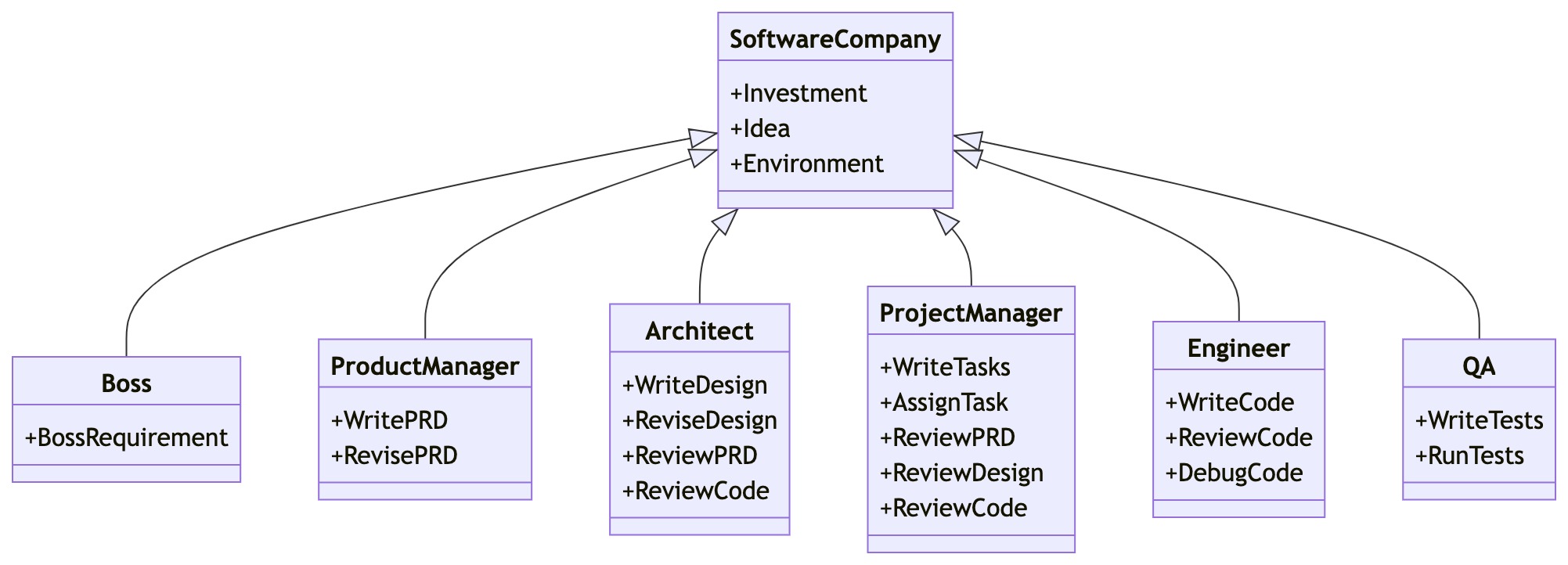
Get Started
Installation
Ensure that Python 3.9 or later, but less than 3.12, is installed on your system. You can check this by using:
python --version.
You can use conda like this:conda create -n metagpt python=3.9 && conda activate metagpt
pip install --upgrade metagpt
# or `pip install --upgrade git+https://github.com/geekan/MetaGPT.git`
# or `git clone https://github.com/geekan/MetaGPT && cd MetaGPT && pip install --upgrade -e .`
Install node and pnpm before actual use.
For detailed installation guidance, please refer to cli_install or docker_install
Configuration
You can init the config of MetaGPT by running the following command, or manually create ~/.metagpt/config2.yaml file:
# Check https://docs.deepwisdom.ai/main/en/guide/get_started/configuration.html for more details
metagpt --init-config  # it will create ~/.metagpt/config2.yaml, just modify it to your needs
You can configure ~/.metagpt/config2.yaml according to the example and doc:
llm:
  api_type: "openai"  # or azure / ollama / groq etc. Check LLMType for more options
  model: "gpt-4-turbo"  # or gpt-3.5-turbo
  base_url: "https://api.openai.com/v1"  # or forward url / other llm url
  api_key: "YOUR_API_KEY"
Usage
After installation, you can use MetaGPT at CLI
metagpt "Create a 2048 game" # this will create a repo in ./workspaceor use it as library
from metagpt.software_company import generate_repo
from metagpt.utils.project_repo import ProjectRepo

repo: ProjectRepo = generate_repo("Create a 2048 game")  # or ProjectRepo("<path>")
print(repo)  # it will print the repo structure with files
You can also use Data Interpreter to write code:
import asyncio
from metagpt.roles.di.data_interpreter import DataInterpreter

async def main():
    di = DataInterpreter()
    await di.run("Run data analysis on sklearn Iris dataset, include a plot")

asyncio.run(main())  # or await main() in a jupyter notebook setting
QuickStart & Demo Video
- Try it on MetaGPT Huggingface Space
- Matthew Berman: How To Install MetaGPT - Build A Startup With One Prompt!!
- Official Demo Video
https://github.com/user-attachments/assets/888cb169-78c3-4a42-9d62-9d90ed3928c9
Tutorial
- 🗒 Online Document
- 💻 Usage
- 🔎 What can MetaGPT do?
- 🛠 How to build your own agents?
- 🧑💻 Contribution
- 🔖 Use Cases
- ❓ FAQs
Support
Discord Join US
📢 Join Our Discord Channel! Looking forward to seeing you there! 🎉
Contributor form
📝 Fill out the form to become a contributor. We are looking forward to your participation!
Contact Information
If you have any questions or feedback about this project, please feel free to contact us. We highly appreciate your suggestions!
- Email: alexanderwu@deepwisdom.ai
- GitHub Issues: For more technical inquiries, you can also create a new issue in our GitHub repository.
We will respond to all questions within 2-3 business days.
マルチエージェント制御の他の選択肢
 AutoGPTワークフロー
ここでのエージェントは、外部サービスの呼び出し・データ変換・モデルへの問い合わせ・条件分岐といった単位である「ブロック」を繋いだグラフです。コードではなくキャンバス上で組み立て、任意のタイミング、スケジュール、あるいはトリガーで実行します。ただし1つのリポジトリに無償の自己ホスト版と有償ホスティングの実装が同居しており、プラットフォーム側のディレクトリはPolyForm Shieldのため、利用はできても競合サービスとしての提供は禁じられています。
 DeerFlowマルチエージェント制御
2.0はWeb UIからバックエンドまでを1ポートの裏に立てる完成品アプリケーションです。リードエージェントがサブエージェントを起動し、永続メモリを持ち、ローカル・Docker・Kubernetes・E2Bのサンドボックスで作業を実行して、Markdownで定義されたスキル経由でレポート・スライド・Webページ・動画を作ります。モデルはLangChainのプロバイダ指定で配線し、検索はキー不要のDuckDuckGoを既定に6種類へ差し替え可能、TelegramやSlack、飛書などのチャットからも呼べます。導入前に知るべきことが2つあります。有名になったv1の深掘りリサーチは別ブランチに凍結されていて、いまインストールされるものではありません。そしてREADME自身が、設計はループバック限定の信頼環境向けであり、ゲートウェイの管理権限はホスト上でのコード実行と等価だと明記しています。
 AutoGenマルチエージェント制御
マルチエージェントシステムに対するMicrosoft Researchのアプローチで、専門化したエージェント間の構造化された対話から解が立ち上がります。探索的な課題や研究寄りの問題に強みがあります。採用前に確認すべき点が2つあります。メジャーバージョン間でAPIが大きく作り直されていること、そしてGitHubがリポジトリのライセンスをCC-BY-4.0と報告していることです。後者はコンテンツ向けのライセンスであり、OSI承認のソフトウェアライセンスではありません。商用利用の前にメンテナへ条件を確認してください。