
MetaGPT
Runs LLM agents as a software team that starts a project from scratch, not a helper for a codebase you already have.
What is MetaGPT?
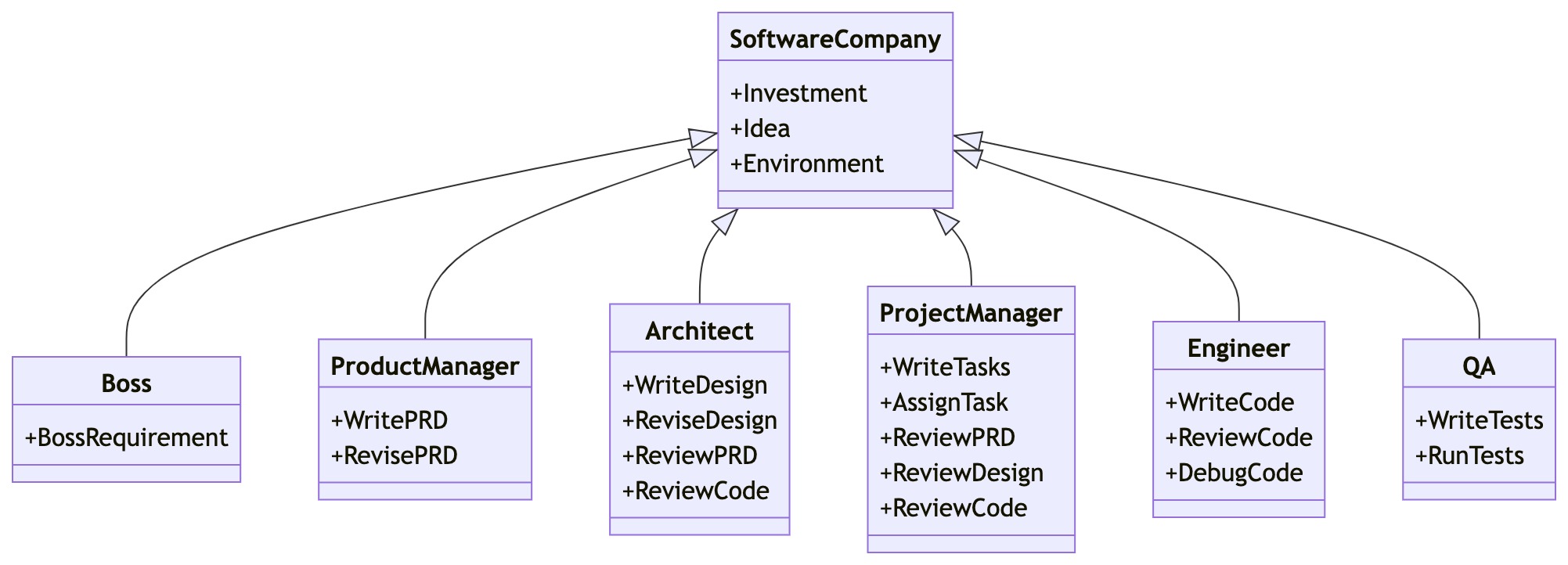
Hand MetaGPT a one-line requirement and a team of LLM roles works through it in turn, leaving a requirements document, a system design and source files in a folder under `workspace/`. Which roles show up depends on where you installed from, and the gap is not cosmetic: the published 0.8.2 package hires a product manager, an architect, a project manager and an engineer, while current main — the README's clone-and-install route — hires a team leader, a product manager, an architect, an engineer and a data analyst, with the project manager commented out. Under the demo sits a general framework: you subclass Role and Action, declare which upstream actions each role watches, and a shared Environment routes the messages that put the team in order. A separate agent, the Data Interpreter, does data work alone, planning the steps, writing Python and retrying what fails. The catch is scope — MetaGPT's own FAQ says functions start being left unimplemented past roughly 500 lines of generated code.
What can you do with MetaGPT?
- One sentence in, a project folder out —
metagpt "Create a 2048 game"fills a folder underworkspace/with the requirements document, the system design and the source files, andgenerate_repo()does the same from Python. Turning the design diagrams into pictures is a separate step that hands the diagram text tommdc, installed withnpm install -g @mermaid-js/mermaid-cli; without it you get a logged warning and the diagram source rather than a failed run, andmermaid.enginecan be switched toplaywright,pyppeteer,inkornone. - Roles, actions, and who watches whom — You subclass
RoleandAction, then call_watchto name the upstream actions a role reacts to. Every role observes a sharedEnvironmentand publishes its result back into it, so the order of work falls out of those subscriptions rather than from a graph you draw yourself. - Cap the spend, then pick the run back up —
Team.invest(3.0)— or--investment, which defaults to $3 — sets a token budget that stops the run with an error once the accumulated cost reaches it, and--n-round(default 5) separately bounds the rounds of message passing. If the run then fails or you interrupt it, the whole team is written to disk and--recover-pathpicks it up from there. - The Data Interpreter plans, writes and runs Python — Ask for an analysis with a plot and it breaks the work into a plan, writes code for each step and executes it in a live Jupyter kernel, so variables survive from one step into the next. A step that raises is rewritten and rerun up to three times with the error text put back in front of the model. None of the software-company roles need to be around it.
- Registering your own tool takes three steps, not one —
@register_tool()on a function or class undermetagpt/tools/libsturns its Google-style docstring into the schema the model reads. That alone does nothing:DataInterpreter.toolsdefaults to empty and the recommender that picks between tools is only built when it is non-empty, so you also import the module and constructDataInterpreter(tools=["magic_function"]). - The research the team publishes ships in the repo —
examples/aflowsearches a space of workflows represented as code with a Monte Carlo tree search, generating the agent workflow itself instead of you writing it;examples/sporewrites prompts with no ground-truth labels;examples/selaapplies the same tree search to automated machine learning. Each runs on its own, with no software company involved.
Before you choose MetaGPT
- PyPI still serves 0.8.2 from March 2025, so the newer roles exist only on main, which has taken three commits since July 2025 and where a reported hang that stalls the engineer on Linux was still open in August 2026.Reported in#2110
- Incremental mode expects a project MetaGPT itself created, and the guide puts requirements about architecture files or how one function should behave out of scope, so it is not a route into an existing repository.
Star history
17 Aug to 28 Aug · +223
Frequently asked questions
Is MetaGPT free for commercial use?
MetaGPT is released under the MIT licence — OSI-approved open source, which permits commercial use.
How can MetaGPT be deployed?
MetaGPT is available as Self-hosted / Runs locally.
Documentation
Reproduced from the FoundationAgents/MetaGPT README, published under MIT. Read the original ↗
MetaGPT: The Multi-Agent Framework
News
🚀 Mar. 10, 2025: 🎉 mgx.dev is the #1 Product of the Week on @ProductHunt! 🏆
🚀 Mar. 4, 2025: 🎉 mgx.dev is the #1 Product of the Day on @ProductHunt! 🏆
🚀 Feb. 19, 2025: Today we are officially launching our natural language programming product: MGX (MetaGPT X) - the world’s first AI agent development team. More details on Twitter.
🚀 Feb. 17, 2025: We introduced two papers: SPO and AOT, check the code!
🚀 Jan. 22, 2025: Our paper AFlow: Automating Agentic Workflow Generation accepted for oral presentation (top 1.8%) at ICLR 2025, ranking #2 in the LLM-based Agent category.
👉👉 Earlier news
Software Company as Multi-Agent System
- MetaGPT takes a one line requirement as input and outputs user stories / competitive analysis / requirements / data structures / APIs / documents, etc.
- Internally, MetaGPT includes product managers / architects / project managers / engineers. It provides the entire process of a software company along with carefully orchestrated SOPs.
Code = SOP(Team)is the core philosophy. We materialize SOP and apply it to teams composed of LLMs.
Get Started
Installation
Ensure that Python 3.9 or later, but less than 3.12, is installed on your system. You can check this by using:
python --version.
You can use conda like this:conda create -n metagpt python=3.9 && conda activate metagpt
pip install --upgrade metagpt
# or `pip install --upgrade git+https://github.com/geekan/MetaGPT.git`
# or `git clone https://github.com/geekan/MetaGPT && cd MetaGPT && pip install --upgrade -e .`
Install node and pnpm before actual use.
For detailed installation guidance, please refer to cli_install or docker_install
Configuration
You can init the config of MetaGPT by running the following command, or manually create ~/.metagpt/config2.yaml file:
# Check https://docs.deepwisdom.ai/main/en/guide/get_started/configuration.html for more details
metagpt --init-config  # it will create ~/.metagpt/config2.yaml, just modify it to your needs
You can configure ~/.metagpt/config2.yaml according to the example and doc:
llm:
  api_type: "openai"  # or azure / ollama / groq etc. Check LLMType for more options
  model: "gpt-4-turbo"  # or gpt-3.5-turbo
  base_url: "https://api.openai.com/v1"  # or forward url / other llm url
  api_key: "YOUR_API_KEY"
Usage
After installation, you can use MetaGPT at CLI
metagpt "Create a 2048 game" # this will create a repo in ./workspaceor use it as library
from metagpt.software_company import generate_repo
from metagpt.utils.project_repo import ProjectRepo

repo: ProjectRepo = generate_repo("Create a 2048 game")  # or ProjectRepo("<path>")
print(repo)  # it will print the repo structure with files
You can also use Data Interpreter to write code:
import asyncio
from metagpt.roles.di.data_interpreter import DataInterpreter

async def main():
    di = DataInterpreter()
    await di.run("Run data analysis on sklearn Iris dataset, include a plot")

asyncio.run(main())  # or await main() in a jupyter notebook setting
QuickStart & Demo Video
- Try it on MetaGPT Huggingface Space
- Matthew Berman: How To Install MetaGPT - Build A Startup With One Prompt!!
- Official Demo Video
https://github.com/user-attachments/assets/888cb169-78c3-4a42-9d62-9d90ed3928c9
Tutorial
- 🗒 Online Document
- 💻 Usage
- 🔎 What can MetaGPT do?
- 🛠 How to build your own agents?
- 🧑💻 Contribution
- 🔖 Use Cases
- ❓ FAQs
Support
Discord Join US
📢 Join Our Discord Channel! Looking forward to seeing you there! 🎉
Contributor form
📝 Fill out the form to become a contributor. We are looking forward to your participation!
Contact Information
If you have any questions or feedback about this project, please feel free to contact us. We highly appreciate your suggestions!
- Email: alexanderwu@deepwisdom.ai
- GitHub Issues: For more technical inquiries, you can also create a new issue in our GitHub repository.
We will respond to all questions within 2-3 business days.
Other options in Multi-Agent Orchestration
 AutoGPTWorkflow
An agent here is a graph of blocks — one block calls a service, transforms data, prompts a model or branches — assembled on a canvas rather than written in code, then run on demand, on a schedule or from a trigger. One repository holds both the free self-hosted platform and the code behind the paid hosted one, and that is the catch: everything under the platform directory is PolyForm Shield, which permits use but forbids offering it as a competing product.
 DeerFlowOrchestration
Version 2.0 is a complete application behind one port — web UI, gateway backend and all — where a lead agent spawns sub-agents, keeps persistent memory, executes work in sandboxes from local Docker to Kubernetes and E2B, and produces reports, slide decks, web pages and video through Markdown-defined skills. Models wire up through LangChain provider classes, search works keyless via DuckDuckGo and swaps for six alternatives, and the agent answers from Telegram, Slack, Feishu and other chat channels. Two facts should precede adoption: the celebrated v1 deep-research pipeline is frozen on a separate branch and is not what installs today, and the README scopes the design to loopback-only trusted use — gateway admin is equivalent to code execution on the host.
 AutoGenOrchestration
Microsoft Research's take on multi-agent systems, where progress emerges from a structured conversation between specialised agents. Strong for exploration and research-flavoured problems. Two things to check before adopting: the API was substantially reworked between major versions, and GitHub reports the repository licence as CC-BY-4.0 — a content licence, not an OSI-approved software one. Confirm the terms with the maintainers before commercial use.