
XAgent
目標を一文で渡すと、自分でサブタスクに分解し、Dockerコンテナの中で順に片づけていく自律型エージェントです。ライブラリではなく、そのまま動かすアプリケーションです。
XAgentとは
やりたいことを一文で書いて渡すと、外側のループが目標をサブタスクへ分け、内側のループがシェル・Pythonノートブック・ウェブブラウザ・ファイル編集を使って一つずつ片づけていきます。プロジェクト自身はこれを二重ループ機構と呼び、担当エージェントを振り分けるディスパッチャ、計画を立てるプランナー、実際に手を動かすアクターの三つで構成されると説明しています。道具一式は起動時に立ち上がるDockerコンテナ側にあり、作業はその中で進み、できたファイルは実行後に手元へ回収されます。ただし2023年末の実験的な公開物という性格が強く、モデル呼び出しはOpenAIの関数呼び出し形式が前提で、付属の設定ファイルは提供が終了したモデル名を指したままです。実務の道具というより、計画と実行を分ける設計を読み解くための実装例として見るのが妥当で、そのまま動かすには相応の手直しが要ります。
XAgentで何ができますか?
- 依頼は一文、手元のファイルも一緒に渡せます — 「この売上データを分析してレポートにまとめて」といった普通の書き方で依頼し、起動時のオプションで手元のファイルを添えられます。手順を先に用意しておく必要はなく、どんな順番で進めるかを考えるところからエージェントの担当です。
- 外側で計画し、内側で実行する二重ループ — 外側のループが目標からサブタスクを切り出し、内側のループが道具を使って一つずつ処理します。サブタスクの合間に計画へ戻れるので、途中で分かったことを先の手順に反映できますが、手を入れられるのは実行中のサブタスクとそれ以降だけです。分割の上限は設定ファイル側にあり、既定では深さ三段、同じ親の下に並ぶ手順は五つまでです。
- ToolServerというコンテナが道具一式を持ちます — bash・対話型のPythonノートブック・ウェブ検索と閲覧・ファイルの読み書きが、ToolServerと呼ばれる別のDockerコンテナから提供されます。bashが使えるのでライブラリの追加インストールまでその中で完結し、できたファイルは実行後に手元のフォルダへ回収されます。
- 実行のすべてが記録され、後からたどり直せます — 計画、モデルとのやり取り、呼び出した道具、コンテナ側の作業フォルダの中身までが記録として残り、設定で過去の記録を指定すれば同じ実行を再現できます。公式には機密情報を除いたので共有できると書かれていますが、コードが実際に外すのは設定ファイル内のAPIキーだけなので、渡す前に中身を確かめてください。
- 判断に迷ったら人に聞き返せます — 依頼があいまいで動きようがないときは、エージェントの側から質問を投げ、回答を受け取ってから作業を続けられます。付属の設定では無効になっているため、設定ファイルの項目かコマンドラインのオプションで有効にします。
- ブラウザ画面とコマンドラインのどちらからでも — 起動するとブラウザから使える画面が立ち上がり、計画と各ステップが流れてくる様子を追えます。同じ実行はコマンド一つでも始められ、どちらにも一歩ずつ進めるモードがあって、サブタスクに入る前で止まり、その目標を書き換えられます。
XAgentを選ぶ前に
- 設定の既定モデルは2025年6月に提供が終了したgpt-4-32kで、あらかじめ決められたGPT-4系・GPT-3.5系と自社モデル以外の名前はコード側で弾かれます。
- 開発は2024年初頭にほぼ止まり、タグ付きリリースは2023年11月のv1.0.0だけで、2026年7月にまとめて入った不具合と脆弱性の修正もリリースには反映されていません。報告#434
- 同梱の構成ファイルはツール管理側にホストのDockerソケットを渡し、道具側のコンテナを特権モードで起動し、データベースと画面ログインのパスワードも固定なので、使い捨てにできる環境が前提です。
スター推移
8月17日〜8月28日 · +8
よくある質問
XAgentは商用利用できますか?
XAgentはApache-2.0ライセンスで公開されています。OSI承認のオープンソースライセンスで、商用利用が認められています。
XAgentはどの形で使えますか?
XAgentはセルフホスト・ローカル実行の形で利用できます。
ドキュメント
OpenBMB/XAgent のREADMEより転載(Apache-2.0)。 原文を読む ↗
📖 Introduction
XAgent is an open-source experimental Large Language Model (LLM) driven autonomous agent that can automatically solve various tasks. It is designed to be a general-purpose agent that can be applied to a wide range of tasks. XAgent is still in its early stages, and we are working hard to improve it.
🏆 Our goal is to create a super-intelligent agent that can solve any given task!
We welcome diverse forms of collaborations, including full-time and part-time roles and more. If you are interested in the frontiers of agents and want to join us in realizing true autonomous agents, please contact us at xagentteam@gmail.com.
XAgent
XAgent is designed with the following features:
- Autonomy: XAgent can automatically solve various tasks without human participation.
- Safety: XAgent is designed to run safely. All actions are constrained inside a docker container. Run it anyway!
- Extensibility: XAgent is designed to be extensible. You can easily add new tools to enhance agent’s abilities and even new agents!
- GUI: XAgent provides a friendly GUI for users to interact with the agent. You can also use the command line interface to interact with the agent.
- Cooperation with Human: XAgent can collaborate with you to tackle tasks. It not only has the capability to follow your guidance in solving complex tasks on the go but it can also seek your assistance when it encounters challenges.
XAgent is composed of three parts:
- 🤖 Dispatcher is responsible for dynamically instantiating and dispatching tasks to different agents. It allows us to add new agents and improve the agents’ abilities.
- 🧐 Planner is responsible for generating and rectifying plans for tasks. It divides tasks into subtasks and generates milestones for them, allowing agents to solve tasks step by step.
- 🦾 Actor is responsible for conducting actions to achieve goals and finish subtasks. The actor utilizes various tools to solve subtasks, and it can also collaborate with humans to solve tasks.
🧰 ToolServer
ToolServer is the server that provides XAgent with powerful and safe tools to solve tasks. It is a docker container that provides a safe environment for XAgent to run. Currently, ToolServer provides the following tools:
- 📝 File Editor provides a text editing tool to write, read, and modify files.
- 📘 Python Notebook provides an interactive Python notebook that can run Python code to validate ideas, draw figures, etc.
- 🌏 Web Browser provides a web browser to search and visit webpages.
- 🖥️ Shell provides a bash shell tool that can execute any shell commands, even install programs and host services.
- 🧩 Rapid API provides a tool to retrieve APIs from Rapid API and call them, which offers a wide range of APIs for XAgent to use. See ToolBench to get more information about the Rapid API collections. You can also easily add new tools to ToolServer to enhance XAgent’s abilities.
✨ Quickstart
🛠️ Build and Setup ToolServer
ToolServer is where XAgent’s action takes place. It is a docker container that provides a safe environment for XAgent to run.
So you should install docker and docker-compose first.
Then, you need to build the ToolServer image. Construct referring to any one of the following methods:
Pull the image from docker hub by running the following command:
docker compose upBuild an image from local sources by running the following command:
docker compose build
docker compose up
This will build the image for the ToolServer and start the ToolServer’s container.
If you want to run the container in the background, please use docker compose up -d.
Refer here for detailed information about our ToolServer.
If the ToolServer is updated, you have to repull/rebuild the images:
docker compose pullOr
docker compose build🎮 Setup and Run XAgent
After setting up ToolServer, you can start to run XAgent.
- Install requirements (Require Python >= 3.10)
pip install -r requirements.txt- Configure XAgent
- You should configure XAgent in
assets/config.ymlbefore running it. - At least one OpenAI key is provided in
assets/config.yml, which is used to access OpenAI API. We highly recommend usinggpt-4-32kto run XAgent;gpt-4is also OK for most simple tasks. In any case, at least onegpt-3.5-turbo-16kAPI key should be provided as a backup model. We do not test or recommend usinggpt-3.5-turboto run XAgent due to minimal context length; you should not try to run XAgent on that. - If you want to change the config_file path for
XAgentServer, you should modify theCONFIG_FILEvalue in.envfile and restart the docker container.
- Run XAgent
python run.py --task "put your task here" --config-file "assets/config.yml"-
You can use the argument
--upload-filesto select the initial files you want to submit to XAgent. -
The local workspace for your XAgent is in
local_workspace, where you can find all the files generated by XAgent throughout the running process. -
After execution, the entire
workspaceinToolServerNodewill be copied torunning_recordsfor your convenience. -
Besides, in
running_records, you can find all the intermediate steps information, e.g., task statuses, LLM’s input-output pairs, used tools, etc. -
You can load from a record to reproduce a former run, just by setting
record_dirin config(default toNull). The record is a system-level recording tied to the code version of XAgent. All running-config、query、code execution statuses (including errors)、server behavior will be documented. -
We have removed all sensitive information (including API keys) from the record so you can safely share it with others. In the near future, we will introduce more granular sharing options highlighting the contributions of humans during execution.
- Run XAgent with GUI
The container
XAgent-Serveris started with nginx and a web server listening on port5173. You could visithttp://localhost:5173to interact with XAgent by using web UI. The default username and password areguestandxagent, respectively. Refer here for the detailed information about our GUI Demo.
🎬 Demo
Here, we also show some cases of solving tasks by XAgent:
You can check our live demo on XAgent Official Website. We also provide a video demo and showcases of using XAgent here:
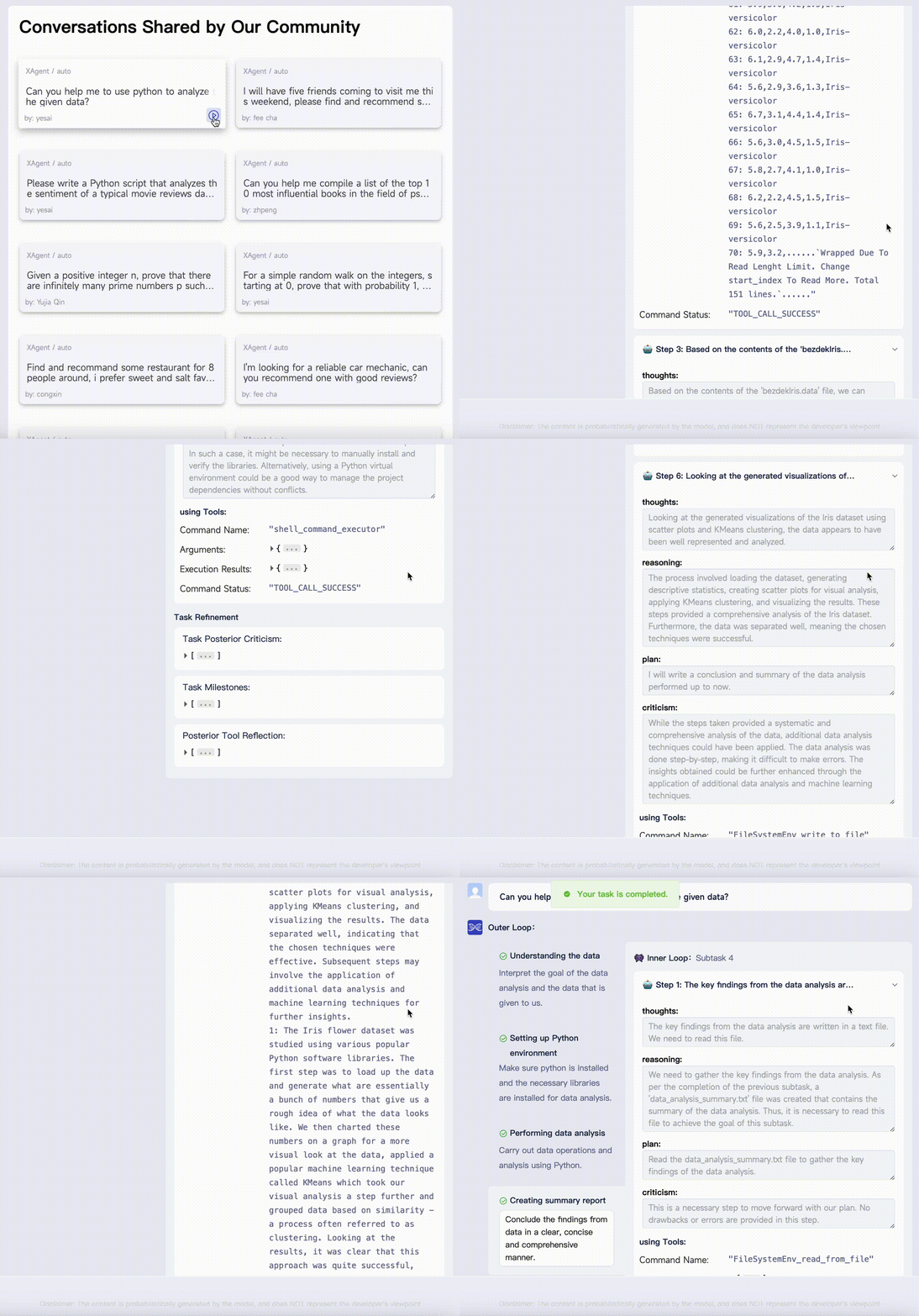
Case 1. Data Analysis: Demonstrating the Effectiveness of Dual-Loop Mechanism
We start with a case of aiding users in intricate data analysis. Here, our user submitted an iris.zip file to XAgent, seeking assistance in data analysis. XAgent swiftly broke down the task into four sub-tasks: (1) data inspection and comprehension, (2) verification of the system’s Python environment for relevant data analysis libraries, (3) crafting data analysis code for data processing and analysis, and (4) compiling an analytical report based on the Python code’s execution results.
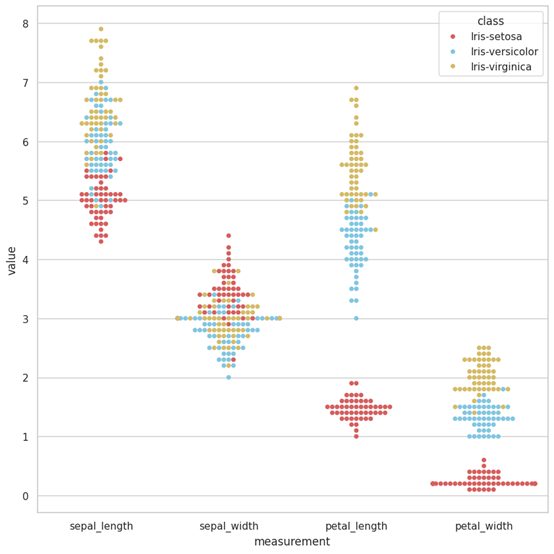
Here is a figure drawn by XAgent.
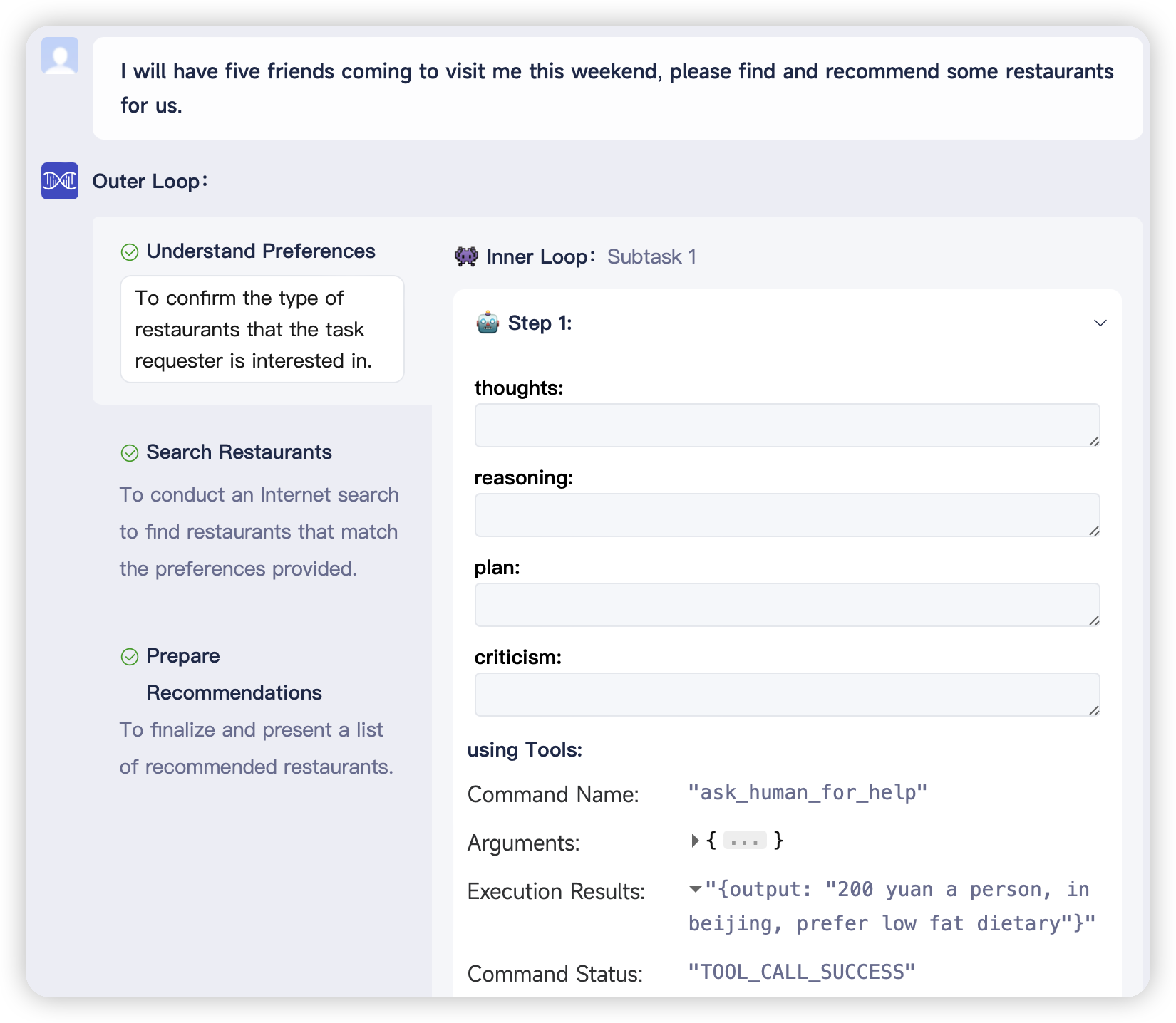
Case 2. Recommendation: A New Paradigm of Human-Agent Interaction
Empowered with the unique capability to actively seek human assistance and collaborate in problem-solving, XAgent continues to redefine the boundaries of human-agent cooperation. As depicted in the screenshot below, a user sought XAgent’s aid in recommending some great restaurants for a friendly gathering yet failed to provide specific details. Recognizing the insufficiency of the provided information, XAgent employed the AskForHumanHelp tool, prompting human intervention to elicit the user’s preferred location, budget constraints, culinary preferences, and dietary restrictions. Armed with this valuable feedback, XAgent seamlessly generated tailored restaurant recommendations, ensuring a personalized and satisfying experience for the user and their friends.
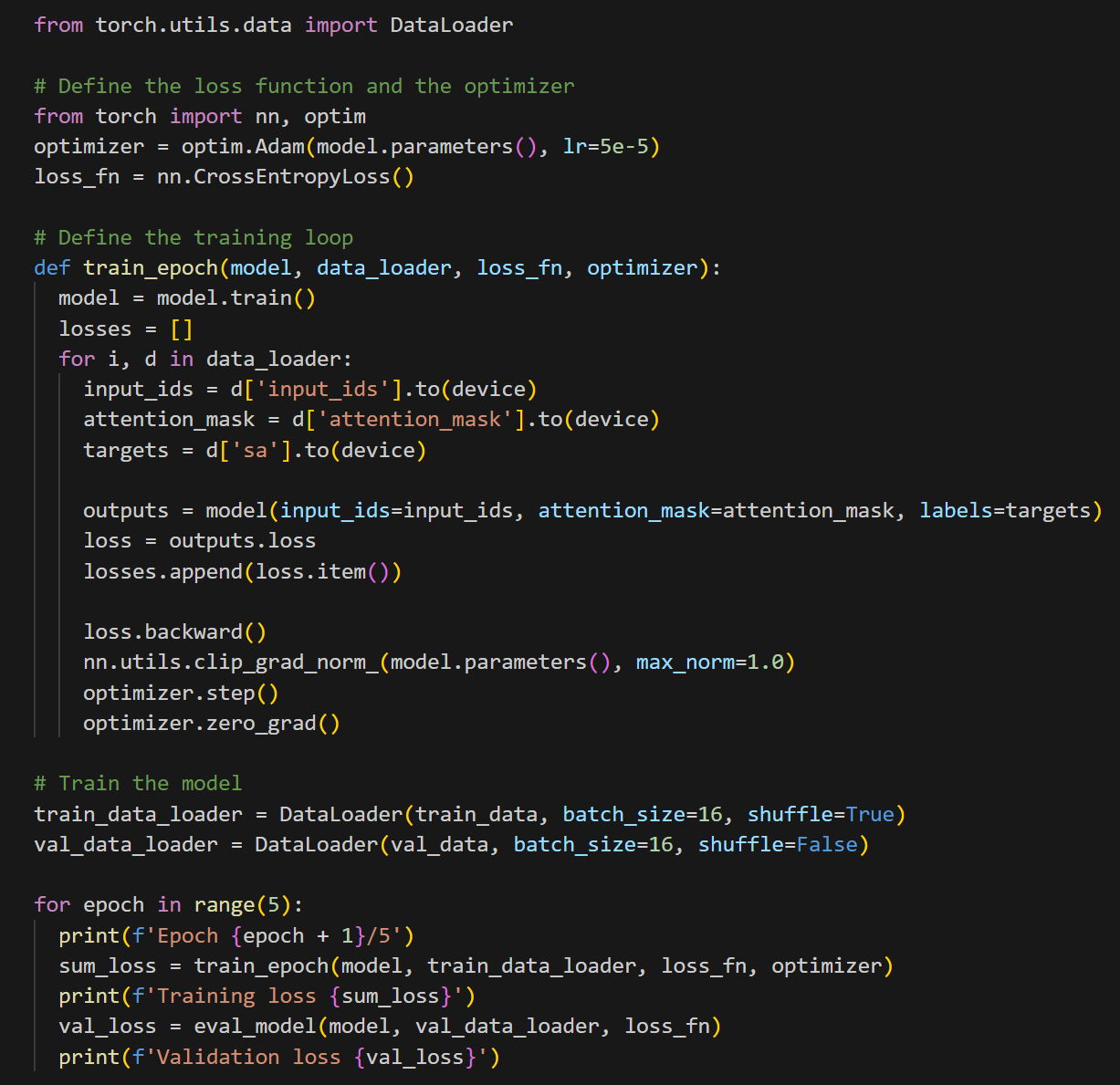
Case 3. Training Model: A Sophisticated Tool User
XAgent not only tackles mundane tasks but also serves as an invaluable aid in complex tasks such as model training. Here, we show a scenario where a user desires to analyze movie reviews and evaluate the public sentiment surrounding particular films. In response, XAgent promptly initiates the process by downloading the IMDB dataset to train a cutting-edge BERT model (see screenshot below), harnessing the power of deep learning. Armed with this trained BERT model, XAgent seamlessly navigates the intricate nuances of movie reviews, offering insightful predictions regarding the public’s perception of various films.


📊 Evaluation
We conduct human preference evaluation to evaluate XAgent’s performance. We prepare over 50 real-world complex tasks for assessment, which can be categorized into 5 classes: Search and Report, Coding and Developing, Data Analysis, Math, and Life Assistant. We compare the results of XAgent with AutoGPT, which shows a total win of XAgent over AutoGPT. All running records can refer to here.
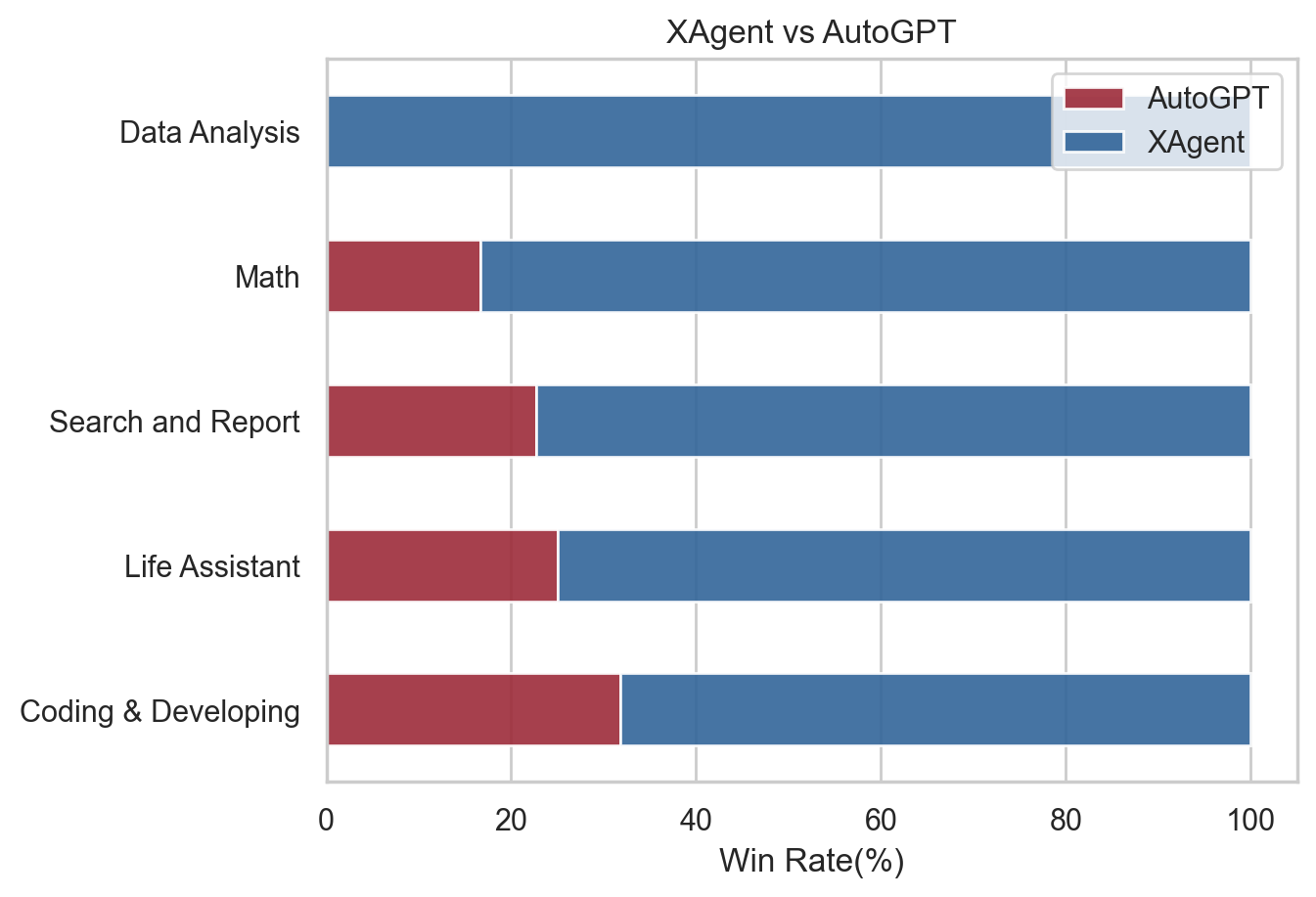
We report a significant improvement of XAgent over AutoGPT in terms of human preference.
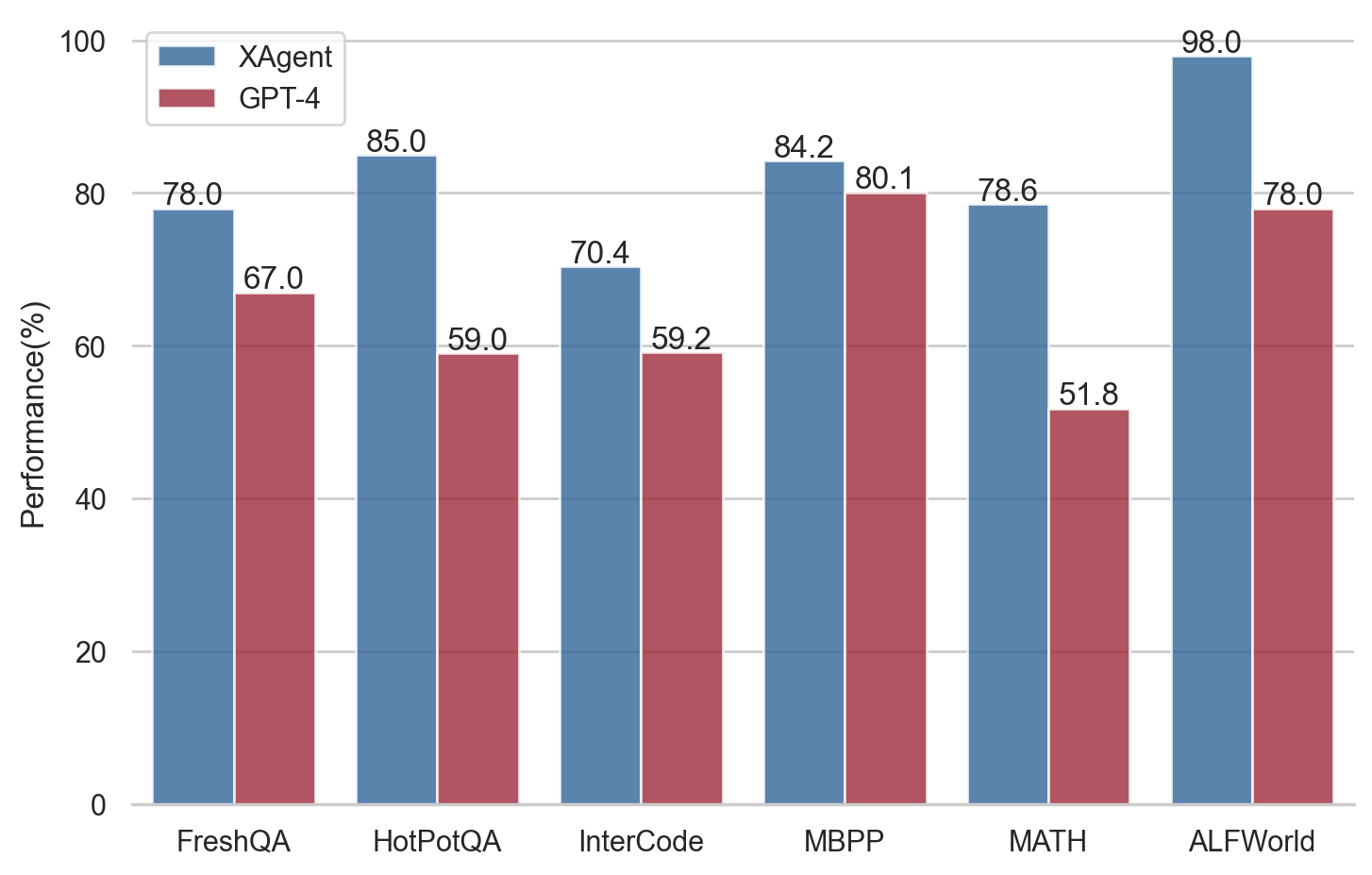
We also evaluate XAgent on the following benchmarks:
🖌️ Blog
Our blog is available at here!
🌟 Our Contributors
A heartfelt thank you to all our contributors. Your efforts make this project grow and thrive. Every contribution, big or small, is invaluable.
🌟 Star History
マルチエージェント制御の他の選択肢
 AutoGPTワークフロー
ここでのエージェントは、外部サービスの呼び出し・データ変換・モデルへの問い合わせ・条件分岐といった単位である「ブロック」を繋いだグラフです。コードではなくキャンバス上で組み立て、任意のタイミング、スケジュール、あるいはトリガーで実行します。ただし1つのリポジトリに無償の自己ホスト版と有償ホスティングの実装が同居しており、プラットフォーム側のディレクトリはPolyForm Shieldのため、利用はできても競合サービスとしての提供は禁じられています。
 DeerFlowマルチエージェント制御
2.0はWeb UIからバックエンドまでを1ポートの裏に立てる完成品アプリケーションです。リードエージェントがサブエージェントを起動し、永続メモリを持ち、ローカル・Docker・Kubernetes・E2Bのサンドボックスで作業を実行して、Markdownで定義されたスキル経由でレポート・スライド・Webページ・動画を作ります。モデルはLangChainのプロバイダ指定で配線し、検索はキー不要のDuckDuckGoを既定に6種類へ差し替え可能、TelegramやSlack、飛書などのチャットからも呼べます。導入前に知るべきことが2つあります。有名になったv1の深掘りリサーチは別ブランチに凍結されていて、いまインストールされるものではありません。そしてREADME自身が、設計はループバック限定の信頼環境向けであり、ゲートウェイの管理権限はホスト上でのコード実行と等価だと明記しています。
 MetaGPTマルチエージェント制御
`metagpt "Create a 2048 game"`と一行打つだけで、要件定義書・設計書・ソースコードが`workspace/`以下に書き出されます。ただし働く顔ぶれは入手経路で変わります。PyPIで配布されている0.8.2は製品担当・設計担当・進行担当・エンジニアの4役ですが、READMEが案内するgit cloneのmainではチームリーダーとデータアナリストが加わり、進行担当は外れています。デモの下にあるのは汎用のフレームワークで、RoleとActionを継承し、どのActionの結果に反応するかを宣言すれば、共有のEnvironmentがメッセージを配って作業順を決めます。データ分析だけならData Interpreter単体で完結します。限界もはっきりしていて、公式FAQは生成コードが500行を超えると未実装の関数が残ると認めています。