
n8n
Wire services together as workflows you draw on screen, with an AI agent node available anywhere in them
What is n8n?
Connects hundreds of services as workflows you draw on screen — each step in the flow is a node — and increasingly puts an AI agent node inside those workflows. The licence is the thing to check first: it is source-available under the Sustainable Use License, not OSI-approved open source. Internal use and self-hosting are fine; reselling it as a hosted service is not.
What can you do with n8n?
- Start from a trigger — Every workflow begins with a trigger node that says when to run: a schedule, an incoming webhook, or something happening in a connected service.
- Skip the glue with ready-made nodes — More than 1500 services ship as ready-made nodes, so connecting two of them is drawing a line between nodes rather than writing the integration.
- Use an earlier node's output later — A node's settings take expressions that pull from the output of any node before it, so a value fetched at the start can be used much further along.
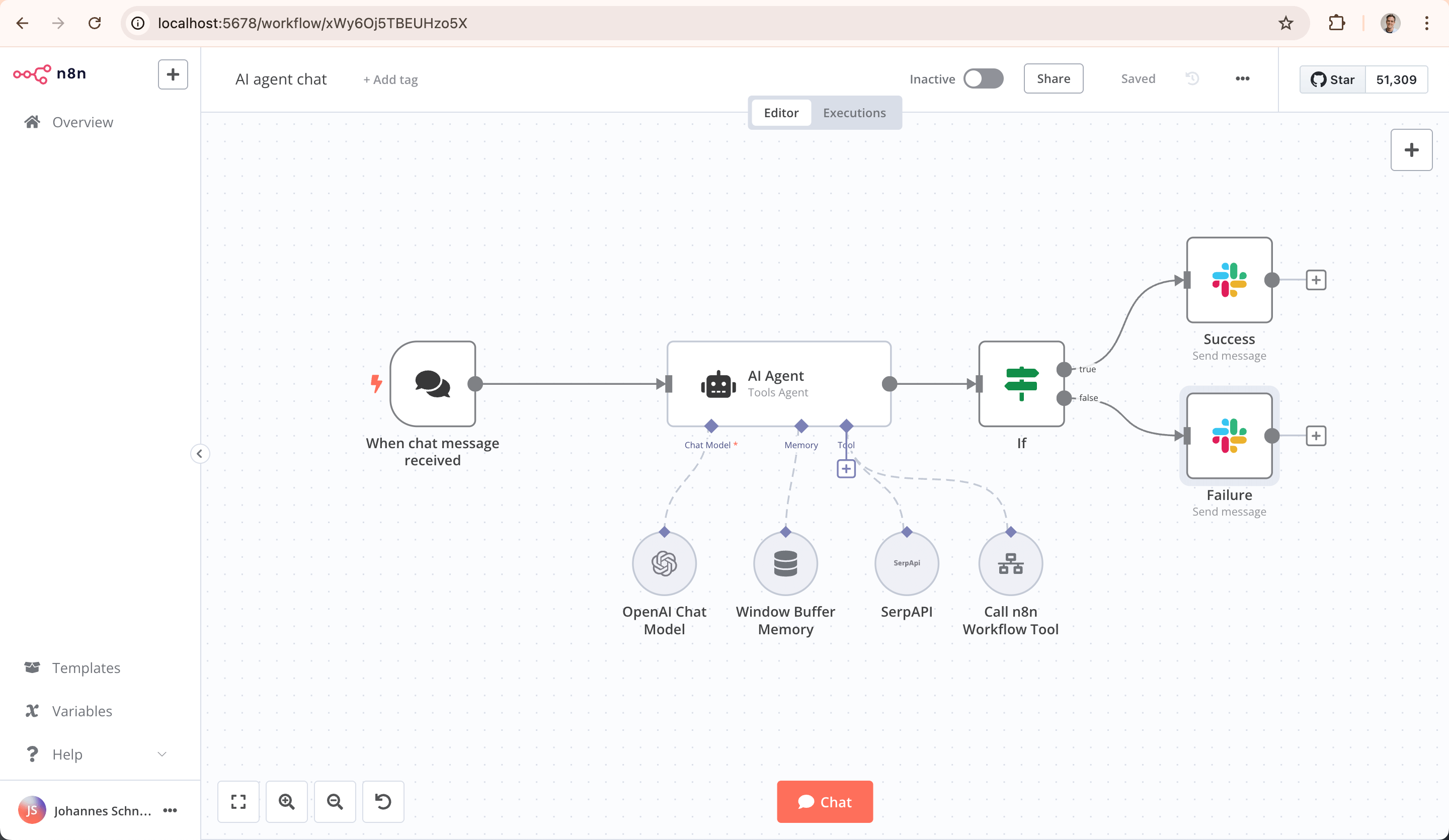
- Drop an AI agent node into the workflow — An AI agent node picks between its tools, routes on what it finds, and can wait for a person's approval before the workflow continues.
- Start from a published template — More than 9,000 workflow templates are published on n8n.io/workflows, so you can begin from one that already works instead of an empty canvas.
- Write code where wiring runs out — A Code node runs JavaScript, Python and npm packages, for the parts that cannot be expressed by connecting nodes.
Before you choose n8n
Star history
15 Aug to 28 Aug · +2k
Frequently asked questions
Is n8n free for commercial use?
n8n is published under Sustainable Use License, a source-available licence rather than OSI-approved open source — read its terms before relying on it commercially.
How can n8n be deployed?
n8n is available as Self-hosted / Runs locally / Managed cloud.
Documentation
Reproduced from the n8n-io/n8n README, published under Sustainable Use License. Read the original ↗

n8n – The Platform for AI Agents and Workflow Automation
Fair-code platform to build and deploy AI agents and workflows. Combine a visual canvas with custom code, run it self-hosted or in the cloud, and connect to 1500+ integrations. AI automation you can trust with real work, from prototype to production.
Key Capabilities
- AI-Native Automation Platform: Build and operationalize AI workflows and multi-step agents using your own data, models, and tools
- Model Flexibility, No Lock-In: Connect to OpenAI, Anthropic, Google, or open-source models and switch providers without changing your architecture
- From Prototype to Production: Design multi-step AI workflows with logic, tool use, human approvals, and full observability
- Code When You Need It: Combine visual building with JavaScript, Python, and npm packages for advanced AI workflows
- Enterprise-Ready AI: Self-host or deploy securely with role-based access, audit trails, and support for sensitive data
- Leverage What Already Exists: 1500+ integrations and 9,000+ workflow templates to connect AI with your existing systems
Quick Start
Try n8n instantly with npx (requires Node.js):
npx n8nOr deploy with Docker:
docker volume create n8n_data
docker run -it --rm --name n8n -p 5678:5678 -v n8n_data:/home/node/.n8n docker.n8n.io/n8nio/n8n
Access the editor at http://localhost:5678
Resources
- 📚 Documentation
- 🔧 1500+ Integrations
- 💡 Example Workflows
- 🤖 AI & LangChain Guide
- 👥 Community Forum
- 📖 Community Tutorials
Support
Need help? Our community forum is the place to get support and connect with other users: community.n8n.io
Join the Team
Want to shape the future of automation? Check out our job posts and join our team!
What does n8n mean?
Short answer: It means “nodemation” and is pronounced as n-eight-n.
Long answer: “I get that question quite often (more often than I expected) so I decided it is probably best to answer it here. While looking for a good name for the project with a free domain I realized very quickly that all the good ones I could think of were already taken. So, in the end, I chose nodemation. ‘node-’ in the sense that it uses a Node-View and that it uses Node.js and ‘-mation’ for ‘automation’ which is what the project is supposed to help with. However, I did not like how long the name was and I could not imagine writing something that long every time in the CLI. That is when I then ended up on ‘n8n’.” - Jan Oberhauser, Founder and CEO, n8n.io
Other options in Workflow & Low-code
 hermes-agentTools & Integrations
Hermes Agent is Nous Research's own agent: a terminal UI plus a single gateway process that carries the same conversation into Telegram, Discord, Slack, WhatsApp, Signal and Email, with a cron scheduler, isolated subagents, and seven terminal backends from local and Docker to Modal and Vercel Sandbox. Its distinguishing piece is a closed learning loop — the agent curates its own memory on periodic nudges, creates skills after complex tasks, and searches past sessions through FTS5 with LLM summarization — which means the state that makes it useful accumulates under `~/.hermes`, outside your version control, and needs occasional pruning. It is an assistant you run and configure rather than a library you build on: the README documents `hermes` subcommands and slash commands, not an embedding API, so it is a poor fit if you wanted an agent loop to call from your own code. Putting a shell-capable agent behind chat platforms also makes the command-approval and DM-pairing settings load-bearing rather than optional.
 AutoGPTWorkflow
An agent here is a graph of blocks — one block calls a service, transforms data, prompts a model or branches — assembled on a canvas rather than written in code, then run on demand, on a schedule or from a trigger. One repository holds both the free self-hosted platform and the code behind the paid hosted one, and that is the catch: everything under the platform directory is PolyForm Shield, which permits use but forbids offering it as a competing product.
 LangflowWorkflow
Useful for sketching an agent visually and for showing non-engineers what a pipeline actually does, then exporting it as an API. Visual editors get unwieldy as branching grows, so treat it as a design and demo surface rather than the final home for complex logic.