
Opik
Tracing, evaluation and production monitoring for LLM apps, with the backend open-sourced as well
What is Opik?
A decorator on a function or a wrapper around a client is enough to start recording traces, and from there the same data feeds experiments that score responses automatically instead of by hand — hallucination, answer relevance, context recall and the rest. More than thirty integrations cover the usual frameworks and providers, and the whole platform can run locally or on Kubernetes rather than only as a hosted service. Its difficulty is not capability but overlap: it competes directly with two platforms already in this catalogue, so the choice turns on integrations and hosting rather than on what is missing.
What can you do with Opik?
- Start recording with one decorator — Adding a tracking decorator to a function, or wrapping a provider client, captures the call tree without restructuring the application, in either the Python or the TypeScript SDK.
- Stop reviewing every response by hand — Experiments run a dataset through the application and score the outputs automatically with metrics such as hallucination, answer relevance and context recall, turning review into a report rather than an afternoon.
- Attach to the framework you already use — More than thirty integrations cover LangChain, LlamaIndex, CrewAI and providers including Anthropic, AWS Bedrock and Google Gemini, so instrumentation is usually configuration rather than code.
- Run the whole thing yourself — The backend is open source too, with documented local and Kubernetes deployments — the traces and datasets do not have to leave your infrastructure to be useful.
- Keep prompts and configuration versioned — Prompts and agent configuration are tracked alongside the traces they produced, which is what makes a regression traceable to the change that caused it.
Before you choose Opik
- It overlaps almost completely with Langfuse and Phoenix, both already catalogued here; if one of those is already running, the case for a second platform is about integrations and hosting, not missing capability.
- Self-hosting means operating the platform's backend services rather than importing a library, so a local trial is a container deployment and a production one is a cluster to look after.
Star history
21 Aug to 28 Aug · +135
Frequently asked questions
Is Opik free for commercial use?
Opik is released under the Apache-2.0 licence — OSI-approved open source, which permits commercial use.
How can Opik be deployed?
Opik is available as Self-hosted / Managed cloud / Runs locally.
Documentation
Reproduced from the comet-ml/opik README, published under Apache-2.0. Read the original ↗

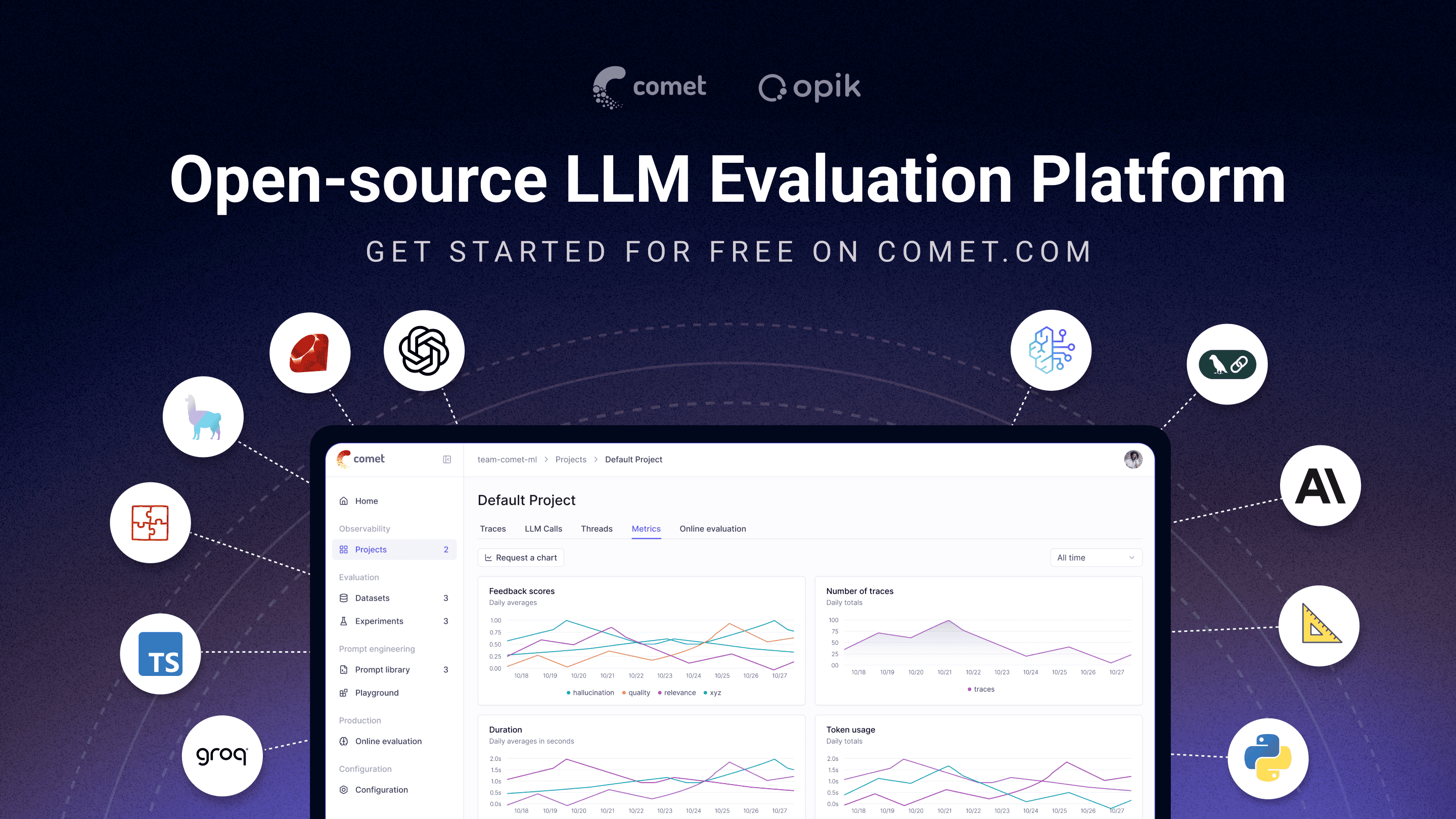
🚀 What is Opik?
Opik covers the full LLM application lifecycle, from the first trace in development to production monitoring, for teams building LLM apps and AI agents. Key offerings include:
- AI Agent Tracing & Observability: Deep tracing of LLM calls, conversation logging, and agent activity, with full trace trees for multi-step agents and tool calls.
- LLM Evaluation: Datasets, experiments, and LLM-as-a-judge metrics for hallucination detection, moderation, and RAG assessment.
- Prompt & Agent Optimization: The Opik Agent Optimizer SDK to improve prompts and agents.
- Production-Ready Monitoring: Scalable dashboards and online evaluation rules.
- Opik Guardrails: Features to help you implement safe and responsible AI practices.
- CI/CD Evaluation: A PyTest integration to test LLM pipelines on every commit.
Key capabilities include:
-
Development & Tracing:
- Track all LLM calls and traces with detailed context during development and in production (Quickstart).
- Extensive 3rd-party integrations for easy observability: Seamlessly integrate with a growing list of frameworks, supporting many of the largest and most popular ones natively (including recent additions like Google ADK, Autogen, and Flowise AI). (Integrations)
- Annotate traces and spans with feedback scores via the Python SDK or the UI.
- Experiment with prompts and models in the Prompt Playground.
-
Evaluation & Testing:
- Automate your LLM application evaluation with Datasets and Experiments.
- Leverage powerful LLM-as-a-judge metrics for complex tasks like hallucination detection, moderation, and RAG assessment (Answer Relevance, Context Precision).
- Integrate evaluations into your CI/CD pipeline with our PyTest integration.
-
Production Monitoring & Optimization:
- Log high volumes of production traces: Opik is designed for scale (40M+ traces/day).
- Monitor feedback scores, trace counts, and token usage over time in the Opik Dashboard.
- Utilize Online Evaluation Rules with LLM-as-a-Judge metrics to identify production issues.
- Leverage Opik Agent Optimizer and Opik Guardrails to continuously improve and secure your LLM applications in production.
Who it’s for: ML engineers building LLM-powered agents, AI teams moving from prototype to production, and engineering teams that need open-source, self-hostable observability they can run in their own environment.
Why open source matters here: Opik is Apache-2.0 licensed and free to self-host: the full platform, backend included, not just a client SDK. The repository includes the server backend, web application, tracing, datasets, experiments, evaluations, prompt management, online evaluation, and agent optimization components, all under Apache-2.0. You can run LLM observability inside your own infrastructure with no data leaving your environment and no Enterprise sales conversation required.
[!TIP] If you are looking for features that Opik doesn’t have today, please raise a new Feature request 🚀
⚡ Quick Start
Install the Python SDK and configure it:
pip install opik
opik configure
Wrap any function with the @track decorator to start logging traces:
from opik import track

@track
def my_function(input: str) -> str:
    return input
Every call to my_function is now logged to Opik, including nested calls, so this works for full agent and pipeline traces, not just single LLM calls. See the Quickstart guide for the TypeScript SDK and other setup options.
📊 How Does Opik Compare?
Opik competes in the LLM observability / AI agent evaluation category alongside LangSmith, Arize (Phoenix and Arize AX), Weights & Biases (Weave), Langfuse, and Braintrust.
| Capability | Opik | LangSmith | Phoenix | Arize AX | Weights & Biases (Weave) | Langfuse | Braintrust |
|---|---|---|---|---|---|---|---|
| Open source | Yes, Apache-2.0 (full platform) | No | Source-available (Elastic License 2.0, not OSI-approved) | No | Open-source SDK/toolkit; self-managed platform requires a commercial license | MIT-licensed core platform; commercial enterprise modules | No |
| Self-hosted deployment | Yes | Enterprise only | Yes | Enterprise only | Enterprise only for Weave itself | Yes, core | Enterprise only |
| Free tier available (cloud or self-hosted) | Yes, both | Yes, cloud | Yes, self-hosted | Yes, cloud | Yes, cloud | Yes, both | Yes, cloud |
| Agent / multi-step tracing | Yes | Yes | Yes | Yes | Yes | Yes | Yes |
| LLM-as-a-judge evaluation | Yes | Yes | Yes | Yes | Yes | Yes | Yes |
| Prompt management | Yes | Yes | Partly | Partly | Partly | Yes | Yes |
| Framework-agnostic | Yes | Partly, built around LangChain | Yes | Yes | Yes | Yes | Yes |
When teams choose Opik: Opik’s full observability, evaluation, and optimization platform is Apache-2.0 licensed and free to self-host. Unlike closed platforms whose self-hosted deployment requires an Enterprise plan, Opik can be deployed without a commercial license, and it’s framework-agnostic so it won’t lock you into a single agent ecosystem. See the table above for where self-hosting and licensing differ across alternatives.
❓ Frequently Asked Questions
Is Opik open source?
Opik is licensed under Apache 2.0. Its server, web application, and core observability and evaluation capabilities can be self-hosted without a commercial license.
Can I self-host Opik?
Yes. Opik can be deployed locally or in your own infrastructure using the documented self-hosting options.
Does Opik support AI agent tracing?
Yes. Opik captures multi-step traces containing LLM calls, tool executions, retrieval steps, and other agent activity.
Does Opik support LLM evaluation?
Yes. Opik supports datasets, experiments, code-based metrics, LLM-as-a-judge evaluation, and online evaluation.
Is Opik tied to a specific agent framework?
No. Opik is framework-agnostic and supports its SDK, OpenTelemetry, and framework-specific integrations.
🛠️ Opik Server Installation
Get your Opik server running in minutes. Choose the option that best suits your needs:
Option 1: Comet.com Cloud (Easiest & Recommended)
Access Opik instantly without any setup. Ideal for quick starts and hassle-free maintenance.
👉 Create your free Comet account
Option 2: Self-Host Opik for Full Control
Deploy Opik in your own environment. Choose between Docker for local setups or Kubernetes for scalability.
Self-Hosting with Docker Compose (for Local Development & Testing)
This is the simplest way to get a local Opik instance running. Note the new ./opik.sh installation script:
On Linux or Mac Environment:
# Clone the Opik repository
git clone https://github.com/comet-ml/opik.git

# Navigate to the repository
cd opik

# Start the Opik platform
./opik.sh
On Windows Environment:
# Clone the Opik repository
git clone https://github.com/comet-ml/opik.git

# Navigate to the repository
cd opik

# Start the Opik platform
powershell -ExecutionPolicy ByPass -c ".\\opik.ps1"
Installation Script Options
The opik.sh and opik.ps1 scripts support the following options:
# Start full Opik suite (default behavior)
./opik.sh

# Start only infrastructure services (databases, caches etc.)
./opik.sh --infra

# Start infrastructure + backend services
./opik.sh --backend

# Enable guardrails with any profile
./opik.sh --guardrails # Guardrails with full Opik suite
./opik.sh --backend --guardrails # Guardrails with infrastructure + backend

# Build the containers from source before starting
./opik.sh --build

# Check that all containers are healthy
./opik.sh --verify

# Stop all containers
./opik.sh --stop

# Stop all containers and remove all Opik data volumes
# WARNING: ALL OPIK DATA WILL BE LOST
./opik.sh --clean

# Show all available options
./opik.sh --help
Use the --help or --info options to troubleshoot issues. Dockerfiles now ensure containers run as non-root users for enhanced security. Once all is up and running, you can now visit localhost:5173 on your browser! For detailed instructions, see the Local Deployment Guide.
Self-Hosting with Kubernetes & Helm (for Scalable Deployments)
For production or larger-scale self-hosted deployments, Opik can be installed on a Kubernetes cluster using our Helm chart. Click the badge for the full Kubernetes Installation Guide using Helm.
💻 Opik Client SDK
Opik provides a suite of client libraries and a REST API to interact with the Opik server. This includes SDKs for Python and TypeScript, plus first-party OpenTelemetry support: any language with an OpenTelemetry SDK — including Java, Ruby, and .NET — can send traces to Opik. For detailed API and SDK references, see the Opik Client Reference Documentation.
Python SDK Quick Start
To get started with the Python SDK:
Install the package:
# install using pip
pip install opik

# or install with uv
uv pip install opik
Configure the python SDK by running the opik configure command, which will prompt you for your Opik server address (for self-hosted instances) or your API key and workspace (for Comet.com):
opik configure[!TIP] You can also call
opik.configure(use_local=True)from your Python code to configure the SDK to run on a local self-hosted installation, or provide API key and workspace details directly for Comet.com. Refer to the Python SDK documentation for more configuration options.
You are now ready to start logging traces using the Python SDK.
This README has been shortened. The full version is on GitHub. Read the original ↗
Other options in Observability & Evals
 LiteLLMModel Serving
The library half lets one function call reach any supported provider in the OpenAI request and response shape. The gateway half is the reason most teams arrive: a self-hosted server that issues virtual keys with their own budgets and rate limits, falls back when a provider fails, spreads load across deployments, and records cost per key. The price is an extra component in the request path that you now operate, and code under the enterprise directory is not covered by the MIT grant.
 ClickHouseObservability
A column-oriented engine for append-heavy, high-cardinality data, which is the shape agent telemetry takes: one row per model call, filtered later by model, cost or error. Langfuse moved its traces here from Postgres in December 2024 and ClickHouse acquired the project in January 2026, so a self-hosted observability stack increasingly means running this underneath. It is the wrong choice for anything transactional — updates and deletes rewrite whole column parts rather than edit rows — so treat it as where agent runs land, not as the database your application writes state to.
 LangfuseObservability
Records what an agent actually did — every call, tool invocation and cost — and turns those traces into evaluation datasets. The managed service runs the same codebase you can self-host with Docker Compose, so migrating in either direction stays cheap. Some enterprise features sit outside the MIT core; check which tier you need before committing.