
Devika
2024年にDevinのオープンソース版として注目された自律エージェント。コード自体の更新は同年9月で止まっています。
Devikaとは
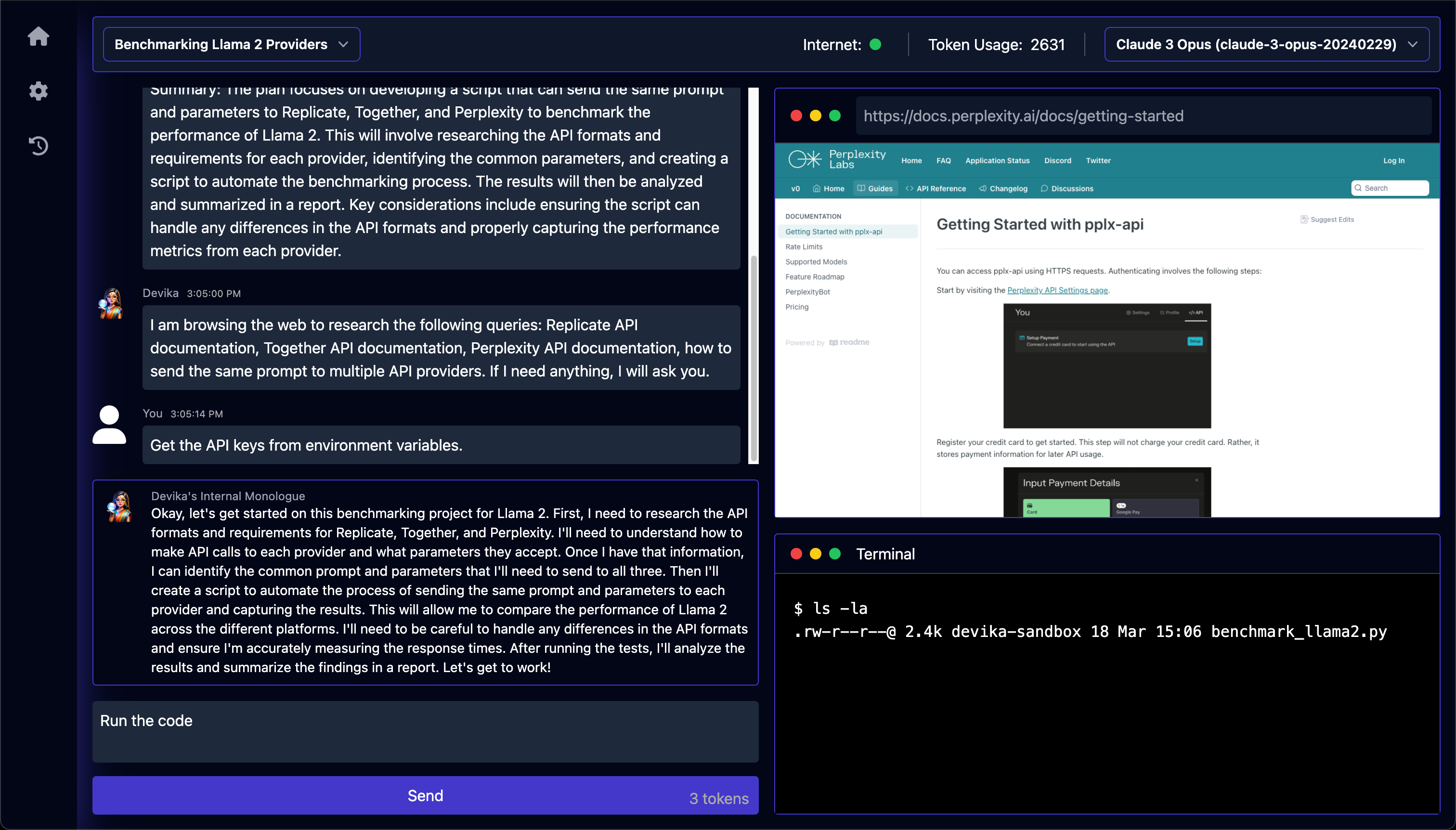
Devikaを動かすと、番号付きの計画、エージェントの独り言、閲覧中ページのスクリーンショット、ターミナルの出力、消費トークン数が1つの画面に並びます。目標を1行送ると、プランナーが手順を書き出し、リサーチャーが最大3件の検索クエリに絞り、各クエリの1件目のリンクだけをPlaywrightのブラウザで開いて本文を抜き出し、コーダーがプロジェクトフォルダにファイルを書き出す、という決まった順序で進みます。一方、READMEが掲げたSWE-benchでDevinに並ぶという目標は一度も計測されず、結果を書くはずのファイルは空のものと1行のプレースホルダが残るだけです。コード自体の更新も2024年で止まっているため、これから何かを載せる土台としてではなく、当時の「オープンソース版Devin」がどこまで動いていたのかを自分の手で確かめられる実装として見るのが妥当です。
Devikaで何ができますか?
- 計画・ブラウザ・ターミナルを1画面で追う — 会話に加えて、エージェントが読んでいるページのスクリーンショット、実行したシェルコマンドとその出力、消費トークン数が同じ画面に並び、どの工程で止まったのかを目で追えます。生成されたファイルを開くMonacoエディタは、横にスクロールした先の別画面にあります。
- 着手前に手順を確認する — 大まかな目標を送ると、プランナーが短い返事と番号付きの手順をチャットに返してから作業に入ります。狙いがずれていれば、コーダーがファイルを作る前に気づけます。
- Web調査は最大3クエリ、各1ページ — リサーチャーは「モデルが既に知っていることは検索しない」という指示のもと、検索クエリを最大3件に絞ります。各クエリで開くのは1件目のリンクだけで、PlaywrightのChromiumで表示して本文を抜き出します。
- 情報が足りなければ質問して待つ — APIキーや前提条件が不明なときは、リサーチャーが推測で進めずに質問を返し、実行はチャットで返信するまで一時停止します。返信するとその続きから再開します。
- 2回目以降の指示は6つの担当に振り分けられる — アクションエージェントが次のメッセージを読み、質問への回答、プロジェクトの実行、Netlifyへのデプロイ、機能追加、バグ修正、PDFレポートの作成のうち1つだけを選んで担当エージェントに渡します。
- モデルと検索エンジンは作業中でも切り替えられる — 2つのドロップダウンはプロジェクト選択欄の隣にあり、送信のたびにその時点の選択が読み直されます。Claude 3、GPT-4o、Gemini 1.5、Mistral、Groqのほか、OllamaやLM Studioのローカルモデルも途中から選べますが、クラウド側の一覧は2024年当時のモデルで止まっています。
Devikaを選ぶ前に
- コードの更新は2024年9月が最後で、以降の唯一のコミットは2025年9月にREADMEを作者の後継プロジェクトOpcodeの案内へ書き換えたものだけのため、2024年中に報告されたセットアップの失敗は修正されていません。報告#499
- プロジェクトの実行を頼むと、モデルが書いたコマンドが手元のマシンでそのまま動き、設計文書が触れている隔離用のコードは中身が空のため、ほかのファイルと切り離す仕組みは実質ありません。
- APIキーが不要な唯一の検索経路はDuckDuckGoの内部エンドポイントを直接読む実装で、2024年4月には結果が返らないという報告が出ているため、実際にはBingかGoogleの検索APIキーが必要になります。報告#458
スター推移
8月17日〜8月28日 · +4
よくある質問
Devikaは商用利用できますか?
DevikaはMITライセンスで公開されています。OSI承認のオープンソースライセンスで、商用利用が認められています。
Devikaはどの形で使えますか?
Devikaはセルフホスト・ローカル実行の形で利用できます。
ドキュメント
stitionai/devika のREADMEより転載(MIT)。 原文を読む ↗
[!IMPORTANT]
This project is currently in a very early development/experimental stage. There are a lot of unimplemented/broken features at the moment. Contributions are welcome to help out with the progress!
Table of Contents
- About
- Key Features
- System Architecture
- Getting Started
- Configuration
- Contributing
- Help and Support
- License
About
Devika is an advanced AI software engineer that can understand high-level human instructions, break them down into steps, research relevant information, and write code to achieve the given objective. Devika utilizes large language models, planning and reasoning algorithms, and web browsing abilities to intelligently develop software.
Devika aims to revolutionize the way we build software by providing an AI pair programmer who can take on complex coding tasks with minimal human guidance. Whether you need to create a new feature, fix a bug, or develop an entire project from scratch, Devika is here to assist you.
[!NOTE] Devika is modeled after Devin by Cognition AI. This project aims to be an open-source alternative to Devin with an “overly ambitious” goal to meet the same score as Devin in the SWE-bench Benchmarks… and eventually beat it?
Demos
https://github.com/stitionai/devika/assets/26198477/cfed6945-d53b-4189-9fbe-669690204206
Key Features
- 🤖 Supports Claude 3, GPT-4, Gemini, Mistral , Groq and Local LLMs via Ollama. For optimal performance: Use the Claude 3 family of models.
- 🧠 Advanced AI planning and reasoning capabilities
- 🔍 Contextual keyword extraction for focused research
- 🌐 Seamless web browsing and information gathering
- 💻 Code writing in multiple programming languages
- 📊 Dynamic agent state tracking and visualization
- 💬 Natural language interaction via chat interface
- 📂 Project-based organization and management
- 🔌 Extensible architecture for adding new features and integrations
System Architecture
Read README.md for the detailed documentation.
Getting Started
Requirements
Version's requirements
  - Python >= 3.10 and < 3.12
  - NodeJs >= 18
- bun- Install uv - Python Package manager download
- Install bun - JavaScript runtime download
- For ollama ollama setup guide (optinal: if you don’t want to use the local models then you can skip this step)
- For API models, configure the API keys via setting page in UI.
Installation
To install Devika, follow these steps:
- Clone the Devika repository:
git clone https://github.com/stitionai/devika.git - Navigate to the project directory:
cd devika - Create a virtual environment and install the required dependencies (you can use any virtual environment manager):
uv venv # On macOS and Linux. source .venv/bin/activate # On Windows. .venv\Scripts\activate uv pip install -r requirements.txt - Install the playwright for browsering capabilities:
playwright install --with-deps # installs browsers in playwright (and their deps) if required - Start the Devika server:
python devika.py - if everything is working fine, you see the following output:
root: INFO : Devika is up and running! - Now, for frontend, open a new terminal and navigate to the
uidirectory:cd ui/ bun install bun run start - Access the Devika web interface by opening a browser and navigating to
http://127.0.0.1:3001
how to use
To start using Devika, follow these steps:
- Open the Devika web interface in your browser.
- To create a project, click on ‘select project’ and then click on ‘new project’.
- Select the search engine and model configuration for your project.
- In the chat interface, provide a high-level objective or task description for Devika to work on.
- Devika will process your request, break it down into steps, and start working on the task.
- Monitor Devika’s progress, view generated code, and provide additional guidance or feedback as needed.
- Once Devika completes the task, review the generated code and project files.
- Iterate and refine the project as desired by providing further instructions or modifications.
Configuration
Devika requires certain configuration settings and API keys to function properly:
when you first time run Devika, it will create a config.toml file for you in the root directory. You can configure the following settings in the settings page via UI:
-
API KEYS
BING: Your Bing Search API key for web searching capabilities.GOOGLE_SEARCH: Your Google Search API key for web searching capabilities.GOOGLE_SEARCH_ENGINE_ID: Your Google Search Engine ID for web searching using Google.OPENAI: Your OpenAI API key for accessing GPT models.GEMINI: Your Gemini API key for accessing Gemini models.CLAUDE: Your Anthropic API key for accessing Claude models.MISTRAL: Your Mistral API key for accessing Mistral models.GROQ: Your Groq API key for accessing Groq models.NETLIFY: Your Netlify API key for deploying and managing web projects.
-
API_ENDPOINTS
BING: The Bing API endpoint for web searching.GOOGLE: The Google API endpoint for web searching.OLLAMA: The Ollama API endpoint for accessing Local LLMs.OPENAI: The OpenAI API endpoint for accessing OpenAI models.
Make sure to keep your API keys secure and do not share them publicly. For setting up the Bing and Google search API keys, follow the instructions in the search engine setup
Help and Support
If you have any questions, feedback, or suggestions, please feel free to reach out to us. you can raise an issue in the issue tracker or join the discussions for general discussions.
We also have a Discord server for the Devika community, where you can connect with other users, share your experiences, ask questions, and collaborate on the project. To join the Devika community Discord server, click here.
コーディングエージェントの他の選択肢
 opencodeコーディングエージェント
特徴は、何もかもが埋め込みではなく宣言である点です。名前付きのエージェントをJSONかMarkdownで定義し、それぞれに使うモデルと、ツールごとの権限を与えます。読み取り・編集・コマンド実行のそれぞれについて、許可・確認・拒否のいずれかを選べます。切り替えはキー1つです。標準でも、全権限を持つものと、編集や実行の前に必ず確認するものの2種類が同じ仕組みで用意されています。MITでプロバイダにも依存しませんが、変化が速いうえ最近リポジトリの所有者が変わったため、古いリンクや固定したバージョンはすぐ古びます。
 Codex CLIコーディングエージェント
リポジトリを読み、変更を提案し、コマンドを実行するという動き自体は他のターミナル型と同じですが、境界の引き方が特徴的です。macOSとLinuxではOSのサンドボックス機構を使い、触れるファイルと実行できるコマンドを制限します。制限がモデルの善意に依存しない、という点が違います。サインインはChatGPTのプランかOpenAIのAPIキーを経由します。コードはApache-2.0でも、背後のモデルは開かれた部分ではない、というのが取引条件です。
 Ponytailコーディングエージェント
日付の入力欄を頼んだだけで、依存パッケージが入り、ラッパーのコンポーネントができ、スタイルシートが増え、タイムゾーンの議論が始まることがあります。ブラウザには何年も前から専用の入力欄があるのにです。Ponytailはその癖に狙いを定めた1つのスキルで、動く範囲で最も小さい実装へ、そして環境が既に備えているものは書かない方向へエージェントを押します。冗談で終わらないのは、開発元が実際に測っている点です。実在のリポジトリで12件の作業を、スキルの有無で比較し、数値と一緒に測定方法も公開しています。以前のより見栄えのする数値は平均ではなく最良の場合だった、という訂正まで書かれています。