
Devika
A 2024 open-source answer to Devin that plans, searches the web and writes code. Code changes stopped that September.
What is Devika?
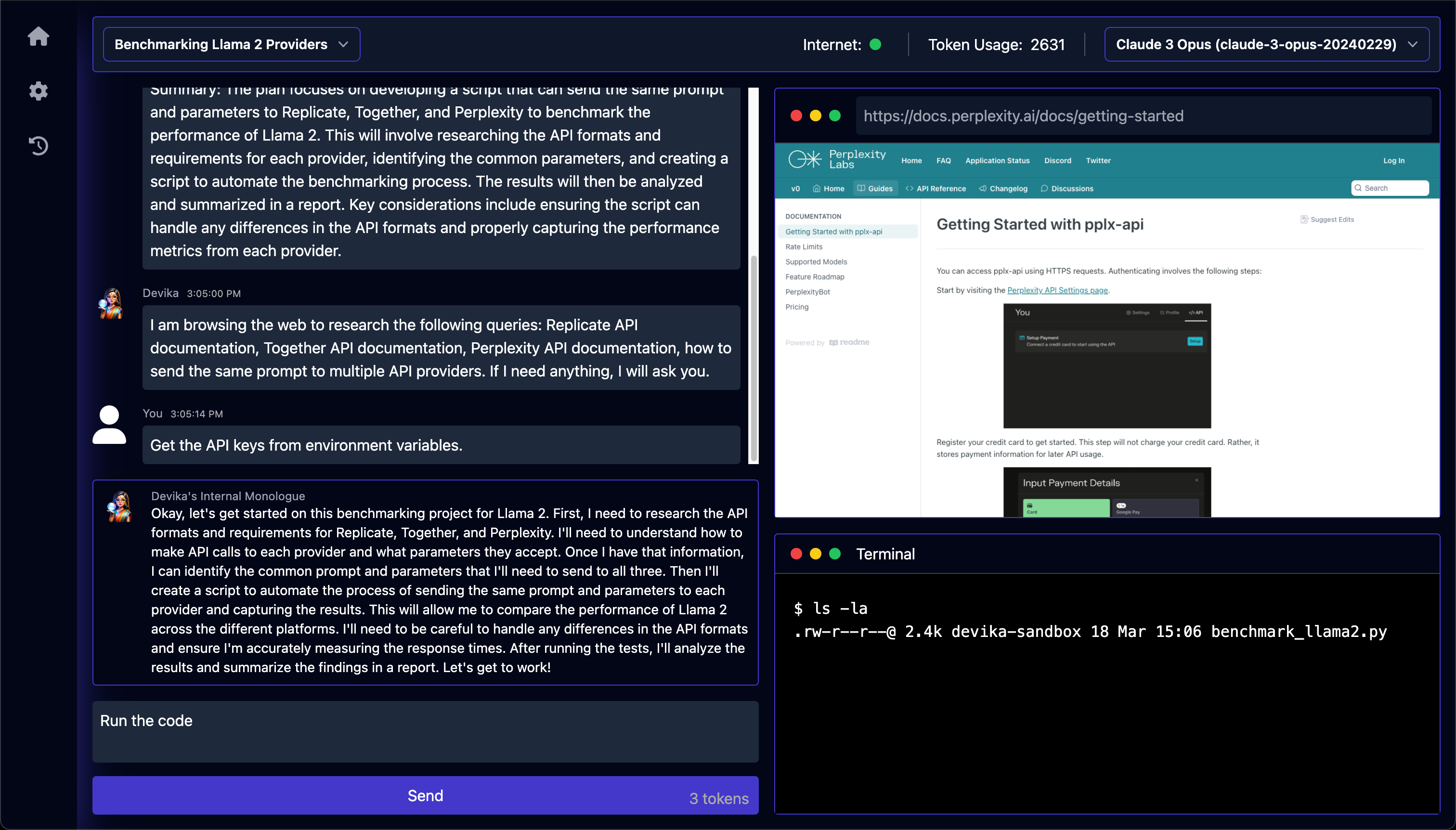
Devika turns a one-line objective into files on disk through a fixed chain of specialists: a planner breaks it into a numbered checklist of steps, a researcher condenses that into at most three search queries, a browser opens the first hit for each one and keeps the text, and a coder writes the result into a project folder. The interface is the reason to look: the plan, the agent's running commentary, a screenshot of the page it is reading, the shell output and the token count are all on one screen, so a run that goes wrong usually shows you the step where it did. What it never did was finish. The README's stated ambition was to match Devin's score on the SWE-bench benchmark, and the two files in the repository meant to hold that result are a placeholder line and an empty file. With the code untouched since 2024, Devika is worth reading as the clearest surviving example of that year's open-source Devin wave, not as something to build on.
What can you do with Devika?
- A plan you can read before any file is written — You send a high-level objective and the planner answers in the chat with a short reply and a numbered checklist of steps, so an approach that misreads the task is visible before the coder creates anything.
- Research is capped at three queries, one page each — The researcher is told to skip anything the model already knows and to write no more than three search queries; each one is run and only its first hit is opened, in a Playwright-driven Chromium that strips the page to its text.
- It stops and asks when something is missing — Instead of guessing at an API key or an unstated requirement, the researcher can return a question, and the run pauses in the chat until you reply — then continues from where it stopped.
- The plan, the browser and the terminal on one screen — Alongside the conversation you get a screenshot of the page the agent is reading, the shell commands it ran with their output and a running token count; the generated files open in a Monaco editor one horizontal scroll away.
- Follow-up messages are sorted into one of six jobs — An action agent reads what you type next and picks exactly one: answer a question about the project, run it, deploy it to Netlify, add a feature, fix a bug, or write the project up as a PDF report.
- Model and search engine are dropdowns you can change mid-task — Both sit in the top bar next to the project selector and are read afresh each time you press send, so you can switch between Claude 3, GPT-4o, Gemini 1.5, Mistral, Groq or a local model via Ollama or LM Studio partway through — though the hosted list stopped at the models of 2024.
Before you choose Devika
- The last code change was in September 2024; the one commit since is a September 2025 README rewrite pointing readers at Opcode, the author's next project, so setup failures reported through 2024 were never fixed.Reported in#499
- Asking it to run the project executes the commands the model wrote directly on your machine, with nothing separating them from your other files — the isolation its architecture document describes is two empty files.
- The only search option that needs no API key scrapes an internal DuckDuckGo endpoint instead of an API, and it was reported returning nothing from April 2024, so in practice you need a Bing or Google search API key.Reported in#458
Star history
17 Aug to 28 Aug · +4
Frequently asked questions
Is Devika free for commercial use?
Devika is released under the MIT licence — OSI-approved open source, which permits commercial use.
How can Devika be deployed?
Devika is available as Self-hosted / Runs locally.
Documentation
Reproduced from the stitionai/devika README, published under MIT. Read the original ↗
[!IMPORTANT]
This project is currently in a very early development/experimental stage. There are a lot of unimplemented/broken features at the moment. Contributions are welcome to help out with the progress!
Table of Contents
- About
- Key Features
- System Architecture
- Getting Started
- Configuration
- Contributing
- Help and Support
- License
About
Devika is an advanced AI software engineer that can understand high-level human instructions, break them down into steps, research relevant information, and write code to achieve the given objective. Devika utilizes large language models, planning and reasoning algorithms, and web browsing abilities to intelligently develop software.
Devika aims to revolutionize the way we build software by providing an AI pair programmer who can take on complex coding tasks with minimal human guidance. Whether you need to create a new feature, fix a bug, or develop an entire project from scratch, Devika is here to assist you.
[!NOTE] Devika is modeled after Devin by Cognition AI. This project aims to be an open-source alternative to Devin with an “overly ambitious” goal to meet the same score as Devin in the SWE-bench Benchmarks… and eventually beat it?
Demos
https://github.com/stitionai/devika/assets/26198477/cfed6945-d53b-4189-9fbe-669690204206
Key Features
- 🤖 Supports Claude 3, GPT-4, Gemini, Mistral , Groq and Local LLMs via Ollama. For optimal performance: Use the Claude 3 family of models.
- 🧠 Advanced AI planning and reasoning capabilities
- 🔍 Contextual keyword extraction for focused research
- 🌐 Seamless web browsing and information gathering
- 💻 Code writing in multiple programming languages
- 📊 Dynamic agent state tracking and visualization
- 💬 Natural language interaction via chat interface
- 📂 Project-based organization and management
- 🔌 Extensible architecture for adding new features and integrations
System Architecture
Read README.md for the detailed documentation.
Getting Started
Requirements
Version's requirements
  - Python >= 3.10 and < 3.12
  - NodeJs >= 18
- bun- Install uv - Python Package manager download
- Install bun - JavaScript runtime download
- For ollama ollama setup guide (optinal: if you don’t want to use the local models then you can skip this step)
- For API models, configure the API keys via setting page in UI.
Installation
To install Devika, follow these steps:
- Clone the Devika repository:
git clone https://github.com/stitionai/devika.git - Navigate to the project directory:
cd devika - Create a virtual environment and install the required dependencies (you can use any virtual environment manager):
uv venv # On macOS and Linux. source .venv/bin/activate # On Windows. .venv\Scripts\activate uv pip install -r requirements.txt - Install the playwright for browsering capabilities:
playwright install --with-deps # installs browsers in playwright (and their deps) if required - Start the Devika server:
python devika.py - if everything is working fine, you see the following output:
root: INFO : Devika is up and running! - Now, for frontend, open a new terminal and navigate to the
uidirectory:cd ui/ bun install bun run start - Access the Devika web interface by opening a browser and navigating to
http://127.0.0.1:3001
how to use
To start using Devika, follow these steps:
- Open the Devika web interface in your browser.
- To create a project, click on ‘select project’ and then click on ‘new project’.
- Select the search engine and model configuration for your project.
- In the chat interface, provide a high-level objective or task description for Devika to work on.
- Devika will process your request, break it down into steps, and start working on the task.
- Monitor Devika’s progress, view generated code, and provide additional guidance or feedback as needed.
- Once Devika completes the task, review the generated code and project files.
- Iterate and refine the project as desired by providing further instructions or modifications.
Configuration
Devika requires certain configuration settings and API keys to function properly:
when you first time run Devika, it will create a config.toml file for you in the root directory. You can configure the following settings in the settings page via UI:
-
API KEYS
BING: Your Bing Search API key for web searching capabilities.GOOGLE_SEARCH: Your Google Search API key for web searching capabilities.GOOGLE_SEARCH_ENGINE_ID: Your Google Search Engine ID for web searching using Google.OPENAI: Your OpenAI API key for accessing GPT models.GEMINI: Your Gemini API key for accessing Gemini models.CLAUDE: Your Anthropic API key for accessing Claude models.MISTRAL: Your Mistral API key for accessing Mistral models.GROQ: Your Groq API key for accessing Groq models.NETLIFY: Your Netlify API key for deploying and managing web projects.
-
API_ENDPOINTS
BING: The Bing API endpoint for web searching.GOOGLE: The Google API endpoint for web searching.OLLAMA: The Ollama API endpoint for accessing Local LLMs.OPENAI: The OpenAI API endpoint for accessing OpenAI models.
Make sure to keep your API keys secure and do not share them publicly. For setting up the Bing and Google search API keys, follow the instructions in the search engine setup
Help and Support
If you have any questions, feedback, or suggestions, please feel free to reach out to us. you can raise an issue in the issue tracker or join the discussions for general discussions.
We also have a Discord server for the Devika community, where you can connect with other users, share your experiences, ask questions, and collaborate on the project. To join the Devika community Discord server, click here.
Other options in Coding Agents
 opencodeCoding Agents
The distinguishing idea is that everything is declared rather than hard-wired: you define named agents in JSON or a markdown file, give each one its own model and its own per-tool permissions — allow, ask or deny for reading, editing and running commands — and switch between them with a keystroke. Two built-in primary agents ship this way, one with full access and one that asks before editing or running anything. It is MIT and provider-agnostic, but it moves fast and it recently changed hands, so old links and pinned versions go stale quickly.
 Codex CLICoding Agents
It works the way the other terminal agents do — read the repository, propose changes, run commands — but the boundary it enforces is unusual: on macOS and Linux it uses operating-system sandboxing to restrict which files and commands the agent can reach, so the limit does not depend on the model choosing to respect it. Sign-in runs through a ChatGPT plan or an OpenAI API key, which is the trade: the code is Apache-2.0, the model behind it is not the open part.
 PonytailCoding Agents
Ask an agent for a date picker and you can get a dependency, a wrapper component, a stylesheet and a conversation about time zones, when the browser has had `<input type="date">` for years. Ponytail is a single skill aimed at that habit: it pushes the agent towards the smallest thing that works, and towards not writing anything when the platform already provides it. What makes it worth a look rather than a joke is that the maintainers measured it — twelve real tasks on a real repository, with and without the skill — and published the method alongside the numbers, including a note that an earlier, more flattering figure was the per-task ceiling rather than the average.